• This forum is the machine-generated translation of www.cad3d.it/forum1 - the Italian design community. Several terms are not translated correctly.

table thickness on separate

  • Thread starter Thread starter HAKIM
  • Start date Start date

HAKIM

Guest
Good morning.
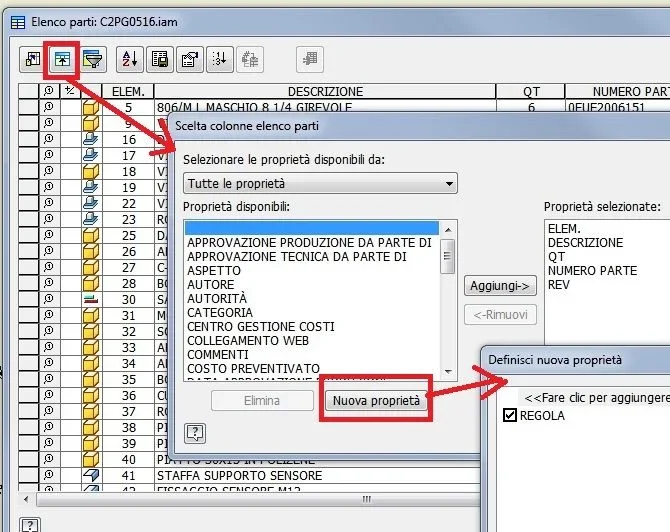
I would need to know how to create a box on list automatic parts that recognize me the thickness of the sheet I created (see attachment) and save it all the time.
also if you can also a box showing the external measurements of the flat model.
Thank you.
 

Attachments

  • ELENCO PARTI.webp
    ELENCO PARTI.webp
    26.3 KB · Views: 38
Hi.
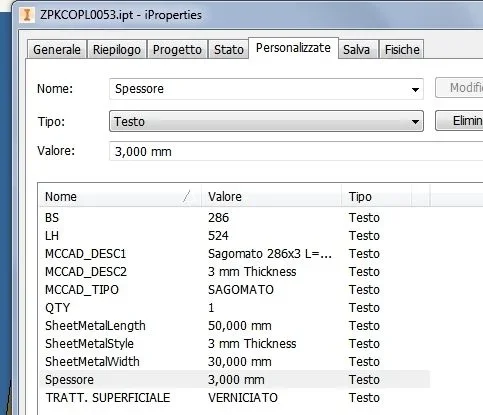
you must associate with your custom iproperties the variable "sheet metal rule"_foto__071.webp_foto__072.webp
 
Hi.
attention, the sheet rule appears, "the trick" is to create the rule with the thickness value_foto__078.webp
 
other solution
1) activate export of the variable "thickness" in fx parameters
_foto__096.webpautomatically the variable is "written" in custom iproperties_foto__097.webp
 
attention
you can save the new rule if, the project file set the use of the style library in "reading-writing"
_foto__110.webp
_foto__109.webp
 
is it possible to write in custom iproperties the thickness but in fraction format? in the sense instead of 2 mm --> 20/10 . now I carry the thickness , then in the iprops I created a new field in which I write by hand the fraction reading the thickness exported, in the cartiglio I inserted the written field in fraction. I tried to convert the value 2 to 20/10 but without success.

Thank you.
 
Hi.
I simply created the rules with the fraction,1615137137076.webpthen, in iproperties, I created a variable whose value is the formula : =<sheet metal="" rule=""></sheet>
 
Hi.
I simply created the rules with the fraction,View attachment 61200then, in iproperties, I created a variable whose value is the formula : =<sheet metal="" rule=""></sheet>
Hi.
Thanks for the answer, but to view it in the iproperties only 20/10 as I do, besides I would also comfortable (in another field) see the active sheet rule , only for quick verification , because I happened to have someone had "played" with the rules of the sheet and I had a nice surprise to the cut.

Thank you very much
Hi.
 
Hi.
I simply created the rules with the fraction,View attachment 61200then, in iproperties, I created a variable whose value is the formula : =<sheet metal="" rule=""></sheet>
I'm sorry if I stress you, it would be interesting to be able to change the sheet rule directly from the separate axial components, such as materials to understand us.
I tried so but it doesn't work:
created custom iprop field rule where I entered the expression =<sheet metal="" rule=""> as you have indicated
I then thought that by changing the value of the rule (with an existing one) in the separate components of the axieme, it would update the part if you tell him to exclude the expression but at this point it becomes a simple text field and does not change the rule of the part.

Hi.
Thank you.</sheet>
 
Hi.
I didn't try but... It seems that here the problem has been resolved:
Thank you very much seems exactly what I was looking for, in the afternoon I should be able to make a copy of an axieme in which I have to change the sheet rule to the parts.
with the outcome

Thank you.
Hi.
 
Hi.
I didn't try but... It seems that here the problem has been resolved:
tested the rule works perfectly thanks very much indeed.

p.s. it is necessary, for large assemblies, to prepare a list of pieces to be changed because the selection must be made either by the graphic area or by the tree and for large assemblies it may not be so immediate if the files to be edited are many (as in my case) , but by printing a distinct part and highlighting the parts to be modified is very fast as procedure.
 

Forum statistics

Threads
44,997
Messages
339,767
Members
4
Latest member
ibt

Members online

No members online now.
Back
Top