
• This forum is the machine-generated translation of www.cad3d.it/forum1 - the Italian design community. Several terms are not translated correctly.

technical documentation - explosions

  • Thread starter Thread starter Utente NX
  • Start date Start date

Utente NX

Guest
Bye to all,
I use nx7 and tc8.
I'm supposed to make explosive views of components of a car.
I said that I wanted to know if there are solutions to my problems.

1)In the first page there is the complete machine or the complete machines that differ for some accessories.
how do I load my complete machine (1000 pcs. total carpentry made) quickly and create an isometric view to export to pdf?
I tried to load in lightweight, but the view created is in wireframe.
do not tell me to put up the 7.5, because I know that it has been implemented the lightweight, but I hope there is a solution, otherwise I wonder how companies have done in the previous years to make views of complete machines if loading times were not biblical but not ideal for a cad of high beams.
I own a hp xw4400 with 4gb of ram on xp pro. with boot modified to show them.

) I was told by the assistance that with the master model approach, the explosion must make it in the modeling of specification.
If I have to make the explosion of some parts of the machine, I create arrangements in the modeling of the specification.
at this point I asked if I can select some subgroups of this machine and keep them unsuppressed in this arrangement, while the rest suppressed.
I would need something like the show only selected command.
If there's nothing direct, I can get what I want through the show only command.
I hope I've been clear.

Thank you. .
 
Bye to all,
I use nx7 and tc8.
I'm supposed to make explosive views of components of a car.
I said that I wanted to know if there are solutions to my problems.

1)In the first page there is the complete machine or the complete machines that differ for some accessories.
how do I load my complete machine (1000 pcs. total carpentry made) quickly and create an isometric view to export to pdf?
I tried to load in lightweight, but the view created is in wireframe.
do not tell me to put up the 7.5, because I know that it has been implemented the lightweight, but I hope there is a solution, otherwise I wonder how companies have done in the previous years to make views of complete machines if loading times were not biblical but not ideal for a cad of high beams.
I own a hp xw4400 with 4gb of ram on xp pro. with boot modified to show them.

) I was told by the assistance that with the master model approach, the explosion must make it in the modeling of specification.
If I have to make the explosion of some parts of the machine, I create arrangements in the modeling of the specification.
at this point I asked if I can select some subgroups of this machine and keep them unsuppressed in this arrangement, while the rest suppressed.
I would need something like the show only selected command.
If there's nothing direct, I can get what I want through the show only command.
I hope I've been clear.

Thank you. .
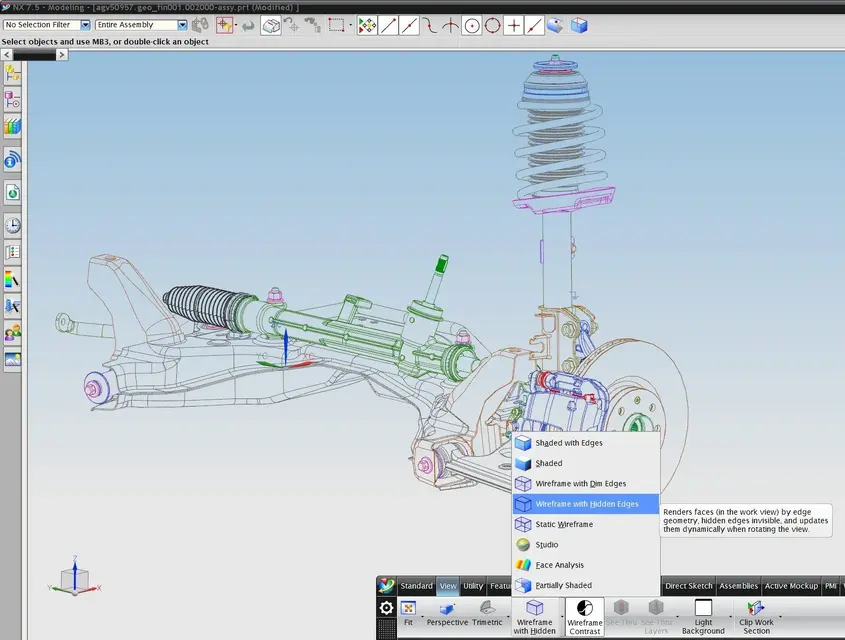
removal of hidden lines can also be done with lightweights.
I only have the 7.5 installed, but the 7 I think is equivalent.
I don't understand "do not tell me to put up the 7.5, because I know that the lightweight has been implemented" was there before. mode has changed and, of course, increase functionality thanks to smart lightweights.
See Annex.
you can also put in the table without problems, just use faceted views.
 

Attachments

  • RM1.webp
    RM1.webp
    164.9 KB · Views: 38
thanks...cavolo... the assistance during the upgrade course at 7 told me that you could not do... that lightweigth was only good for loading.
However, with faceted view, it gives me extra lines that are probably face-to-face.
I will improve in performance, but if I have to generate pdfs with nonexistent lines, I don't know if the game is worth the candle.
Can I switch from a normal view to a faceted view?

For the other question, which I forgot to put number 2, do you have any ideas about it?
 
thanks...cavolo... the assistance during the upgrade course at 7 told me that you could not do... that lightweigth was only good for loading.
However, with faceted view, it gives me extra lines that are probably face-to-face.
I will improve in performance, but if I have to generate pdfs with nonexistent lines, I don't know if the game is worth the candle.
Can I switch from a normal view to a faceted view?

For the other question, which I forgot to put number 2, do you have any ideas about it?
faceted views depend so much on the accuracy of the jts that are stored in the part.I strongly suggest you, if you want to exploit its potential, to make a refile after correctly set the parameters in the customer default.

for Question No 2: I didn't understand much of what you want to do and anyway I know the 2d too little... I never use it, and if I can, I avoid it.
the little I know for "inertia" and not because I studied or used it.
I'm sorry.
 
) I was told by the assistance that with the master model approach, the explosion must make it in the modeling of specification.
If I have to make the explosion of some parts of the machine, I create arrangements in the modeling of the specification.
at this point I asked if I can select some subgroups of this machine and keep them unsuppressed in this arrangement, while the rest suppressed.
I would need something like the show only selected command.
If there's nothing direct, I can get what I want through the show only command.
I hope I've been clear.

Thank you. .
have you tried with the assembly> context control > show (hide) component in view?

allows you to show (hide) the components in the view.

I hope you're useful

Hi.
 
faceted views depend so much on the accuracy of the jts that are stored in the part.I strongly suggest you, if you want to exploit its potential, to make a refile after correctly set the parameters in the customer default.

for Question No 2: I didn't understand much of what you want to do and anyway I know the 2d too little... I never use it, and if I can, I avoid it.
the little I know for "inertia" and not because I studied or used it.
I'm sorry.
Thank you.
Can you tell me what parameters to set in the customer default?
the refile is managed by the cad manager and has already been done on all files when we passed to 7.
If I change the parameters in the customer default and then I save the file, no change the jt by adjusting to the new parameters (clearly after rebooting nx) ?
 
have you tried with the assembly> context control > show (hide) component in view?

allows you to show (hide) the components in the view.

I hope you're useful

Hi.
Thank you. I don't come directly to my need, but even if I take a step further... I'm already satisfied.
 
Thank you.
Can you tell me what parameters to set in the customer default?
the refile is managed by the cad manager and has already been done on all files when we passed to 7.
If I change the parameters in the customer default and then I save the file, no change the jt by adjusting to the new parameters (clearly after rebooting nx) ?
Unfortunately I only have 7.5 so I don't remember the old versions as they had a gui.
I'll put you in the 7.5. You try to extrapolate. . .
you have to go to the customer default in:
- simblies
- standard site
- lightweight representation
depending on the "dimension" of your components set tolerance.
... also depends on what products projects. . .
I recommend a string tolerance of 0.1mm and an angle of 5°.
Of course, the performance will be a bit affected because you will have a more complex faceted.

then carry out a refile of your assemblies with the correct parameters... (if you do refile_part.exe alone gives you all possible modifiers).

alternative is to go nx with the command "assemblies - advanced - representations", make a delete of the faceted present in the part, set the facet parameters as before and regenerate them with created.
Obviously the refile does it automatically and on all components. . .
 

Forum statistics

Threads
44,997
Messages
339,767
Members
4
Latest member
ibt

Members online

No members online now.
Back
Top