
You are using an out of date browser. It may not display this or other websites correctly.
You should upgrade or use an alternative browser.
You should upgrade or use an alternative browser.

alpole
Guest

Pierandrea58
Guest
Thank you.
Tonight I try
I'll tell you
greetings
Tonight I try
I'll tell you
greetings
alpole
Guest
I think I've been too busy
to give you an answer in the demo
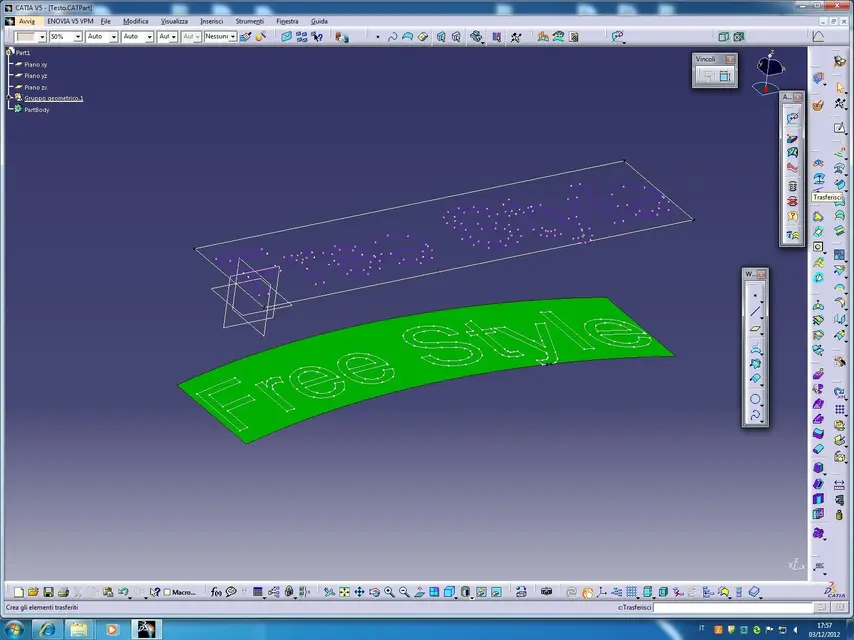
I used various reference and reference surfaces
application for text transfer
imported into dxf-
the most appropriate commands, always in the wordbench
gsd, are transferred and covered surface etc. etc.
(see icons in attached images)
as you will see the results are different, the recommendation
in using the feature sup coating, is that of
use the same topology for the reference surface
and for the transfer, as you can see
different topologies give different results. . .
to give you an answer in the demo
I used various reference and reference surfaces
application for text transfer
imported into dxf-
the most appropriate commands, always in the wordbench
gsd, are transferred and covered surface etc. etc.
(see icons in attached images)
as you will see the results are different, the recommendation
in using the feature sup coating, is that of
use the same topology for the reference surface
and for the transfer, as you can see
different topologies give different results. . .
Attachments

Pierandrea58
Guest
Thank you very much
but, I probably misunderstood myself:
My problem is to put a text on a curve (in this case along a arc) and not on a surface.
I did it with noug that has the function
but I would like to do it with catia the prox time, so as not to lose the parameters.
I believe that catia does not have this function,
At least I don't know her.
but, I probably misunderstood myself:
My problem is to put a text on a curve (in this case along a arc) and not on a surface.
I did it with noug that has the function
but I would like to do it with catia the prox time, so as not to lose the parameters.
I believe that catia does not have this function,
At least I don't know her.
Attachments

Pierandrea58
Guest
to better explain to you, I made a writing (after extruded) on a polyline,
the beautiful is that if you change the curve the text follows it. :smile:
Does catia have a chance to do this?
Sometimes it happens to have to emboss, on plastic pieces or metal castings or rubber parts, writings that are not always horizontal or vertical or however straight but follow a curve.
I can't believe that catia can't do it
Thanks
the beautiful is that if you change the curve the text follows it. :smile:
Does catia have a chance to do this?
Sometimes it happens to have to emboss, on plastic pieces or metal castings or rubber parts, writings that are not always horizontal or vertical or however straight but follow a curve.
I can't believe that catia can't do it
Thanks
Attachments

alpole
Guest
In fact.. It does, even if it is enough
complicated, little <flow> in other programmes
is called this command of deformation-
I believe that the main difficulty is that which does not exist
at present the text entity, unless one
pedantemente do not pull lines-
usually the text is imported, and the fact that
this most times create an unrelated entity increases
The problems
in any case in the file I send you, you will find all the various
step for <linkare> the curve to the text
the commands are;
shape mapping- environment icem shape modelling,
and the manipulation of the reference curve should be made
in a free style-
I hope everything is clear
to the</linkare></flow>
complicated, little <flow> in other programmes
is called this command of deformation-
I believe that the main difficulty is that which does not exist
at present the text entity, unless one
pedantemente do not pull lines-
usually the text is imported, and the fact that
this most times create an unrelated entity increases
The problems
in any case in the file I send you, you will find all the various
step for <linkare> the curve to the text
the commands are;
shape mapping- environment icem shape modelling,
and the manipulation of the reference curve should be made
in a free style-
I hope everything is clear
to the</linkare></flow>
