• This forum is the machine-generated translation of www.cad3d.it/forum1 - the Italian design community. Several terms are not translated correctly.

text on cylindrical surface (normal to surface)

  • Thread starter Thread starter pritio72
  • Start date Start date

pritio72

Guest
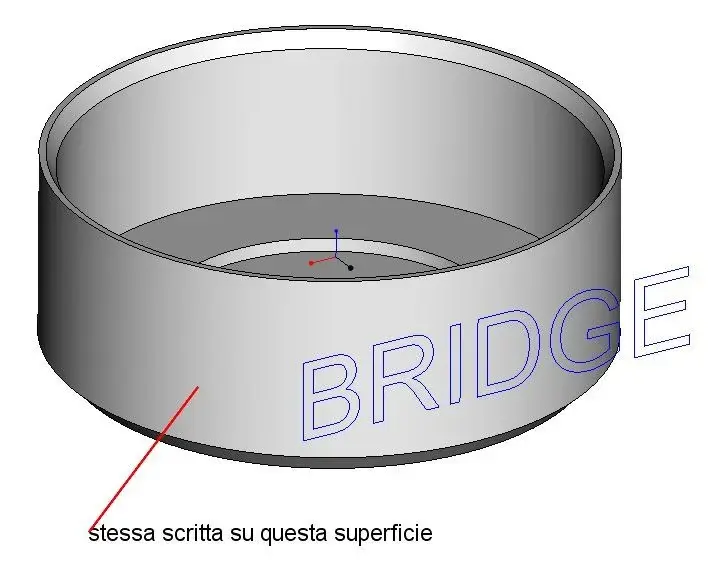
hello to all, I should make a writing on a cylindrical surface.
I press that on the forum there is already a tread but it is not what I have to do.
is to create a writing on a cylindrical surface so that all letters are always normal to the surface.I've already tried to make a text and project it but it's not good because it deforms.
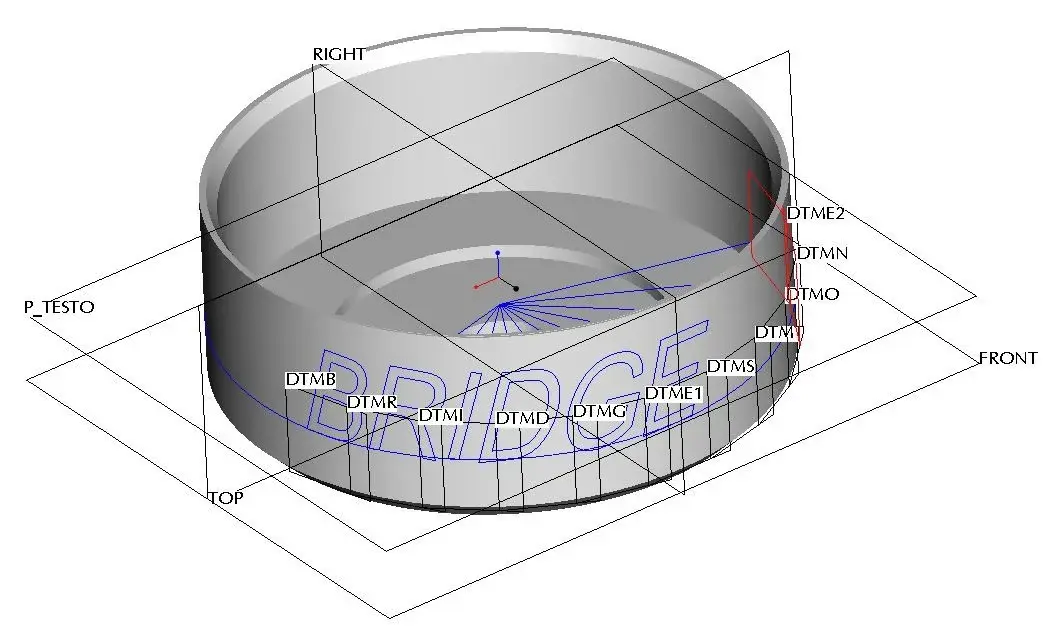
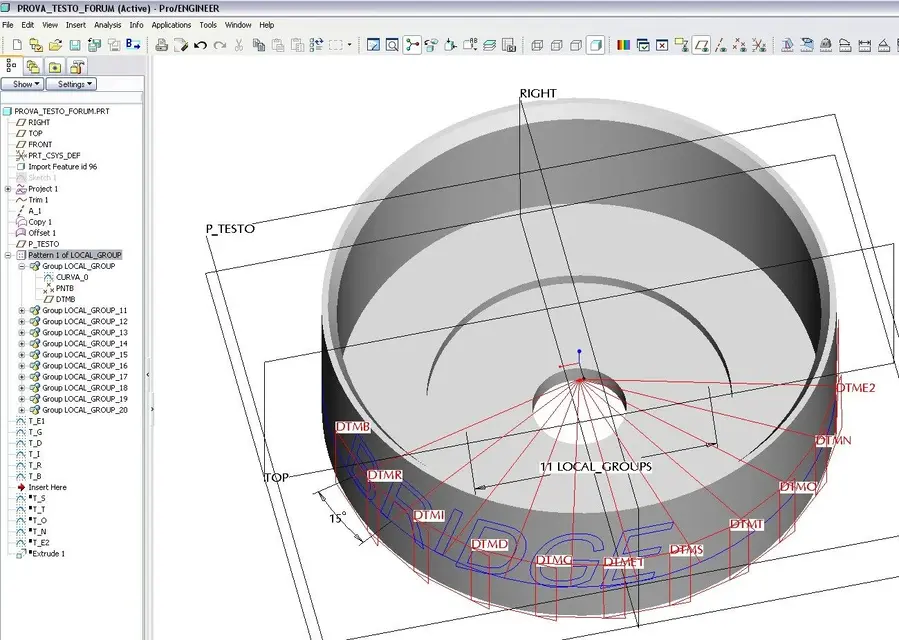
only solution because it does not distort is to create it for construction:
  1. starting from the drawing center a curve with a corner
  2. I build a normal plan to the curve and tangent to the surface(dtm1
  3. on the dtm1 plan I do the sketch of the letter I need.
is there a function that allows me to do this without passing through the construction?

I attach some photos on the method then if there is need I attach the file.prt
 

Attachments

  • scritta_cilindro_00.webp
    scritta_cilindro_00.webp
    29.1 KB · Views: 76
  • scritta_cilindro_01.webp
    scritta_cilindro_01.webp
    32.9 KB · Views: 61
  • scritta_cilindro_02.webp
    scritta_cilindro_02.webp
    60.5 KB · Views: 64
  • scritta_cilindro_03.webp
    scritta_cilindro_03.webp
    142.1 KB · Views: 69
thanks for the info.proved and the writing is perfect.
But now another little problem arises, I would like to use las critta to make an extrusion.
tried by "wrap" on a surface and then go to cut with the curves of the writing the surface and then use it.is there another way?
 
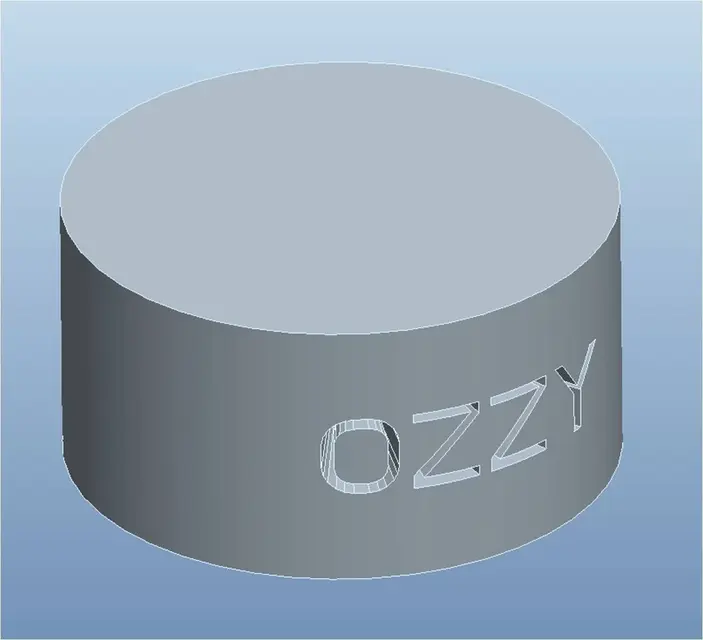
You mean that?

both in addition and in removal?
 

Attachments

  • ozzy_aggiunta.webp
    ozzy_aggiunta.webp
    24.4 KB · Views: 38
  • ozzy_rimozione.webp
    ozzy_rimozione.webp
    20.7 KB · Views: 39
ok exactly as I wanted to..discuss me but I couldn't do it you could courtly explain how you did?thanks in advance! !
 
then you don't have to be upset but simply once you do the sketch:

1.Select the surface on which you want to remove/add.
2.menu edit/offset in the dashboard Offset commands select the third icon that is called expansion feature.
3.click on the options tab and put flag on sketch region, you will activate the command to set the new sketch to project, select the same plan you have defined to create the two-dimensional writing.
4.When you are in sketch copy the writing using the command uses edge and loop option by selecting the written in the template tree (pro/and will turn your text into a spline),
5.Set the normal surface option and at this point you can either add or remove material.

I hope to have been clear, easier to do than to say.:rolleyes:
 
ahz and think that I had already tried, only thing I didn't put the "normal on the surface":eek:
Thanks again for the info.:finger:
greetings
 
ahz and think that I had already tried, only thing I didn't put the "normal on the surface":eek:
Thanks again for the info.:finger:
greetings
typical, sometimes you have things under your eyes but you can't see and look for amazing work around.
the important thing is the final solution. :wink:

of nothing
greetings
 
Hello, everyone.
I ask you something: can you make sure that the text can change without the offset feature going in trim?
I selected it from the tree as an ozzy indication, I tried to replace it with the parameter and I looked for the intent selection but... I couldn't.

Thank you.
 
hi, the offset feature goes in trim because practically when you go to select the sketch automatically divenate all spline; so change the proe text does not regrow the spline so the offset feature can not do it.you have to return to the sketch and recheck all the text.
I hope I've been exhausting enough, then if you're having trouble ask yourself.

p.s. I return to the writing with the function described by ozzy fine, but if the surface is very wide the deformed writing on the sides, despite it is always "normal" to the surface.I did in another method (a little long) but it works well. shortly I praise and insert the file, maybe it can always serve to someone.:finger:
 
This method is an alternative to the method described by ozzy, in order to avoid deformation if the writing is splaimed on a wide surface.

premise: offset of the surface on which I have to wrap the writing.
  1. text sketch on a plan
  2. select sketch - change menu - winds(on the offset surface)
  3. surface trim with curves generated by text wrapping.(photo)
  4. the operation is repeated so many times as the letters are.
at this point we got all the letters du superfice.do not ciresta that give thickness by doing to us both "extrude" and "cut".
In this way, the script appears to be the same size as the sketch.
 

Attachments

  • forum_00.webp
    forum_00.webp
    129.6 KB · Views: 44
  • forum_01.webp
    forum_01.webp
    94.2 KB · Views: 40
then you don't have to be upset but simply once you do the sketch:

1.Select the surface on which you want to remove/add.
2.menu edit/offset in the dashboard Offset commands select the third icon that is called expansion feature.
3.click on the options tab and put flag on sketch region, you will activate the command to set the new sketch to project, select the same plan you have defined to create the two-dimensional writing.
4.When you are in sketch copy the writing using the command uses edge and loop option by selecting the written in the template tree (pro/and will turn your text into a spline),
5.Set the normal surface option and at this point you can either add or remove material.

I hope to have been clear, easier to do than to say.:rolleyes:
Good morning.
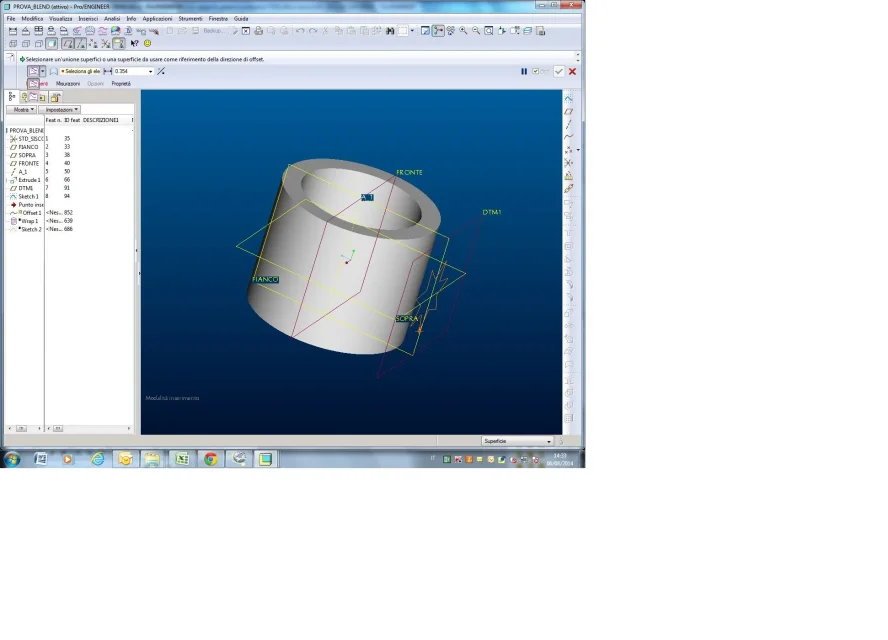
I need to do similar extrusions/cuts but I can't figure out where to find the expansion feature.
there are only the two options visible in the attached image.

Thank you in advance.
 

Attachments

  • Immagine.webp
    Immagine.webp
    97.9 KB · Views: 24
I apologize in advance if I exhume this six-year-old discussion...
I wanted to know if there is the way to do the same thing with I create 2, as some options described in previous posts I just can't find them.

Thank you!
 
I on creo 3 did not have problems with the method of ozzy.
I wanted to ask if the thing is feasible even on a more "complete" surface like a printed piece, then "expalmating" the writings even among more radiated surfaces among them.

Thank you.
 

Forum statistics

Threads
44,997
Messages
339,767
Members
4
Latest member
ibt

Members online

No members online now.
Back
Top