
• This forum is the machine-generated translation of www.cad3d.it/forum1 - the Italian design community. Several terms are not translated correctly.

text to head

  • Thread starter Thread starter rubo825
  • Start date Start date

rubo825

Guest
Hi, everybody, I have a problem with the cart. I press that the folder I use is connected with the properties of part 3d, that is the description is written inside the file 3d and automatically I find it inside the cart. to do this I did not use a normal text box, but a director, where you can create links with the 3d file. but the problem is that I can't automatically send the text over a number of characters. Can anyone help me? with the normal text box is easy (but you can't create links with the 3d), while with the director I can't!!!! help
 
Hi, everybody, I have a problem with the cart. I press that the folder I use is connected with the properties of part 3d, that is the description is written inside the file 3d and automatically I find it inside the cart. to do this I did not use a normal text box, but a director, where you can create links with the 3d file. but the problem is that I can't automatically send the text over a number of characters. Can anyone help me? with the normal text box is easy (but you can't create links with the 3d), while with the director I can't!!!! help
in practice in the command property recall I inserted this string: %{titolo|r1}, which reads the title inside the 3d file, but I can not send it to head..... .
 
I do the title through a vb program that I did. In this way I can add the return to the head of the text.

are really few lines of code.

In practice it is about adding a "vbcrlf" to the point where you want to go to head.

another method is to use a paste copy to insert these characters. or maybe a utility that fits you... I don't know if you can do it.

are just some ideas thrown there.

Hi.
 
in practice in the command property recall I inserted this string: %{titolo|r1}, which reads the title inside the 3d file, but I can not send it to head..... .
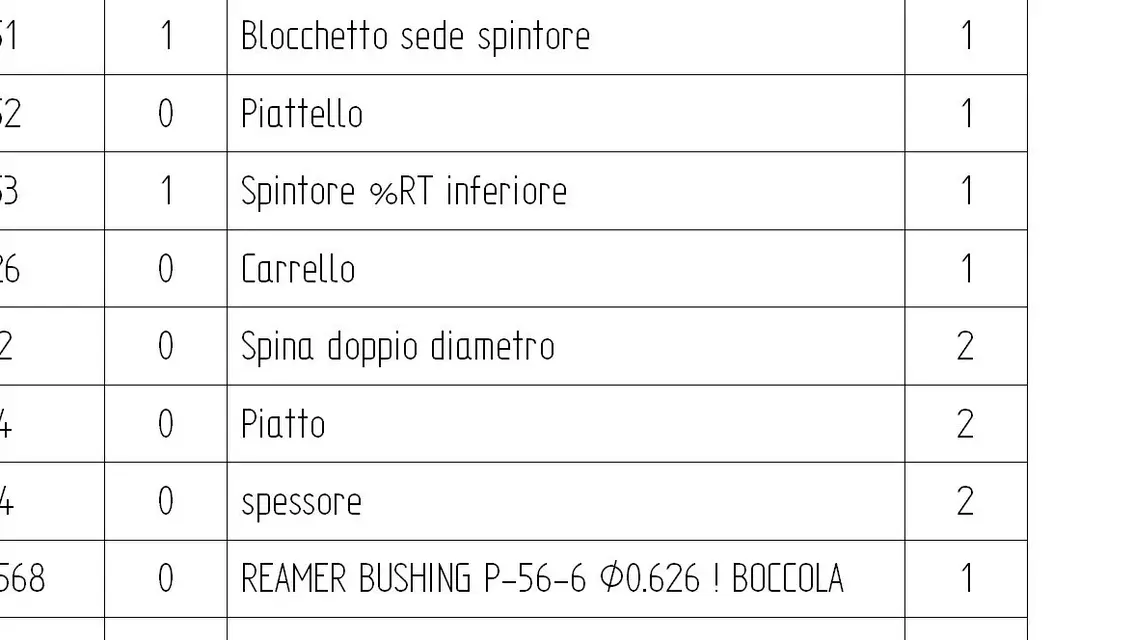
you have to go on the 3d and inside the title property add the %rt item to the description point to get to head.
example: "particular made by me %rt that is all beautiful"
will write to you

special made by me
It's all beautiful
 
you have to go on the 3d and inside the title property add the %rt item to the description point to get to head.
example: "particular made by me %rt that is all beautiful"
will write to you

special made by me
It's all beautiful
Interesting ah!

Do you remember which version this function was introduced?
 
Interesting ah!

Do you remember which version this function was introduced?
then I saw it on the site of assistance on faqs and there was already from v17, that is from the version of if I started to use, but I presume there was also from before.
 
Unfortunately then that %rt goes straight into the list parts....
 

Attachments

  • BOM.webp
    BOM.webp
    24.4 KB · Views: 25
It seems to me that in st2 it is not %rt but something else, the only thing that comes to mind is that you can look in the draft in the properties of the call of the hole %hc in correspondence of the threaded/wrapped holes.
 
Unfortunately then that %rt goes straight into the list parts....
That's more interesting than I didn't notice either. Fortunately I don't use it because on the cartilage the texts are me.

It seems to me that in st2 it is not %rt but something else, the only thing that comes to mind is that you can look in the draft in the properties of the call of the hole %hc in correspondence of the threaded/wrapped holes.
in st2 works %rt, if they have put on another I have to inform
 
I have just checked, confirm the use of %rt to head even in the quotation of the holes.
the problem is that I cannot enter %rt into the text because this field is in the 3d file and is automatically compiled by the management. I would need a command that limits the length of the text and then go to the head.. I don't know if I explain. .
 
the problem is that I cannot enter %rt into the text because this field is in the 3d file and is automatically compiled by the management. I would need a command that limits the length of the text and then go to the head.. I don't know if I explain. .
You can explain.. .then the solution is in a macro vb that allows you to do this. In which case I don't know how to help you, I still open a call in assistance to see if they implement this in the future. Hi.
 
You can explain.. .then the solution is in a macro vb that allows you to do this. In which case I don't know how to help you, I still open a call in assistance to see if they implement this in the future. Hi.
Okay, thank you. So a macro in visual basic that I should do? but is there a guide to make macro in vb for solid edge? I'm not very experienced in these things. .
 

Forum statistics

Threads
44,997
Messages
339,767
Members
4
Latest member
ibt

Members online

No members online now.
Back
Top