• This forum is the machine-generated translation of www.cad3d.it/forum1 - the Italian design community. Several terms are not translated correctly.

textures that change from sun

  • Thread starter Thread starter Giul
  • Start date Start date

Giul

Guest
Hello everyone,
I started using revit 2016 recently and I am learning now while I run several 3d for a study. inserting the textures has arisen a problem. when I modified the family I duplicated a generic material and put the photo as a texture. when I change the material on a different family and insert another photo and then another texture also changes the fam I have previously modified. in a few words it combines all the textures in one, though then the photos are different. I cannot therefore have different materials in the different rooms. Is there a way to block the textures unknown to me? or should I put the photos in a specific place? I tried to redesign changing always family, and to divide the photos into distinct folders, but nothing.
I hope I've been clear
thanks in advance

(I hope it's not a repeated discussion, but I haven't found any more precedent on this)
 
Hello everyone,
I started using revit 2016 recently and I am learning now while I run several 3d for a study. inserting the textures has arisen a problem. when I modified the family I duplicated a generic material and put the photo as a texture. when I change the material on a different family and insert another photo and then another texture also changes the fam I have previously modified. in a few words it combines all the textures in one, though then the photos are different. I cannot therefore have different materials in the different rooms. Is there a way to block the textures unknown to me? or should I put the photos in a specific place? I tried to redesign changing always family, and to divide the photos into distinct folders, but nothing.
I hope I've been clear
thanks in advance

(I hope it's not a repeated discussion, but I haven't found any more precedent on this)
if I have understood you
1) create a material and assign it to a family.
2) create another family and check the same material to which however apply changes (replacement textures).

In this case it is obvious that it also changes the material of the other family, because the material is unique, so when you change the texture the modification is reflected on the material and therefore appeals to all the families/ instances to which it is assigned.
in poor words, the material does not follow the family, but the contrary.
so when you change a parameter of a material, even starting from the family, if you do not want the changes to be reflected on all instances that are connected to that material you must
1) first duplicate the material
2) apply the changes to him.
I hope I've been clear.
 
hello:) first of all thank you for the answer.
Unfortunately, that's not the problem. having the doubt of not having duplicated I have done duplicated each time the material. Unfortunately, the same thing happens.
I put the texture 1 (t1) to the floor. I want to put a texture 2 (t2) to the walls of the bathroom. I put it by duplicating the material and putting in the window I look like the photo of the material I want. then step to the walls of the bathroom. I change the family, duplico the material and in the appearance I put the photo of the t2 I want. when applying the t1 becomes equal to t2, and in the sheet of the material the photos in the appearance card are the same, even if they have different name.
Did I explain better now? Do you have any idea why? Can't I put more than one photo in the textures? I've come that doubt
 
hello:) first of all thank you for the answer.
Unfortunately, that's not the problem. having the doubt of not having duplicated I have done duplicated each time the material. Unfortunately, the same thing happens.
I put the texture 1 (t1) to the floor. I want to put a texture 2 (t2) to the walls of the bathroom. I put it by duplicating the material and putting in the window I look like the photo of the material I want. then step to the walls of the bathroom. I change the family, duplico the material and in the appearance I put the photo of the t2 I want. when applying the t1 becomes equal to t2, and in the sheet of the material the photos in the appearance card are the same, even if they have different name.
Did I explain better now? Do you have any idea why? Can't I put more than one photo in the textures? I've come that doubt
Honestly, it never happened to me.
revit version?
 
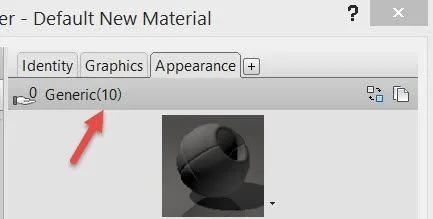
look at the setting of the material window, when the new material is the current material. You see a number that's not zero, like that?
2016-04-20_23-12-46.webp
 
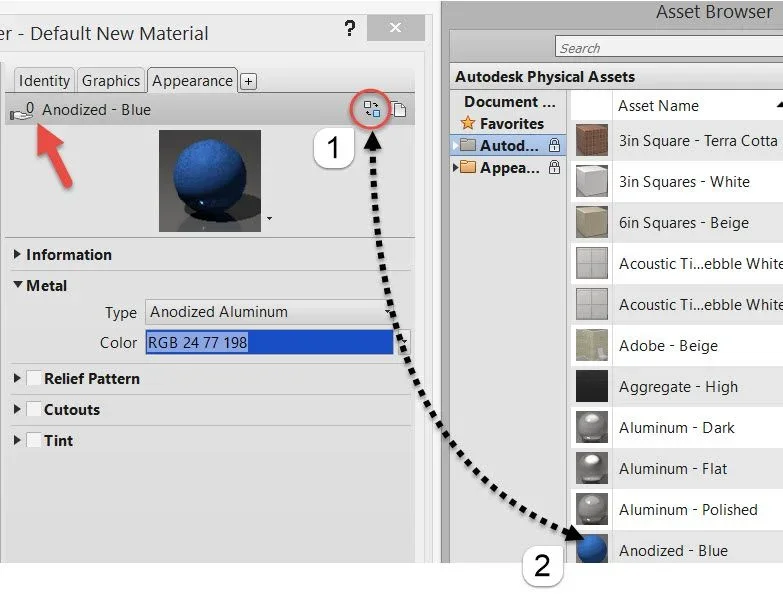
That number 10 means that we have ten materials that compose the set but have different names. How do you change this? so: click on the instrument indicated with el number 1 in this image: After, you shorten the material.
After doing this, number ten no longer exists. Now we have a zero. this means that these setting is unique for this material.
2016-04-20_23-14-38.webp
 

Forum statistics

Threads
44,997
Messages
339,767
Members
4
Latest member
ibt

Members online

No members online now.
Back
Top