• This forum is the machine-generated translation of www.cad3d.it/forum1 - the Italian design community. Several terms are not translated correctly.

thread depth and hole axis

  • Thread starter Thread starter abelli12
  • Start date Start date

abelli12

Guest
I ask who is more experienced than me with the lisp for the solution of two troubles.

1) I would like to create a lisp command that once selected a quota add me in front of the symbol m and behind the text prof.
and then allow me to introduce the numerical value of depth (e.g. for altitude 8 with thread m8 deep 15
becomes m8 prof.15). I have already tried to write the lisp (which I bring back below) but I do not know how to insert the numerical value:
(defun c:f()
(setvar "cmdecho" 0)
(setq entmd (entget (car (entselect dimension: ")))))
(setq entmd(subst (cons 1 "{m<>prof}")(assoc 1 entmd) entmd)
(entmod entmd)
)

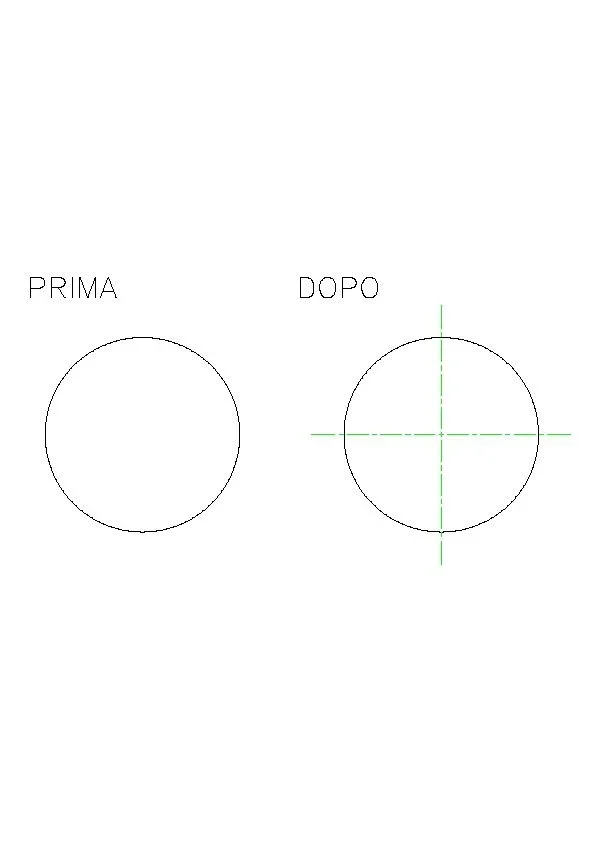
2)I would like to create a command that draws the axis of a hole in the section; i.e. selecting the two drawing lines the average axis. How to do that?

Thank you.
 
1) proof così:
Code:
(defun c:f ( / entmd prof) 
    (setvar "cmdecho" 0)
    (setq entmd (entget (car (entsel "\nselect dimension: "))))
    (setq prof (getstring "\nprofonfità: "))
    (setq entmd (subst (cons 1 (strcat "{m<> prof." prof "}")) (assoc 1 entmd) entmd))
    (entmod entmd)
    (princ)
)
2) attach an image before and after
 
I assume that the two lines are an offset.
the new line is drawn on the layer "axis", if you want to change this line:
(cons 8 "Assistance").


Code:
(defun c:asseforo ( / l1 l2 l1a l1b l2a l2b p1 p2 d)

(if (and
(setq l1 (entget (car (entsel "\nselezionare la prima linea")))))
(= (cdr (assoc 0 l1) "line")
(setq l2 (entget (car (entsel "\nselezionare la seconda line))))))
(= (cdr (assoc 0 l2) "line")
)
(progn)
(setq l1a (cdr)
(setq l1b (cdr (assoc 11 l1))
(setq l2a (cdr (assoc 10 l2))
(setq l2b (cdr (assoc 11 l2))
(if (> (distance l1a l2a) (distance l1a l2b)
(setq d (* (sqrt 2.0) (/ (distance l1a l2a) 2.0)))
(setq p1 (polar l1a (- (angle l1b l1a) (/pi 4.0))))
(setq p2 (polar l1b (+ (angle l1a l1b) (/pi 4.0)))
(entmake)
(list
(cons 0 "line")
(cons 10 p1)
(cons 11 p2)
(cons 8 "asse")
)
)
)
)
(princ)
)
 
Thank you very much for the quick answer!
date of availability and competence I would ask:
- once the axis is generated, how can I do to change the color (red) and the line type (center type) without using command?
(I tried with "change" but every time I have to recheck the axis...it would be preferable to change the two properties of the entity
already within the same axle function without intervention).
3) how can I create a lisp to draw the axes of a circle (as in the attached image)?es2.webp
 
it would be better to set color and typeline in the layer "assi", however this is the code "direct"
Code:
(defun c:asseforo ( / l1 l2 l1a l1b l2a l2b p1 p2 d pa pb)

(if (and
(setq l1 (entget (car (entsel "\nselezionare la prima linea")))))
(= (cdr (assoc 0 l1) "line")
(setq l2 (entget (car (entsel "\nselezionare la seconda line))))))
(= (cdr (assoc 0 l2) "line")
)
(progn)
(setq l1a (cdr)
(setq l1b (cdr (assoc 11 l1))
(setq l2a (cdr (assoc 10 l2))
(setq l2b (cdr (assoc 11 l2))
(if (> (distance l1a l2a) (distance l1a l2b)
(setq d (/ (distance l1a l2a) 2.0))
(setq pa (polar l1a (angle l1a l2a) d)
(setq pb (polar l1b (angle l1b l2b) d)
(setq p1 (polar pa (angle pb pa) d))
(setq p2 (polar pb (angle pa pb) d))
(entmake)
(list
(cons 0 "line")
(cons 10 p1)
(cons 11 p2)
(cons 8 "asse")
'(62 . 1)
'(6 . "center")
)
)
)
)
(princ)
)
for the circle:
Code:
(fun c:assecerchio ( / cir c d p1 p2 p3 p4)

(if)
(setq cir (entget))
(= (cdr (association 0 cir)) "circle")
)
(progn
(setq c (cdr (assoc 10 cr)))
(setq d (* 1.40 (cdr (assoc 40 cir)))))
(setq p1 (polar c pi d))
(setq p2 (polar c 0 d))
(setq p3 (polar c (* pi 0.5) d))
(setq p4 (polar c (* pi 1.5) d))
(entmake
(list
(cons 0 "line")
(cons 10 p1)
(cons 11 p2)
(cons 8 "ass")
'(62. 1)
'(6 . "centro")
)
)
(entmake
(list
(cons 0 "line")
(cons 10 p3)
(cons 11 p4)
(cons 8 "ass")
'(62. 1)
'(6 . "centro")
)
)
)
)
(principal)
)
Note:
' (62 . 1) --> colour number
6. "downtown") --> line name
 
Thank you for your availability and patience...
...maybe I have to set some parameters because with the new code does not go; works all if I delete from the code the two lines:
'(62. 1)
'(6 . "center")

but so the axis entity is neither red nor center typeline.
preferring to set color and typeline directly within the same function what should I change?
Thanks again.
 
He wasn't loaded!
(At the opening I have to charge every time the type line center and hidden).
Thank you so much!
 
He wasn't loaded!
(At the opening I have to charge every time the type line center and hidden).
Thank you so much!
Please:

charge the two typelines in your design model (dwt) for having them available in the new designs.
 
I created a lisp function using s:startup for automatic loading of line types.
Thank you very kind.
 

Forum statistics

Threads
44,997
Messages
339,767
Members
4
Latest member
ibt

Members online

No members online now.
Back
Top