• This forum is the machine-generated translation of www.cad3d.it/forum1 - the Italian design community. Several terms are not translated correctly.

tolerance of union

  • Thread starter Thread starter stefano_faye
  • Start date Start date

stefano_faye

Guest
Good morning.
I'd like to ask you a question.
work in a company that deals with automotive making molds for automotive manufacturers.
the current set of union tolerance is set to 0.001 both as input tolerance and as emission tolerance.
I would like to understand what risks might be to bring a union tolerance to 0.02mm
(as risks I mean whether or not it can lead to benefits in the process)
There is an internal debate on what is the best solution and I would like to ask for your opinion and experience of merit.
Thank you in advance!
 
hi, i nx use 0.001 mm in modeling (default 0.0254 mm, which corresponds to a thousandth of inch). in nx means the distance within which two edges (edge) are considered only one. always in nx there is also an angle tolerance that I put at 0.25° (default 0.5°).
It's a value that few people know it exists and what it's for. closer is tolerance, more accurate is modeling and heavier becomes the file.
from me (nx) works only in creation and output, in input, if the file was modeled with broader tolerances, there is nothing to do.
I had the opportunity to exchange steps and iges with dies using caia and told me that my files were 'perfect', without holes or discontinuity unlike those that used broader tolerances.
make a test, model and export in step for example, a file with 0.02 mm tolerance and then import it with 0.001 mm tolerance.
Hello there.
 
Good morning.
I'd like to ask you a question.
work in a company that deals with automotive making molds for automotive manufacturers.
the current set of union tolerance is set to 0.001 both as input tolerance and as emission tolerance.
I would like to understand what risks might be to bring a union tolerance to 0.02mm
(as risks I mean whether or not it can lead to benefits in the process)
There is an internal debate on what is the best solution and I would like to ask for your opinion and experience of merit.
Thank you in advance!
where do you find this setting in v5? Can you post a picture?
 
but there you are in the settings of the gsd working environment. I thought he meant more sects. Right stefano?
 
Hey, I meant exactly those settings.
the finished product are molds or pieces assembled and the milling mills can work within 0.02mm (tebis milling program)
therefore as finished product there are no problems of tolerance.
I was wondering if problems can arise when updating or working while maintaining a tolerance of 0.02mm instead of our current standard at 0.001mm
is more a diatribe inside the office to decide what tolerance to use
 
but then talk about tolerances in the field of surfaces and not modeling solids. Your first post had not understood well. I think those are the settings you can cuff.
which values to optimize > to you the arduous judgment;-)
 
Hi.
Yeah, actually, I wasn't very clear.
the office is divided into 2 departments, design, which deals with solids and surfaces, which deals with mold surfaces.
I therefore speak of modeling of advanced surfaces (gsd, gso (hysomorphisms and coating surfaces) and class surfaces a)
Do you have experience with merit?
 
Hello stefano,

I have no great experience about it, take it more as my reflection than as an answer to your question.

the online guide reads:

"Input parameters
union tolerance: a default value that defines the distance below which the elements are joined, composed or extracted.
this option is available with the following commands: merge, composition, extracts and multiple extraction.
(omissis)
by default, this option is set to 0.001 mm."

In fact, when I use the merging command (or composition etc.), the union tolerance value that defaults to me is 0.001 mm.

if you change it from the options and impose it at 0.02 mm, when using the unit command (or composition etc.), the default value will become 0.02 mm.

this for me means that changing that value does not act on the model in general, but on the specific command and that however it is possible to change it (according to the needs dictated by the actual distance between the edges of the surfaces that I want to join) directly when I apply the command.. .

if from the converted iges I got surfaces that are between them 0.012 mm when I try to join them with the default value 0.001 the system will return me an error that I can eliminate only by increasing tolerance by e.g. at 0.02 and the edges of the surfaces will be deformed up to a maximum of 0.02 mm and the system will consider them as a single edge.

Is that right? is it wrong? This depends on the surfaces that you are altering: on a bone, an internal reinforcement etc., there will certainly be less problems, instead on a style surface better be prudent.

in case of doubt, better use the compose command, which allows you to "freeze" important or canonical surfaces (think of the plans of a bugna) and deform less significant surfaces.

this for the imported figure on which they usually pour out and amplify all the problems, for the rest what models around with catia suffer less the problem of tolerances as generated by the system itself.

I forgot: often the problem of conversion is due to the conversion itself that generates surfaces with very jagged edges even if not immediately visible, in those cases it is necessary to simplify the surface or optimize the import
 
to make an example of problematic import, I attach the file: surface with many edges.zip

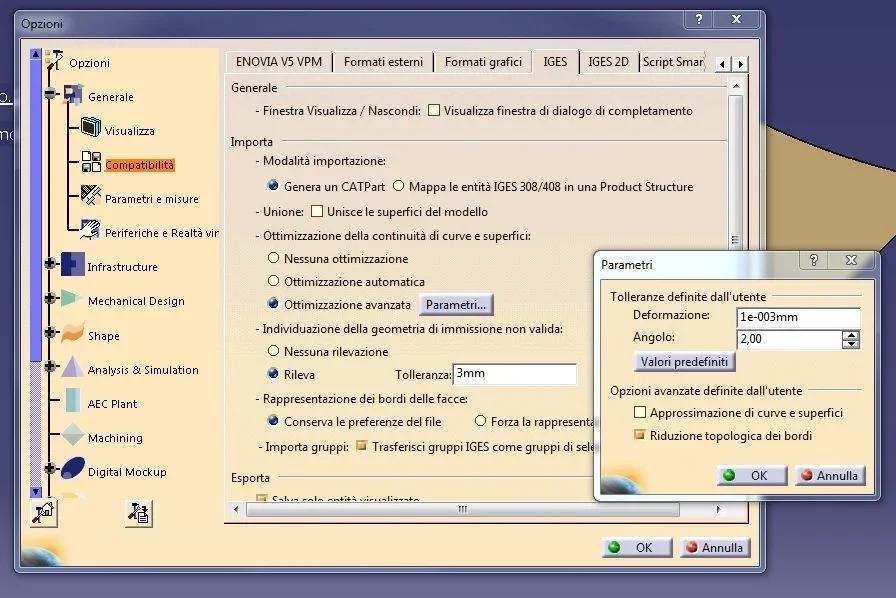
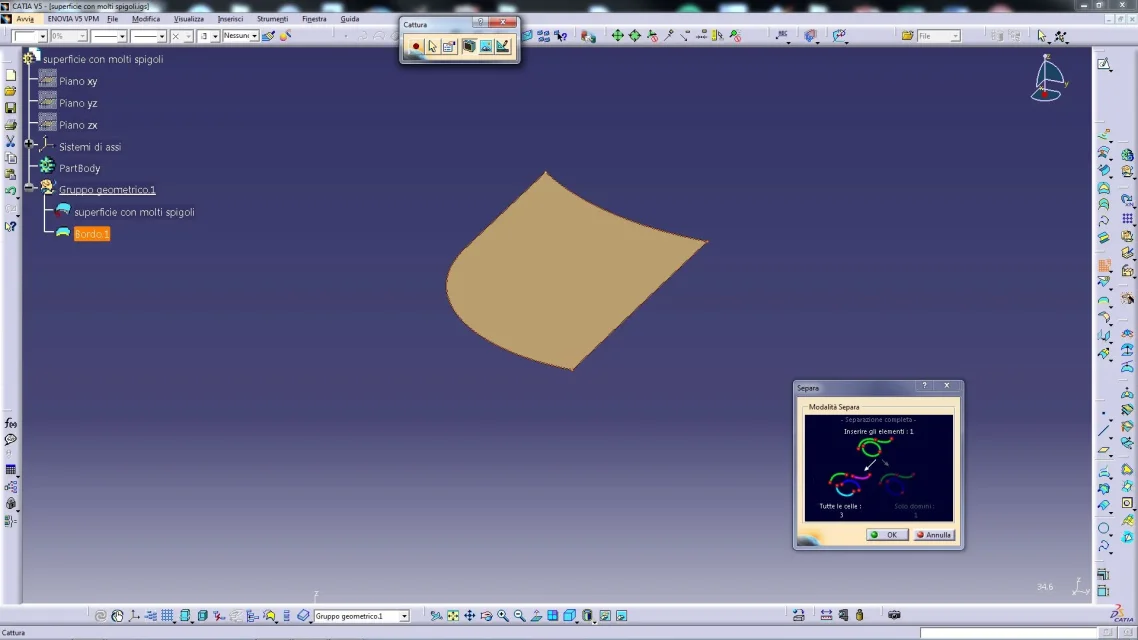
1) if you open the iges with the default iges settings, extract the surface edge and use the separate command, you will notice that the surface that seemed normal, has actually 48 cells or edges.

2) if you open the iges again but after changing the settings: Advanced optimization/topological reduction of the edges, and refer the analysis, the separate command returns only 3 edges.

Let me know.
 

Attachments

  • superficie con molti spigoli.zip
    superficie con molti spigoli.zip
    17.3 KB · Views: 3
  • Capture_000.webp
    Capture_000.webp
    117.5 KB · Views: 7
  • parametri.webp
    parametri.webp
    70.2 KB · Views: 6
  • Capture_001.webp
    Capture_001.webp
    103.4 KB · Views: 6
First of all I thank you for letting me discover the possibility to optimize the incoming igs! there is always to discover!
the open point instead remains just this! the possibility of having to work less to optimize the input surface (both from input data such as igs and from surfaces generated during processing (weather, sweep etc)
as already said we currently work at 0.001mm and the two proposals for the future are:
1) work at 0.02mm by changing general settings
2) change if you need the union up to a maximum of 0.02mm only if necessary. then return to 0.001mm in subsequent unions.
I think this last way of work is wrong, I'm trying to find objective motivations to respond.

I better explain the second case. .View attachment esempio.zipin the example I created two detached surfaces of 0.01mm
with the first union (toll 0.001mm) gives connection error
with the second union (toll 0.02mm) combines surfaces
The beard is in the last two unions.. in practice making a first union at 0.01mm combines surfaces. making a second union at 0.001mm the surface remains connected.
a little complicated but I hope it is clearer with the example!
 
1) work at 0.02mm by changing general settings
2) change if you need the union up to a maximum of 0.02mm only if necessary. then return to 0.001mm in subsequent unions.
in practice making a first union at 0.01mm combines surfaces. making a second union at 0.001mm the surface remains connected.
I press that I do not open the file (I have r21), so I do not understand well what you mean by making a first union at 0.01 and then a second at 0.001

if you have 2 different surfaces 0.01:

a) you try to combine them with tolerance 0.001 - it gives you error and if you do not solve it remain separateb) try to combine them with tolerance 0.02 - le unisce (I believe, holding the first selection and deforming the second) and remain unitedc) join them again with tolerance 0.001 (and here I don't understand you) for me is influential, leaves them as before as they are already united
d) but if you do not pay attention and join them by setting incorrect values for geometry -are united but degenerate as from attached image
if you apply solution 1) you will encounter less errors during closing operations but as a result you will not know how many and what deformations you have made necessary to close the model

I personally do this:

0) I try to eliminate upstream (import iges) topological errors
1) leave 0.001 default
2) union, select a distance propagation surface and button dx that combines surfaces and stops when the error is higher than tolerance
3) I continue with propagation unions until "insulating" in fact the surfaces that generate error.
4) examine the faults of connections to determine which (superfici) are to be optimized and which (superfici) are good
5) I carry out a smoothing of the face or edge or rework the surfaces
6) where necessary I carry out a connection instead of union, which allows me better correction of defects

if it is prototyping imposed input value very large and solve quickly.

Let me know.
 

Attachments

  • deformazione conseguente.webp
    deformazione conseguente.webp
    142.2 KB · Views: 7
Good evening,
If I may, I would add some information.
the join of surfaces, if it is the same as this image
http://www.dkszone.net/wp-content/uploads/2010/05/federation_2_11_.jpgIt does not seem to me to perform some physical deformation of the merged surfaces .
It is "simply" a logical operation to make the system recognize a series of faces and surfaces as a unique entity.
therefore (I repeat, always for what is of my knowledge) increasing from 0.001 mm to 0.02 mm the tolerance of the join, do not physically move the edges, but simply indicate to the system that all edges apart less than 0.02 mm are to be considered "attached".
different, however, the smooth (for curves) and the healing (for surfaces)
http://catiadoc.free.fr/online/sdgug_c2/images/dbcurvesmoothnls.gif
http://www.staff.city.ac.uk/~ra600/...ia tutorials/wfsug_c2/images/dbhealdefnls.gifIn these two cases, however, geometry is physically modified to achieve the required result.

returning to the join.
What problems could you encounter by increasing tolerance from 0.001 to 0.02 ?
I don't know.
But I wonder:
- it seems to me that 0.001 mm is the tolerance used in many wireframe commands and surfaces. If I intersect with a plane the surface "only at 0.02" and build a sweep (e.g. a flange) starting from this intersection, what happens? recognizes a unique curve and creates a unique surface or generates a series of loose pieces?
- I imposed 0.02 mm. but the step/iges that export, what tolerance does it have, and the system that will matter?
If, for example, the importing system has a contiguous tolerance between surfaces of 0.01 mm or less, what happens?

I know, I ask questions instead of answering...
 
the clarification of expatriated reader on the union command made me doubt whether or not you deform the edges of the surfaces when joining them.

in the office we had carried out some practical tests where by magnifying the image (and combining) the edge of the second selection was 'moved' towards the first, but I admit that the only graphic display could not be significant on what really does the command to the merged surfaces.

I'm out of the house now, but I'll be back in a few days and I can do some evidence.

Hi.
 
Hi, gianni,
seeing the video display, I had your own belief, actually, that the join command would deform the surfaces.
because if you have two flat rectangular surfaces (xy) with a shared edge ( <0,001), transfer one in z of 0.05 mm and join them (by bringing the toll. to 0.1) , you find yourself with two attached edges and seems perfect.
If I intersect it with a plan, the generated curve is unique.
If I extract the curve or the surfaces, they always seem fine.
Okay, so?
Not really.

first test.
an iges. as by miracle reappear the "scaline" between the two surfaces of 0.05 mm.

Second test.
disassemble the intersection curve in 2. also these, return to the distance of 0.05 mm.

third test.
a healing from 0.05 to 0.001 mm.
In this case both the iges and the curve "exploded" return the gap of the healing operation, to demonstrate, in my opinion, that an actual physical adaptation of adjacent surfaces took place.

while the join shows you all together, but if you happen to have to disassemble a union or have to export it to iges, you find yourself with faces torn between them.

In the best case, with the "altered" join, you find yourself with a 3d representation that is not exactly what you will export (because sooner or later, an iges or a step always happens...).
in the worst, build on this join other geometries, introducing in each an additional tolerance.
At least for what I understand.
 
I fully agree with expat readers and I enter into the discussion as I think it is an interesting problem for all cads and for that port how much I have experienced.

in the image that I attach I try to show the 'paradox' that you come to create when there is no congruence in modeling:
step 1 shows a side box 99.98 mm and a 'cover' at 0.02 mm away. once sewn surfaces with seam tolerance above the value 0.02 mm, I have the distance between the two sides equal (step 2) to 100 mm with the corresponding side 99.98 mm long (step 3)! ! ! ! !

This happens in nx but I think it is for all cads (try to do the same test with catia).

Hi.
 

Attachments

  • toll.webp
    toll.webp
    95.3 KB · Views: 10
I take the ball to the flight to say that baskets1959 anticipated me as I wanted to say our experience with catia v5.

1) Leaving step, iges etc in catia if model a cube and leave a small opening of 0.0001mm the software ignores opening and manages to extrude.

2) Same thing with opening 0.001mm.

Things change with a profile opening a little more important for example 0.01mm. In this case catia warns us with a message that the profile is open and that therefore being open cannot use it to create extrusion.

In case 1 and 2 though if I analyze the sketcher with the sketch analysis command, catia will tell us that the profiles are closed.
having a certain experience now, the only way to ensure that the profile is really closed is to create a congruence between the two final points.

Only so we will be sure that the profile is closed and we will not encounter problems in case of table exported to dxf for the processing of tool paths for example wire erosion.

I attach files to make you better understand scenarios.
0.01.webpConstraint-Coincidence.webpSketch-Analysis.webpUnfortunately I can't upload the catia files.. not even as a zip...
 
It does not seem to me to perform some physical deformation of the merged surfaces .
It is "simply" a logical operation to make the system recognize a series of faces and surfaces as a unique entity.
therefore (I repeat, always for what is of my knowledge) increasing from 0.001 mm to 0.02 mm the tolerance of the join, do not physically move the edges, but simply indicate to the system that all edges apart less than 0.02 mm are to be considered "attached".
hi expat reader, baskets, falonef
on the fact that union is an operation that makes the surfaces recognize as a unique entity while keeping them parameterically and as equal history, you are right and looking on the web similar discussions is common and recognized opinion, as well as you are right about intersections and subsequent disassembly, as well as various measurements, but following some practical tests, I add other considerations, while agreeing with you on everything you have expressed.

I try to explain:

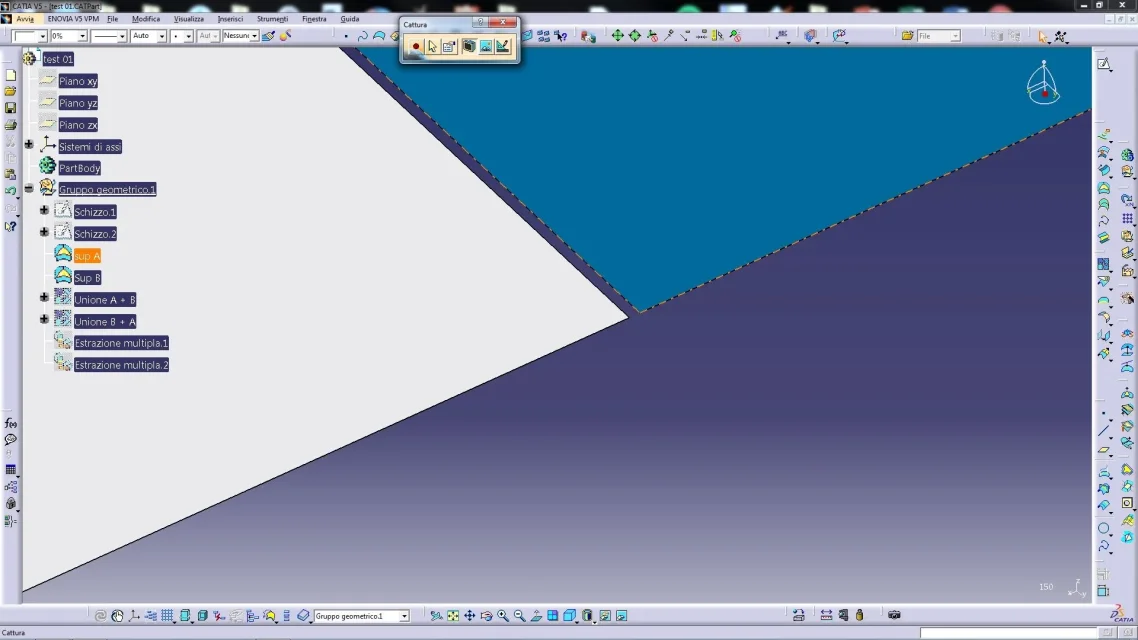
01) I create surface to
02) I create surface b (distant 0.05)
03) I create a+b union by selecting first sup. a and after b (b-board visually shifted to a)
04) I create the union b+a by selecting first sup. b and after a (board of visually shifted towards b)
05) visually the two unions differ from the inner edge that is not in common
06) side measurements give 10 mm, edge distance measurements return 10.05 on different sides if on union 01 or on union 02
06) in wysiwyg mode the display shows the surfaces for what they are originally, i.e. detached by 0.05, as well as the extracted surfaces
07) I create direction z extraction from the inner edge of the a+b union
08) I create direction z extraction from the inner edge of the union b+a
09) surfaces are distant 0.05
10) this seems to confirm that the union command does not deform the original surfaces, but in the representation of the joint edge, dovendo per forza escluderne one, makes that what is subsequently built on the considered valid one can be different depending on the initial selection, and I imagine the impression that it also deforms the surfaces, even if it is enough to use the wysiwyg to understand that the surfaces for caia are the original
11) but then I generate a step and an iges, and... specific deformedin conclusion:

point 10) points out that the initial selection of a union, if not surfaces, at least the internal edge maintained valid

point 11) shows that in output the surfaces are deformed and there doubts increase as the iges of expatriate reader say more... question of setting?

I attach the evidence.
 

Attachments

  • superfici distanti 0,05.webp
    superfici distanti 0,05.webp
    107.5 KB · Views: 3
  • superfici unite.webp
    superfici unite.webp
    108 KB · Views: 3
  • modaliltà WYSWIG.webp
    modaliltà WYSWIG.webp
    109.9 KB · Views: 3
  • estrazioni in Z.webp
    estrazioni in Z.webp
    113.9 KB · Views: 3
  • risultato export igs step.webp
    risultato export igs step.webp
    135.5 KB · Views: 2
  • test 01.zip
    test 01.zip
    24.3 KB · Views: 2
Maybe I didn't quite clarify the use I made of iges.
in the settings of the iges you have the join (si/no) and the optimization of the surfaces.
But if I introduce the join or an export optimization, I'm not checking out what's in 3d.
I'm editing the file further.
My intention was to have an export, as neutral as possible, to understand what effects the gsd joins on the surfaces.
 

Forum statistics

Threads
44,997
Messages
339,767
Members
4
Latest member
ibt

Members online

No members online now.
Back
Top