
• This forum is the machine-generated translation of www.cad3d.it/forum1 - the Italian design community. Several terms are not translated correctly.

trajectory in space

  • Thread starter Thread starter cougarz
  • Start date Start date

cougarz

Guest
I have to make a pipe with unbeared pipes but straight cut to edge and then welded. the most suitable command seemed to me a simple sweep to constant sez but asks me the trajectory that must be in space and not on a plane. How do I create a trajectory in space? I know how to create points in space but I do not find the function that me join them in a trajectory with straight segments (often).
 
I have the wf3 m180
when I click on insert reference curve opens the window pzni curve-> across points-> end at that point I can choose between splines, osingle rays, multiple rays, whole set, add points. I tried but it makes me a curve, not a broken segment as I would like
 
I think you have to do the single strokes, 1st point > > 2nd point > confirmation with central key and so on.
Once you make individual segments, you can perform a sweep and variable section with the constant section option.
 
I think you have to do the single strokes, 1st point > > 2nd point > confirmation with central key and so on.
Once you make individual segments, you can perform a sweep and variable section with the constant section option.
I've managed it, but for every stretch I have to restart the curve command and give only 2 points. for now I just need to connect a few points but it's a bit slender to make a feature for each segment. It's weird that there's no other way. cmq thanks to all
 
I've managed it, but for every stretch I have to restart the curve command and give only 2 points. for now I just need to connect a few points but it's a bit slender to make a feature for each segment. It's weird that there's no other way. cmq thanks to all
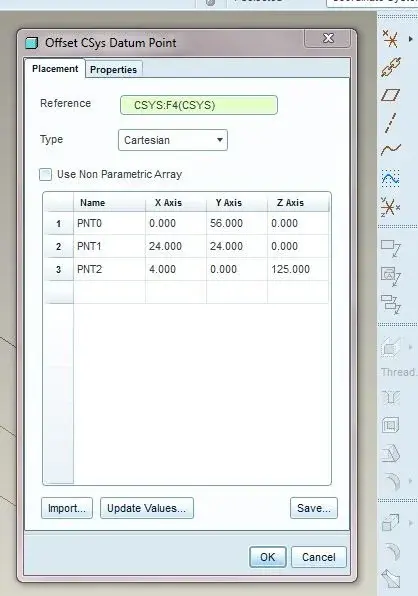
you have to create all points with one feature: offset coordinates points (possibly importing coordinates from files). and then create point curve with the ray=0 option. see attachments.
Bye.
 

Attachments

  • Capture.webp
    Capture.webp
    21.1 KB · Views: 17
  • Capture2.webp
    Capture2.webp
    27.9 KB · Views: 12

Forum statistics

Threads
44,997
Messages
339,767
Members
4
Latest member
ibt

Members online

No members online now.
Back
Top