
• This forum is the machine-generated translation of www.cad3d.it/forum1 - the Italian design community. Several terms are not translated correctly.

transfer menus, icons, settings, lisp, from autocad 2008 to 2010

  • Thread starter Thread starter sara1978
  • Start date Start date

sara1978

Guest
hi to all of you on the forum, I write because I am in trouble, I find myself having to transfer "the autocad work system" (i.e. menus, custom icons and not, settings, lisp, ...) from autocad 2008 to 2010.

As I remember that when I made it from acad 13 to 2007 I had to do everything by hand, I would like to avoid it now, but the help does not help me at all, you would know to explain to me if it is possible and what are the steps to do?

thanks to all and good holidays!! !
 

Attachments

  • disposizione e icone Acad-2008.webp
    disposizione e icone Acad-2008.webp
    66.8 KB · Views: 31
in the autocad menu (start -> programs -> autodesk) find "exegui migrations custom settings". You can do everything from there.
 
...da acad 13
in reality it was from the acad 14 but little changed
in the autocad menu (start -> programs -> autodesk) find "exegui migrations custom settings". You can do everything from there.
Thanks, but it seems you can only use it to migrate from the same version (:confused: but what's the point...? just a copy between colleagues x have the same way of work... ).
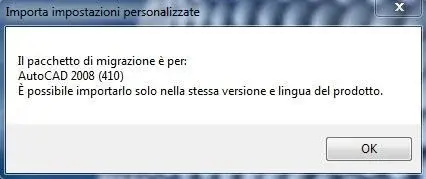
And now... Everything by hand?
 

Attachments

  • no import.webp
    no import.webp
    9.2 KB · Views: 65
No. you can migrate between different versions.
find the setting export, import settings and migrate from a previous version.

export your settings in 2008 and import them into 2010, or migrate directly from 2010
 
precise that I rise from a repentum 4 + xp2002 x32 + acad 2008
a new pc i7 +win7 +acad2010 x64
No. you can migrate between different versions.
find the setting export, import settings and migrate from a previous version.

export your settings in 2008 and import them into 2010, or migrate directly from 2010
That's exactly what I did:
export settings,
moved the zip file to the new pc
import settings
but the answer is what you see in the previous image. . .

Where am I wrong then?
(I attach my options 2008)
 

Attachments

  • esporta acad-2008.webp
    esporta acad-2008.webp
    18.7 KB · Views: 72
Sorry but on the new pc (so with 2010) you should have imported autocad settings 2010, not of 2008...
Don't you think?
 
Sorry but on the new pc (so with 2010) you should have imported autocad settings 2010, not of 2008...
Don't you think?
Of course there is... but sorry, I already told you that I had exposed since 2008 and imported in 2010 into the other pc, but that the answer of autocad 2010 is what you see in the image of my post n°3, that is:
"the migration package is for autocad 2008. it is possible to import it only in the same version and language of the product".

Is this it?

So 2010 tells me he doesn't like the file made since 2008, so now that alternatives remain to me?
 
if the versions are in the same language evidently autocad gets angry for the difference between 32 and 64 bits.

I'm really worried about it today. I bought an i7 with win7-64.
 
So now what alternatives do I have?
if the language is the same, at the moment remains the proof of change to the new operating system.
test that will make you gp. :
if the versions are in the same language evidently autocad gets angry for the difference between 32 and 64 bits.

I'm really worried about it today. I bought an i7 with win7-64.
 
in fact autocad previews migration from a previous version if installed on the pc.
the thing has its own logic, it is not said that in different pcs there are the same configuration files and equal paths, the risk of not finding files or partitions would be too high.

I solved this...

- installed 2008
- "import autocad settings 2008" exported from the other pc
- installed 2011
- "execute migration from a previous version"

...is certainly the least evil.

I didn't have any problems installing 2008 on win7 x64, but actually not on other programs.

:smile:
 

Forum statistics

Threads
44,997
Messages
339,767
Members
4
Latest member
ibt

Members online

No members online now.
Back
Top