• This forum is the machine-generated translation of www.cad3d.it/forum1 - the Italian design community. Several terms are not translated correctly.

transition solid edge st4 to solidworks 2017: best solution

  • Thread starter Thread starter -Mc-
  • Start date Start date

-Mc-

Guest
Good morning to all,
in a company for which I work, it was decided (for various reasons), to pass from soloedge st4 to solidworks 2017.
in the transition phase, we will have to "misk" the files and use the solidedge designs in solidworks, both parts and assemblies, especially for those elements that are now considered standard (not subject to change).
It is important that the elements keep the same code in order to have the distinct compiled in the correct way.

- in solidedge st4 does not exist pack&go: correct?
- how can I do to save the most used assemblies/parts and then use them in sw? What is the best method?
- Is there an application?

I look forward to your opinions :-)

Good job to all!
 
- in solidedge st4 does not exist pack&go: correct?
you should know that you use solidedge.. .
how can I do to save the most used assemblies/parts and then use them in sw? What is the best method?
carry them in neutral format (step, iges...) and then load them into solidworks. on the management of parts, mutibody parts, assemblies do not know how to behave, it could also depend on the export settings. maybe attach a couple of trivial files explaining what should go out in terms of organization of bodies or parts
Is there an application?
For what?

imported files will be dead bodies without historical functions and therefore not editable
 
you should know that you use solidedge.. .
It's an old version and I don't know, otherwise, I wouldn't have asked the question.
carry them in neutral format (step, iges...) and then load them into solidworks. on the management of parts, mutibody parts, assemblies do not know how to behave, it could also depend on the export settings. maybe attach a couple of trivial files explaining what should go out in terms of organization of bodies or parts
it behaves well and, with sw2017, you can also make it changeable thanks to the recognition of functions.
imported files will be dead bodies without historical functions and therefore not editable
That's not true.
thanks to the massivon commitment, but I need the advice of a prepared person, to understand how to set the job.
Thank you.
 
the recognition of the functions there is from several versions, but besides the fact that you can not decide, unless it has been implemented in 2017, neither the type nor the sequence of the functions the sketches are without quotas and geometric constraints.
this means that if the functions are, fortunately, those desired sketches must be reworked one by one in order to make them manageable.
 
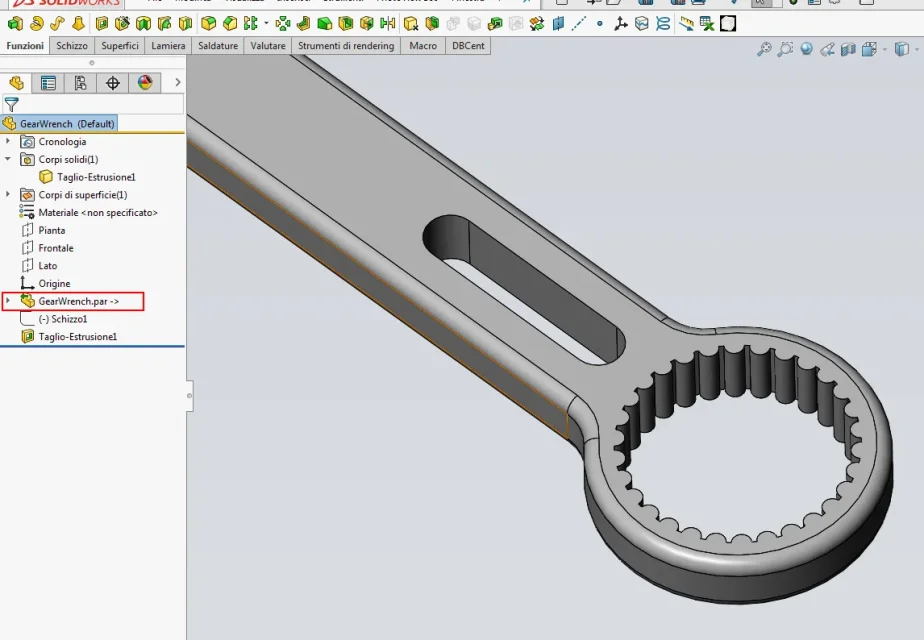
mark that with the 2017 version of s.w. you can open the solidege native files (theoretically also with the st4) version without making the conversion from solidege. Obviously they are seen in s.w. 2017 as solid bodies but there is the advantage that if they are modified by s.e. you can recharge with new changes; s.w. keeps the connection with the original file.
I don't have s.e. installed, I downloaded a file from the network and opened (works). If you want to post a part in s.e.-st4 and I can verify it.
of course on the imported file you can do jobs but you cannot use the features of featureworks; this happens to always have the connection with the original file.
I attach a photo... where there is the red rectangle that indicates the connection of the import files.00.webp
 
the company for which work he made the software change last year.
to say of the technician who installed the software the best thing is to start from the clean.
In fact many drawings I had to give them back.
solidworks 2016 .par opens them without problems and import them as a block. but you can sketch and make the changes you feel appropriate. I took some time to understand. The 2017 version hasn't put it yet so I don't know how history has changed.
You can't open the tables, I saved them as dxf and imported like that.
Otherwise I'll do it again.
is not a painless passage

Hi.
 
thanks to the massivon commitment, but I need the advice of a prepared person, to understand how to set the job.
Thank you.
on how to set the job that depends on you...if you look at my previous post on import files from st4 to s.w.2017 you make an idea.
the code is kept of course all parameters (ect description) these you have to remake them with s.w.
if on a particular with s.w. fuznioni you can't (particularly complicated open-piece surfaces ect) you can always change the native and reload it.
Then I think that you have to make a job reset try thinking about a pdm or management (look on the forum there are we use dbcenter)...in this distinct way and what else would be much faster.
Maybe with the management you can import the details of the facts with the st4.
from the few information this could be the advice.. .
greetings
 
to say of the technician who installed the software the best thing is to start from the clean.
In fact many drawings I had to give them back.
that translated into current language (and translation only do you after you have made the transfer for new licenses) means that the best thing is to throw in the toilet all the historian and do it from scratch with the new cad.
solidworks 2016 .par opens them without problems and import them as a block.
ah, opening the files are all good, then with the imported you don't pee or almost. the imported are good if they are commercial parts. for the rest if you have to make a change is worth the loving advice of the (new) technical: do everything.
You can't open the tables, I saved them as dxf and imported like that.
that is an inverecondo abomination. What do you do with a dxf that comes from an imported 3D in the sketch or in the table? You're gonna pee.
Otherwise I'll do it again.
Right. and what you don't do is because you didn't have to use them, otherwise you're sure that you'll also make them because you have a parametric cad with the tables associated with the 3d and use 2d imported from a dxf of the historian is from tso :smile:
is not a painless passage
that translated means that for the technical office will be a bloodbath, especially not to slow down the step compared to those who make the chips from the tables.

sti software vendors are really geniuses to adorn the pill. They tell you slowly, without pushing loud and using a lot of vase. :redface:
 
mark that with the 2017 version of s.w. you can open the solidege native files (theoretically also with the st4) version without making the conversion from solidege. Obviously they are seen in s.w. 2017 as solid bodies but there is the advantage that if they are modified by s.e. you can recharge with new changes; s.w. keeps the connection with the original file.
thank you very much for the very useful information!
Yes, it is true; we have tried and works; through the recognition of functions it recovers almost everything as if it were a native sw part;
of course for little complex elements; for sheet metal elements, the speech is complicated.
on how to set the job that depends on you...if you look at my previous post on import files from st4 to s.w.2017 you make an idea.
Yes, I was thinking about it today; I did several tests; the archive if existing is bad: undefined sketches and unrelated... I mean, it would still be to be taken. Besides, they are not so many files so... It wouldn't be so traumatic.
sti software vendors are really geniuses to adorn the pill. They tell you slowly, without pushing loud and using a lot of vase.
No, the sellers in this case have nothing to do with it. the decision is due to other factors much more important.
 
Yes, it is true; we have tried and works; through the recognition of functions it recovers almost everything as if it were a native sw part;
Excuse me if I insist on this, but how are these functions done?
do they have the same sequence as solid edges?
If not, do they have a modeling logic or are they fine functions to themselves?
are the most useful ones to build that part or are just functions?
Are the sketches bound? Are they listed? are simple and easily transformable into parametric?

this just to say that between having a part with reconstructed functions on which to put hand with a waste of time to make it changeable and a part with an imported body the difference is very little. especially if the original solid edges are bad.
do not think about it
 
Yeah, you're right. It's my goal to do everything from scratch. As you said, it is very important to have a well done archive especially to be able to modify/build new assemblies.
Undefined sketches (one by function) are generated.
pro: we do not want to define them with the quotas and the relations that concern me for the possible functional modification.
counter: the file gets heavier because too many functions are generated.
compared to a few years ago, they made a giant step.
I would like you to participate in the discussion on the other "room" of yourself.
I put the link:https://www.cad3d.it/forum1/threads...orks-2016-come-fare/page2?p=399263#post399263I would like to make a list of commands/functions present on sw and not on if (and vice versa) and faster operations, with less "click", on sw and on if.
I would like to create a "vademecum" of the two comparison systems. objective list based on numbers (command/number of operations, specific command/non-command presence).
may also be useful to developers, who knows... :-)
 
the archive if existing is bad: undefined sketches and unrelated... I mean, it would still be to be taken. Besides, they are not so many files so... It wouldn't be so traumatic.
If the archive of if you have now is bad it simply means that no one knew how to use if. not only, but since you refer to undefined sketches I fear that in ut, to today, they would not be able to use well either swx, nx, creo, catia or whatever you prefer.
I am therefore wondering whether the decision to change falls apart from an assessment of apparent bad efficiency of itself; I write apparent because with models made as you refer it is clear that things then work badly and the fault is not of the cad but of those who sit in front.
Surely those who have worked very bad with if, at the change of cad, will work even worse with swx, and of this you can be sure.
Perhaps those who hold the strings of the bag would have done better to invest in training rather than to get to decide to invest in a change of the cad.

In all this I imagine that you just arrived in the company (so you didn't know how to use if) and that you are going to take over the reins of the fall at this point it would really be important to see what with if you can't do, and so well come your disamina of the two cads.
 
In fact the details that undergo revisions, tests etc. it is worth redesigning them so you have the possibility to manage it as you want from scratch.
after working with solid edge for a while the passage to the new cad was great, you have to look for a bit the controls etc. but it is very intuitive and driving or on kb you find everything, strange thing if you arrive from solid edge :wink:

Obviously sketches and mal defined functions are not the fault of the cad but the way of work.

the advantage of redesigning the details is also in favor of the management of the aid.
I find the program responds better if you don't insert so many imported pieces.
a council that in his time had already given me the technician, prepared person who had launched me a couple of tips revealed useful.
useful is the toolbox library that I had before.
are cmq 2 excellent cad
 

Forum statistics

Threads
44,997
Messages
339,767
Members
4
Latest member
ibt

Members online

No members online now.
Back
Top