andreafly
Guest
hello to everyone I am new and I know more where to bang your head...eheh!
I installed alias 13 on my pc (acer aspire 5745g sch. video geforce gt330m 1gb sist.op. 7).
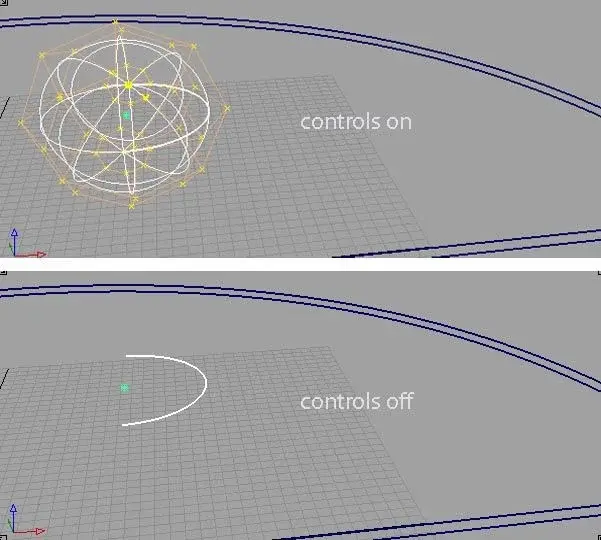
when I activate the control points to change the cv all right, until I disable them. As soon as I do controls off my object disappears in all views and I only have a line that outlines the profile!!! to see it again I have to shader. the problem is also that I cannot select the object if not the line that remains to me. It is a little difficult to explain, think of a sphere, activates the control points, then disable them and disappears the 3d of the sphere and remains only a selectable arc.
I leave the attached file.
I'm freaking out is I need it because I have to make a quick prototyping at the weekend! !
thanks to everyone for any kind of help!
Andrea
I installed alias 13 on my pc (acer aspire 5745g sch. video geforce gt330m 1gb sist.op. 7).
when I activate the control points to change the cv all right, until I disable them. As soon as I do controls off my object disappears in all views and I only have a line that outlines the profile!!! to see it again I have to shader. the problem is also that I cannot select the object if not the line that remains to me. It is a little difficult to explain, think of a sphere, activates the control points, then disable them and disappears the 3d of the sphere and remains only a selectable arc.
I leave the attached file.
I'm freaking out is I need it because I have to make a quick prototyping at the weekend! !
thanks to everyone for any kind of help!
Andrea