• This forum is the machine-generated translation of www.cad3d.it/forum1 - the Italian design community. Several terms are not translated correctly.

usare openoffice per design tables

  • Thread starter Thread starter cacciatorino
  • Start date Start date
mah, I try to go on the safe or at least certified by the swx. there are malfunctions with excel that is tested by them.. .
 
I attach an openoffice set-up for those who want to see it. I think it serves the macro mentioned at the first link to edit the various configurations.

p.s. works with swx 2009 and ooo 3.2.0.
 

Attachments

...interessante... ma io non sono riuscito a capire come fare x averlo...
ho lanciato il setup, ma ora se preso "s" si apre il micro menù.... ??? e mò???

installing spn-configurationdesigner to solidworks
for easier usage spn-configurationdesigner can be installed to solidworks for example this
way:
– open model to solidworks
– make sure that nothing is selected on solidworks
– click s-button on your keyboard
– when menu opens up, right click on it and choose "customize menu"
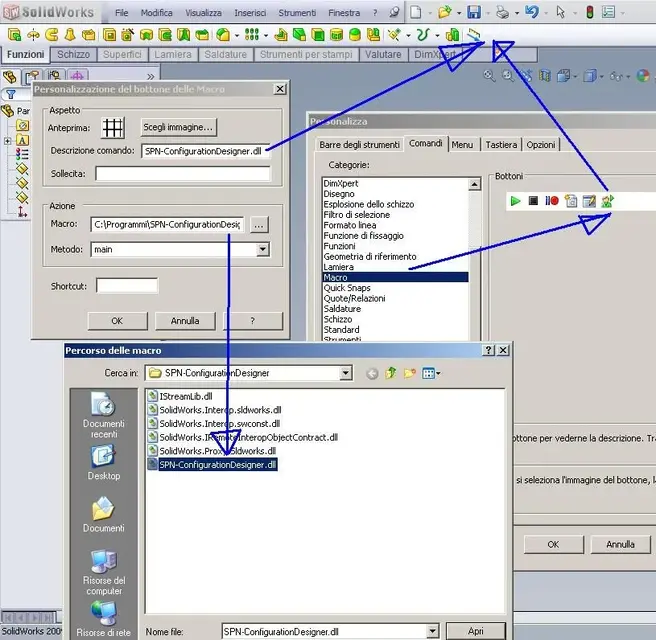
– now add new macro button and attach macro:
c:\program files\spn-configurationdesigner\spn-configurationdesigner.dll
to created button (there is also bitmap for macro button in same folder).
creating spn-configurationdesigner spreadsheet
– press s-button and select the macro button you have created
– spn-configurationdesigner window opens up
– select options if needed
– click "insert spreadsheet" -button and application fills the table to openoffice.org
– during inserting spreadsheet is embedded to model and model is saved
updating spn-configurationdesigner spreadsheet
– push s-button on your keyboard
– click the macro button you created
– spn-configurationdesigner window opens and if you have selected "autoupdate
spreadsheet" then the application fills data from your model to spreadsheet.
– when you have made the changes you can click "update to model"-button and then your
new values are inserted to configurations in model, spreadsheet is embedded and model is
saved.
warning!
– do not use formulas in driving cells if you have checked option "autoupdate spreadsheet"
– do not delete the "family"-cell from the design table!
 
...interessante... ma io non sono riuscito a capire come fare x averlo...
ho lanciato il setup, ma ora se preso "s" si apre il micro menù.... ??? e mò???

installing spn-configurationdesigner to solidworks
for easier usage spn-configurationdesigner can be installed to solidworks for example this
way:
– open model to solidworks
– make sure that nothing is selected on solidworks
– click s-button on your keyboard
– when menu opens up, right click on it and choose "customize menu"
– now add new macro button and attach macro:
c:\program files\spn-configurationdesigner\spn-configurationdesigner.dll
to created button (there is also bitmap for macro button in same folder).
creating spn-configurationdesigner spreadsheet
– press s-button and select the macro button you have created
– spn-configurationdesigner window opens up
– select options if needed
– click "insert spreadsheet" -button and application fills the table to openoffice.org
– during inserting spreadsheet is embedded to model and model is saved
updating spn-configurationdesigner spreadsheet
– push s-button on your keyboard
– click the macro button you created
– spn-configurationdesigner window opens and if you have selected "autoupdate
spreadsheet" then the application fills data from your model to spreadsheet.
– when you have made the changes you can click "update to model"-button and then your
new values are inserted to configurations in model, spreadsheet is embedded and model is
saved.
warning!
– do not use formulas in driving cells if you have checked option "autoupdate spreadsheet"
– do not delete the "family"-cell from the design table!

sorry about posting in english..

when you have installed this software start solidworks. open up for example part and click "s"-button on your keyboard when nothing is selected in sw. small menu is displayed in sw, click right button on your mouse on that small menu and "customize"- option should be available. now link new macro button to menu from "commands"-> "macro" ->"new macro button". in this window you should be allowed to show macro from "c:\program files\spn-configurationdesigner\spn-configurationdesigner.dll"

hope this helps!
 
... interesting... but I couldn't figure out how to make x have it. . .
I launched the setup, but now if taken "s" opens the micro menu...????? What about me? ?
Actually, after installing the software, you should create a macro launch button that goes to the request. see if the attached image can help you.

the fact of pressing the "s" button to launch the command I think refers to the fact of launching the macro from the "spn tool", a set of instructions created by the developer (additional) that speed the use of swx. If you don't have the spn tools you have to launch the program as a macro, from the special box you created.
 

Attachments

  • config_designer.webp
    config_designer.webp
    78.3 KB · Views: 50
sorry about posting in english..


hi samu, nice to meet you here. i apologize to have not tested yet your soft, but i was really busy in the last weeks. neverthless, i want to thank you to have modified the program as requested!

regards.
 
I just tested this pome right.
it has simplified because now to start just click dx in the model view.
It's beastly. :

among other things to me that o2003 and sw2010 x64 and win7x64 could not automatically create data tables, this has solved this problem at the moment.
Thanks samu. ;-)
emanuele
 
thank you all for your continous interestment and helping me out on my projects :) also if you have some free time take a look what else is at the sites. maybe something special could be offered for cad3d.it users ;)
 
new user interface cooked up. same kind of graphics added to other apps too. enjoy! :)
spn-configurationdesigner.png
 

Forum statistics

Threads
44,997
Messages
339,767
Members
4
Latest member
ibt

Members online

No members online now.
Back
Top