
• This forum is the machine-generated translation of www.cad3d.it/forum1 - the Italian design community. Several terms are not translated correctly.

use sketch tracked together to create part

  • Thread starter Thread starter Atreiou
  • Start date Start date

Atreiou

Guest
Maybe it's a banality but I can't find the way.

example:

two lifts on skid in one room
I have to connect them with 5 different pipes
I would be comfortable to draw and bind pipe paths with more sketches in the axieme, so as to take into account any interference
and then use these sketches in one part to do the sweep of the pipes.

Otherwise I have to imagine the pipe, realize it in one part, insert it into a set and change it to the necessary, if I move the plants the pipes must be reconditioned.

solution without using sw routing or piping function?
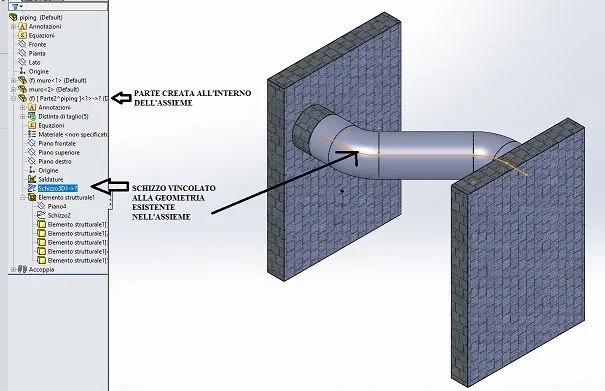
 
simply create the part inside the axieme. then you can decide whether to leave it virtual inside the axieme or save it externally.
instead of using the sweep you can use the structural members, you just need the sketch of the path that inside the axieme could also be a 3d sketch
 
thank you max, but if I don't remember badly the structurals cannot be done together, they are only available in the environment part
 
and daje, you are distracted today, I wrote it just at the beginning
simply create the part inside the axieme.
in the environment together you have no material creation functions, but only subtraction. In fact, you don't even have the sweep function.
So do a good one. new part and create the part on the spot. Obviously then you have to change part to create geometry, but if you don't want to use the piping module there are no other roads. or better the alternative is to use the toolbox profiles, but you do not have much management flexibility
 
I understand, here at home but I don't have sw
So you say that creating the part within the axieme can I draw within it a sketch that I can bind to other parts happy together? and then tie the sketch to the position of the same?
 
Here we are
modifying your file by binding the edges of the sketch to the pipes on the walls I can have a tube that fits to move one of the walls
I do not cover all movements, but small adjustments yes, that is what I care about.
strange thing, on my assemblies I can't start a 3d sketch from the snaps on objects already existing on the axieme, both complete and in speedpak, I must first draw the line and only subsequently I can bind the vertices to the existing points, but not at the start.
 
strange thing, on my axioms I can't get a 3d sketch from the snaps on existing objects on the axieme
check that you have activated
-activate naps in system options
- automatic correlations in instruments> sketch settings
 
settings are correct, I don’t understand why when swx restarts then everything worked correctly, mah
 
Hello.
In practice, therefore, before creating geometry together, it is always advisable to insert--- component -- new part.

I have worked together without creating the new part, and for example, it does not make me realize the sweep operation.

Thank you very much
 
you can only do certain functions, which I bring back: you can create the following functions together: cuts, holes, fittings, bevels, welding cords and belt/chain functions.
If you want to make a sweep, it's not like you're gonna have to put in a part, You must have Do it.
 

Forum statistics

Threads
44,997
Messages
339,767
Members
4
Latest member
ibt

Members online

No members online now.
Back
Top