• This forum is the machine-generated translation of www.cad3d.it/forum1 - the Italian design community. Several terms are not translated correctly.

v18.1 new command?

  • Thread starter Thread starter cacciatorino
  • Start date Start date

cacciatorino

Guest
I was looking at v18.1:

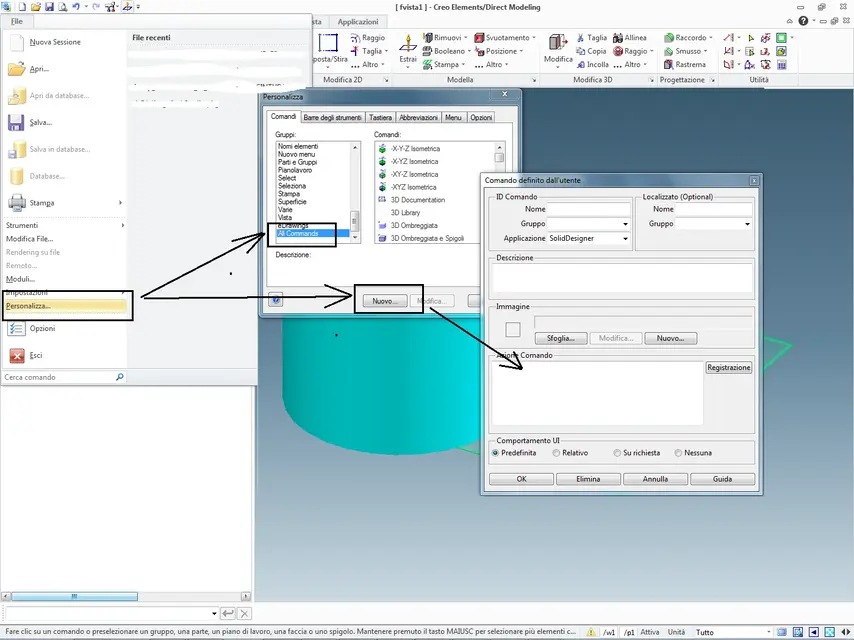
Do you have any idea how to add a custom command? for now I only managed to create a new tab and add a new command and its icon. The problem is I can't add the text to the command!
 
I'm sorry, would you post me an image of the v18?
Is that so different? have they introduced the ribbons? (which I would hate)
have added integration with pro/e?
we are still at v17..
 
I'm sorry, would you post me an image of the v18?
Is that so different? have they introduced the ribbons? (which I would hate)
There you are!
have added integration with pro/e?
I don't know, what do you mean by integration? that the two cads can exchange the parts? ....I saw that the pro/e data interface is started by default, and it is not among the modules for which an additional license is required, but I did not try to load a pro/e file.

In the end I found the way to create a new command, once this is done, just create a new tab in the ribbon bar and add it, taking it from the list of existing ones.
 

Attachments

  • V18_1.webp
    V18_1.webp
    70.6 KB · Views: 39
  • V18_2.webp
    V18_2.webp
    88.3 KB · Views: 29
  • V18_3.webp
    V18_3.webp
    58.8 KB · Views: 23
I don't know, what do you mean by integration? that the two cads can exchange the parts? ....
Well, it would be interesting to see if osd can now read natively the pro/e, 3d and 2d files.

or my god!
added the ribbons!
How are you?
Can you disable?
 
added the ribbons!
How are you?
Can you disable?
I'm just testing with model manager, I still have to use v17 for work because pdm eit doesn't work with v18.

However the modeling ribbon seems to me much better than the ribbon of itself....
 
you can reuse the old toolbars (file *.tlb) defined on v17 directly on v18.1, just copy them to the folder:

c:\users\appdata\roaming\ptc\creo elements direct modeling 18.1\18.1

and recall them from the file menu-->personality-->bar of tools
 

Attachments

  • V18_4.webp
    V18_4.webp
    76.2 KB · Views: 23
you can reuse the old toolbars (file *.tlb) defined on v17 directly on v18.1, just copy them to the folder:

c:\users\appdata\roaming\ptc\creo elements direct modeling 18.1\18.1

and recall them from the file menu-->personality-->bar of tools
excellent

Has anyone been able to change the menu and ribbon background?
or will I have to get used to white in the future? :

I don't work the pan with ctrl+sx mouse, is it you too?
 

Forum statistics

Threads
44,997
Messages
339,767
Members
4
Latest member
ibt

Members online

No members online now.
ciao
Back
Top