
• This forum is the machine-generated translation of www.cad3d.it/forum1 - the Italian design community. Several terms are not translated correctly.

verify quota symbols in drawing

  • Thread starter Thread starter gil
  • Start date Start date

gil

Guest
Bye. I have come up with the following design on which I would like to ask you an opinion. We draw that there is no title to the views, we draw that in the left view altitude in meters and right in millimeters. (almost patishness it takes) I also imagine that the lines tragedged were to be drawn, but let's leave.

My question is: what is the zig zag line that is seen in the left-wing quota, on the basis of what is the rule?
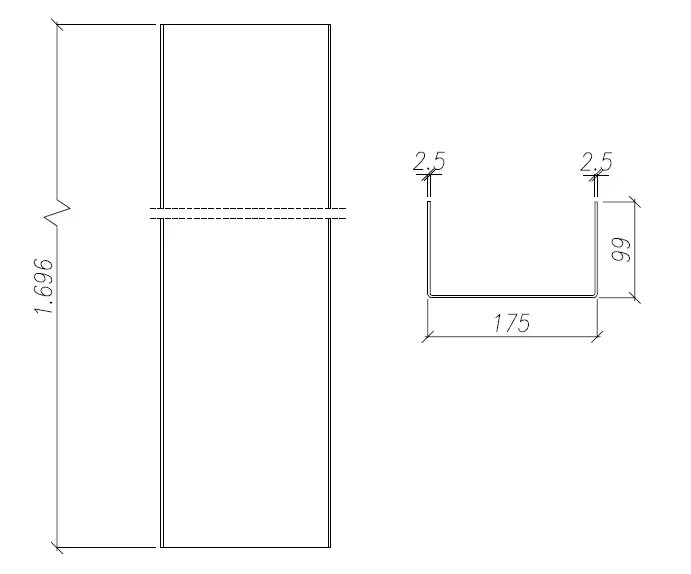
Immagine.webp
 
indicates a share related to a broken view.
the 2 dotted lines are one of the methods to break the view, it is used when a piece is long and you want to use a small sheet, for example. I do not know if that type of quota line refers to a norm, but I know that almost all cads do it that way.
 
I have no idea. I have always known that the quota interrupted, therefore not in scale, is represented underlined. could be something internal to the used software
for example solidworks does it only if you set the quoter style anxious
 
the reference standard is the uni-iso 128-24.

the representation is incorrect: the continuous line with zig-zag (1.19) is used (in place of the dashed used in the drawing) to indicate the separation of interrupted representations when the design is executed by means assisted by the processor (otherwise it is used the 1.18, continuous line irregular end).

the same rule indicates that the measuring line must be the 1.1, fine continuous line and in no case should be used the 1.19.

regarding the quota, has already responded correctly mvw.
 
should be the one iso 129-1
However, you can find it on almost every dispenser on the net. It should be on the baldassini, but I go to memory
 

Forum statistics

Threads
44,997
Messages
339,767
Members
4
Latest member
ibt

Members online

No members online now.
Back
Top