• This forum is the machine-generated translation of www.cad3d.it/forum1 - the Italian design community. Several terms are not translated correctly.

video line thickness adjustment

  • Thread starter Thread starter Sleepers
  • Start date Start date

Sleepers

Guest
sometimes it happens to have to insert in word some parts of a mechanical autocad design (2019); I have never used video thicknesses because I didn't need it, now (better late than ever) I decided to differentiate in the copy paste into word the thinnest and thickest lines.

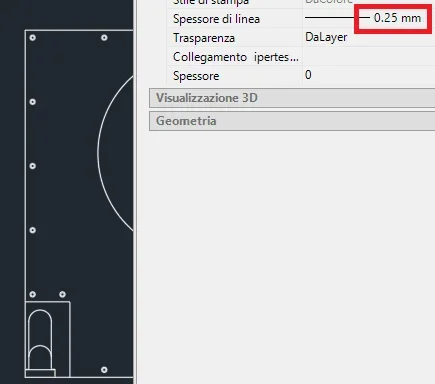
However, I can't "end" the video thickness in autocad: it goes from "excellent" to "consistent" without means (see screenshot). I tried to adjust the line thickness settings, but it is not served.

Am I not capable or is it?

Thank you.
 

Attachments

  • Impostazioni spessore linea.webp
    Impostazioni spessore linea.webp
    14 KB · Views: 10
  • Spessore025.webp
    Spessore025.webp
    7.5 KB · Views: 11
  • Spessore030.webp
    Spessore030.webp
    8.8 KB · Views: 11
a discussion about this topic has already been addressed a little while ago on the forum quizi.
it seems however that it is not possible to manage the line thicknesses in display mode on the monitor, see Who.If your need is to see the thickness differences in the text document, you will need to use the file export method in the bitmap or vector formats allowed by word.
 
a discussion about this topic has already been addressed a little while ago on the forum quizi.
that discussion was about solidworks that has a different management from autocad (which is mechanical is irrelevant and the discussion was opened in the autocad section to have more possibilities of answer*)
to display the thicknesses you need to set the layers correctly, or the individual lines by forcing the thickness) and activate the layers display of line thickness*opening discussion in the correct section is important to have more visibility both within responses and competence.
 
the discussion was opened in the autocad section to have more possibilities of response
Ooops!
shame on me, I was unnecessarily looking for the autocad section under mechanics and I didn't find it (by force, it's not here but in another part of the forum; Let's say I learned for the next time.

if possible, can the moderator move this thread "of there"?
Thank you.
to display the thicknesses you need to set the layers correctly, or the individual lines by forcing the thickness) and activate the layers display of line thickness
I had done it, and in fact I see the video thicknesses quietly.
Only, the enlargement of the lines takes place in too large steps, as I showed in the screenshots.
 
no, this seems to me the command to set print styles/spessors, not video ones.

I add another strangeness: by copying paste on word, some thicknesses vary (in random way) compared to the autocad source file (I attach the image).
I thought I accidentally set the wrong thicknesses, but I checked and they were correct.

in doubt I also printed the page from word, thinking that the wysiwyg is not respected, but also on paper are wrong.
 

Attachments

  • Spessori errati Word.webp
    Spessori errati Word.webp
    9.8 KB · Views: 5
no, this seems to me the command to set print styles/spessors, not video ones.
is the command to set the thicknesses. In the list of thicknesses you will find those on the list and if you change them, for example 0.1300 to 0.1220, you should see them modified. then you will use them to set the thickness of layers or individual lines, but with the view of the thicknesses you should see the change also to video. do some tests using extreme values.
 

Forum statistics

Threads
44,997
Messages
339,767
Members
4
Latest member
ibt

Members online

No members online now.
ciao
Back
Top