• This forum is the machine-generated translation of www.cad3d.it/forum1 - the Italian design community. Several terms are not translated correctly.

view modeling 19 configurator

  • Thread starter Thread starter andrea1974
  • Start date Start date

andrea1974

Guest
Hey, guys, question. I have a group to mount in two different assemblies, but with two different mounts. same pieces that make up the group but different fittings. How do we proceed? Is there a view configurator?
Thank you.
 
Hey, guys, question. I have a group to mount in two different assemblies, but with two different mounts. same pieces that make up the group but different fittings. How do we proceed? Is there a view configurator?
Thank you.
creates configurations in modeling environment, then when you generate views in annotation environment you can determine which configuration the view refers to.

p.s. if your question was not related to the environment 2d but to that 3d, you can also use the "elimina selective sharing" command that allows you to move a part only inside a certain instance of a group, leaving the other instances in the original position.
 
to have different mounts of a two shared groups the most correct and scholastic way to follow is that of the "elective instances".

then go to structure -> selective instances -> cancel selective sharing
and then click on each part of your group that must be placed "differently" and next to each one will appear an orange baffle

By default, the software chooses you as a "context" for the cancellation of selective sharing, the group just above the selection part and is right so that if you go to the next level you may have problems with the configurations of the top group.
CILINDRI.jpgas you notice from the figure I used the command cancels selective sharing on the parts of the open cylinder that move: piston, stem, nut and snout, indeed on the latter I used the annulla selective instances also on the "sphere" of the snout, otherwise I would have had in all the snodes shared the face of the ball not parallel to that of the snode as normally happens.

Last advice, when a subgroup is often mounted in "different mode", as often happens for cylinders, I recommend you create a standard configuration to which you attach tables 2d etc, and then when you put it inside other subgroups use selective instances so you don't risk combining damage in other mounts, especially if you have a pdm and not only pkg saved in the file system
 
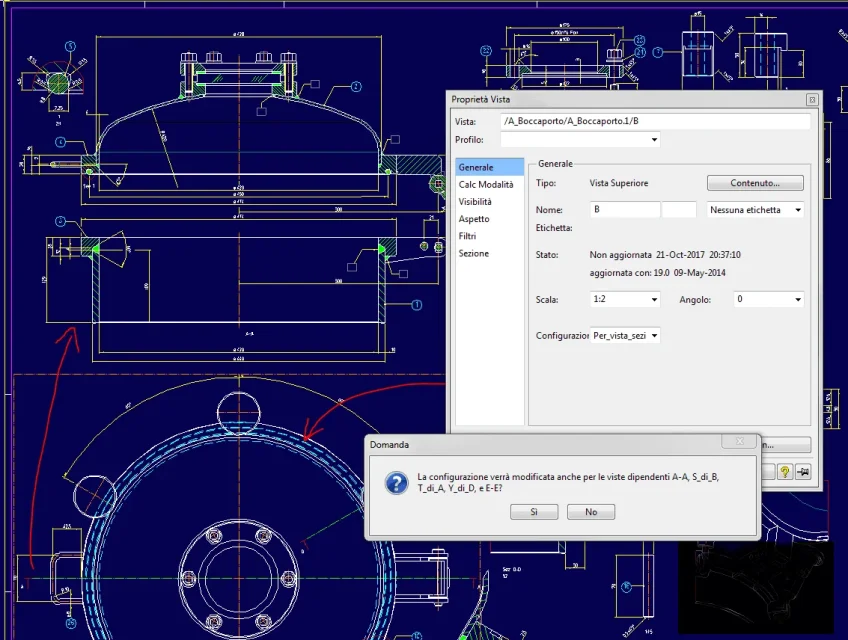
example of configuration aimed at the setting of a particular boiler:
- cockpit catch-0, raised cover for the constructive table
- catching mouthpiece-1, constructive table constituted by the view in the main plant from which the various sections are dependent.
in the view in the plant, for a correct visualization of the flyers of the gulfs, the configuration should not be activated, otherwise they would see the flyers under the flange. when you want to create or change the main section you need to activate the lifting configuration so that you can detach the bottom and get a space for the odds. after listing the dependent sections, the plant is updated again by deactivating the configuration.
This example is very dependent on the boiler design conventions where many views are grouped on the same sheet without creating many separate sheets.
 

Attachments

  • Cattura-boccaporto-0.webp
    Cattura-boccaporto-0.webp
    45.9 KB · Views: 8
  • Cattura-boccaporto-1.webp
    Cattura-boccaporto-1.webp
    99.6 KB · Views: 8
thank you so much you are fantastic, it works, in fact I was referring to the environment 3d.
Because I'm used to the inventor in which there's the view configurator.
 

Forum statistics

Threads
44,997
Messages
339,767
Members
4
Latest member
ibt

Members online

No members online now.
Back
Top