Hope
Guest
Okay, I'm trying not to break your boxes too much, but apparently without too much success.
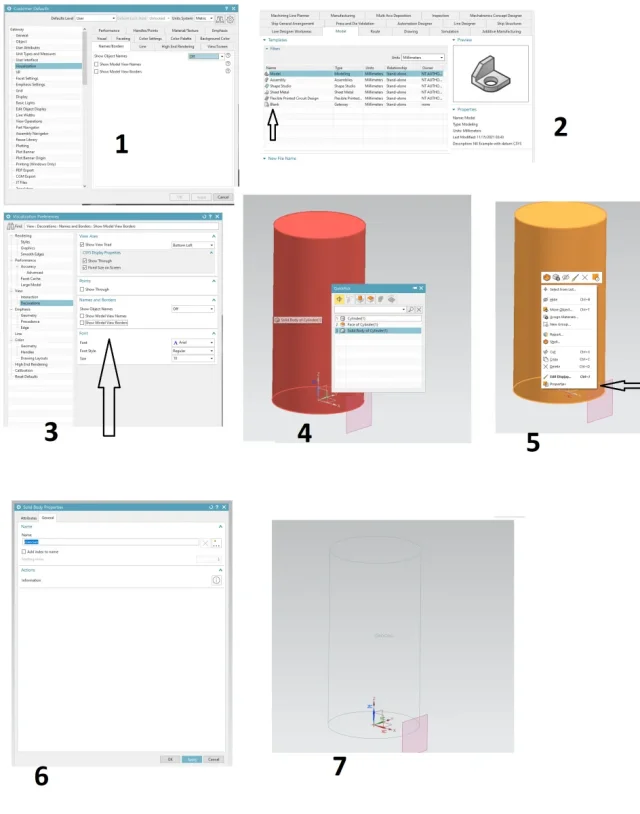
I googlato how to view the name of plans etc in the graphic window and all the info I found say:
- "visualization preferences --> names/borders tab."
- "customer defaults - gateway - visualization names and borders - show object names = ?"
- "customer defaults -> gateway -> visualization names and borders and set show object names to the desired value"
but in my nx1984 student I don't find names and borders anywhere. Did they move it to this version? I'm more likely not to see him.
thanks and good day.

I googlato how to view the name of plans etc in the graphic window and all the info I found say:
- "visualization preferences --> names/borders tab."
- "customer defaults - gateway - visualization names and borders - show object names = ?"
- "customer defaults -> gateway -> visualization names and borders and set show object names to the desired value"
but in my nx1984 student I don't find names and borders anywhere. Did they move it to this version? I'm more likely not to see him.
thanks and good day.