Gian704
Guest
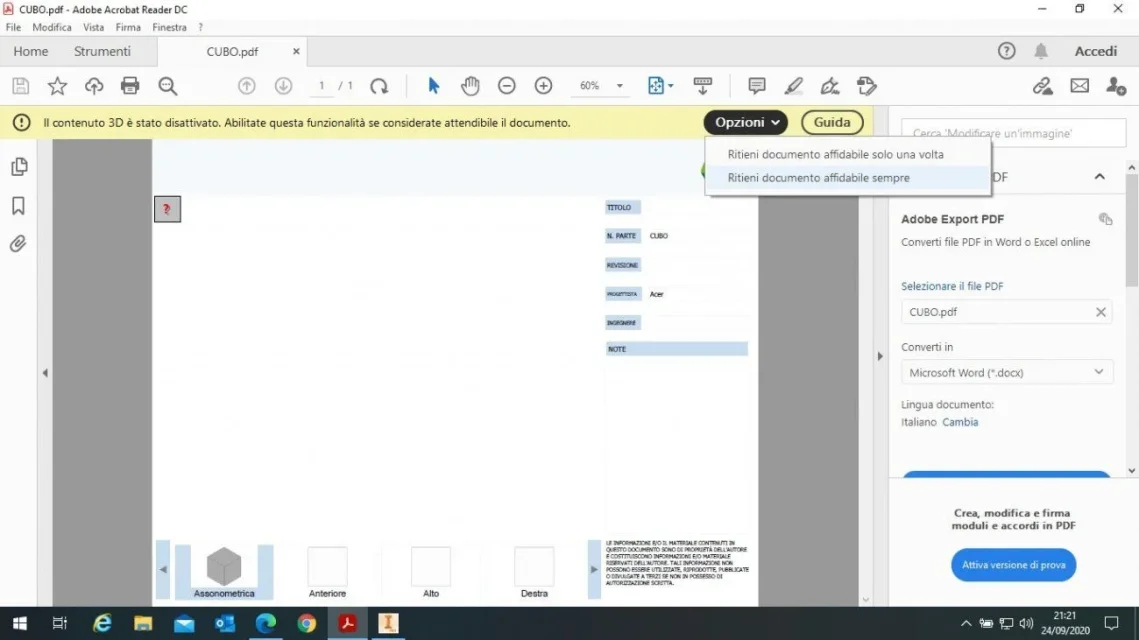
hi, first you have to download acrobat reader last version, then, do the pdf 3d you should find yourself with the empty pdf, at the top you have to click on options and select "remain always reliable document".

so it works, thank you very muchhi, first you have to download acrobat reader last version, then, do the pdf 3d you should find yourself with the empty pdf, at the top you have to click on options and select "remain always reliable document".
with a small set (500 components) in fact is a little "woody" with the 3d orbit but it does not plant, I do not have assemblies from 10000 pieces cmq later I try with a somewhat more full set and I let you know.Have you tried with a consistent set? how big and unmanageable the pdf?
11mb for 500 components, when will it be bigger than you do? Do you send it with wetransfer?with a small set (500 components) in fact is a little "woody" with the 3d orbit but it does not plant, I do not have assemblies from 10000 pieces cmq later I try with a somewhat more full set and I let you know.
p.s. pdf weighs 11 mb
It's not a big problem, I have access to the servers and load it directly, they will charge it on the site in the password download section to give only to those who want, I don't know will see them. cmq there are also catalogs from 50 mb .11mb for 500 components, when will it be bigger than you do? Do you send it with wetransfer?
I had a problem like that long ago, if I don't remember badly I came out only by selecting the "blank.pdf" as a template and selecting to export all entities:Hi.
I tried to make a pdf 3d of a set, but opening it with the pdf viewer you see nothing (I tried with 3 pdf viewer) . I also tried to change some settings but without result.
Thank you.
Hi.
 Moreover, with acrobat reader, you must check if you require to declare the document as trusted otherwise you disable the content:
 and then click on the red question mark on the top left.
I repeat the thread, because I have to install inventor in "view" mode on a colleague's pc, but I don't have the installation files.in practice you install inventor as for a cad machine, you remove the connection to inventor.exe from the desktop and you put a connection to invro.exe.
Starting the latter and opening inventor files, the operating system will associate read only when opening these files, so true inventor can also avoid opening it.
 www.autodesk.it
with this connection install full inventor valid for 30 days, now, since when inventor buys it also installs inventor read only, then I assume that you install it also in this case. for 30 days you have complete inventor , after , from the Start menu -> auntodesk you must launch inventor read only.I repeat the thread, because I have to install inventor in "view" mode on a colleague's pc, but I don't have the installation files.
unload and install the free trial version from here?I ask you for safety before proceeding.Download di Inventor | Inventor prova gratuita | Autodesk
Provate subito Inventor, il software CAD 3D per la progettazione meccanica. Scaricate qui la versione di prova gratuita valida per 30 giorni.
Thank you.
look, even autodesk indicates soI repeat the thread, because I have to install inventor in "view" mode on a colleague's pc, but I don't have the installation files.
unload and install the free trial version from here?I ask you for safety before proceeding.Download di Inventor | Inventor prova gratuita | Autodesk
Provate subito Inventor, il software CAD 3D per la progettazione meccanica. Scaricate qui la versione di prova gratuita valida per 30 giorni.
Thank you.
Thank you!with this connection install full inventor valid for 30 days, now, since when inventor buys it also installs inventor read only, then I assume that you install it also in this case. for 30 days you have complete inventor , after , from the Start menu -> auntodesk you must launch inventor read only.
or launch inventor read only immediately without using the 30 days (which however expire from the installation date)
The [Bleep]*ta is that to install a viewer it takes you several gigabytes for full inventor, I don't understand why they took away the executable of the old inventor view....Thank you!
As soon as the colleague leaves me the free post I try (then I am going to follow you with the result).
Okay, it works!As soon as the colleague leaves me the free post I try (then I am going to follow you with the result).

maximum irony: autodesk writes, on the page you indicated before: "inventor view [...] can also be downloaded as an independent application from all viewers | autodesk". already, but it only works online:-(The [Bleep]*ta is that to install a viewer it takes you several gigabytes for full inventor, I don't understand why they took away the executable of the old inventor view....
already, now there is this software fashion that only go online.....Okay, it works! :
Thank you all.
maximum irony: autodesk writes, on the page you indicated before: "inventor view [...] can also be downloaded as an independent application from all viewers | autodesk". already, but it only works online:-(
beautiful ideaI turn a very wise advice that they gave me: from explore resources rename the executable of inventor "full", perhaps changing the extension from ".exe" to ".xxx", so that it does not start by mistake. . .