
• This forum is the machine-generated translation of www.cad3d.it/forum1 - the Italian design community. Several terms are not translated correctly.

wall on edge help

  • Thread starter Thread starter falcorsv
  • Start date Start date

falcorsv

Guest
Hello to all, I am a novice in the section of catia and with caia, before caia I wrote for inventor and solidworks.
I write to you that you can help me, where I started working in these almost two weeks I always have
created parts and I always got away with it, asking a little here and a little, and at some point I felt like
to try the generative sheetmetal design environment by following a video guide on youtube, in particular the link:https://www.youtube.com/watch?v=ktd-j0druhaeverything went well until I wanted to create the second wall (minute 6:50 in the video) I am not
managed in no way to select the second edge and continue with the lesson, someone can help me
to understand what to do?
I thank you in advance, I also searched in the forum answers but I did not find them.
 
Hello to all, I am a novice in the section of catia and with caia, before caia I wrote for inventor and solidworks.
I write to you that you can help me, where I started working in these almost two weeks I always have
created parts and I always got away with it, asking a little here and a little, and at some point I felt like
to try the generative sheetmetal design environment by following a video guide on youtube, in particular the link:https://www.youtube.com/watch?v=ktd-j0druhaeverything went well until I wanted to create the second wall (minute 6:50 in the video) I am not
managed in no way to select the second edge and continue with the lesson, someone can help me
to understand what to do?
I thank you in advance, I also searched in the forum answers but I did not find them.
Hi.
I watched the video and it seems to me that to make the wall you say you have selected the icon and the edge everything here I don't know why you don't come.
 
Hi.
I watched the video and it seems to me that to make the wall you say you have selected the icon and the edge everything here I don't know why you don't come.
I add a question, since it is the same video, at 10:03 minutes use the wall command on edge to create the upper edge of the box by selecting the edges of the two vertical walls: how do you select the two edges to do the top?
after selecting the first edge, if I click on the second moves the wall that would go to create, I tried all the shift keys, ctrl, alt by clicking but not going.
Thank you.
 
It's a form I don't know, but the behavior in your case is weird, it should take them in sequence without any additional key... Are you sure you have all the parameters of the command set identically to the example?
I looked in the options if there was a particular setting, but it only refers to a catalog file to which to refer.
Isn't that you're working on a mirrored or glued part, so it accepts only one selection?
 
no is a part created ex novo, made the base wall by a sketch, then made the vertical walls on the edges and now I wanted to make the closing walls
 
performs the first selection of the edge, then post a full image of the screen and see if in the bottom left again the writing "select an input edge" or another
 
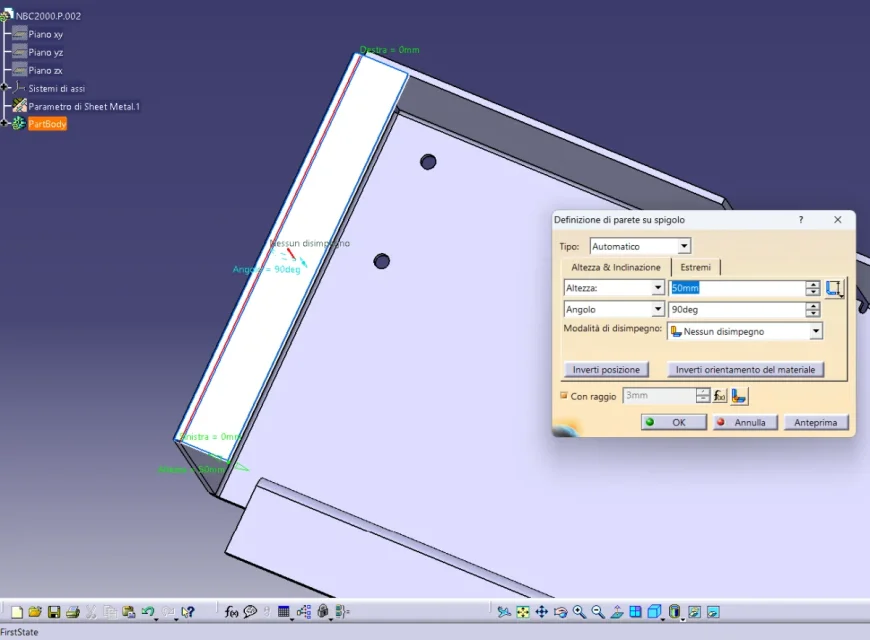
selecting the first edge appears so, no message to select the next edge1698061903812.webpwhen selecting the second edge simply changes the position1698061955204.webpthe message that appears below is firststate
 
you have catia settato in Italian but the message is in English and is different from what should appear, it is really strange, or you have a problem in catsetting, in some bookstores or you miss a service pack...
check that version you have and what service pack.
 

Forum statistics

Threads
44,997
Messages
339,767
Members
4
Latest member
ibt

Members online

No members online now.
Back
Top