• This forum is the machine-generated translation of www.cad3d.it/forum1 - the Italian design community. Several terms are not translated correctly.

wb - operation of "pitch preload"

  • Thread starter Thread starter gilpera
  • Start date Start date

gilpera

Guest
Bye.
I'm trying to figure out how the "precarious bolt" command works in wb.
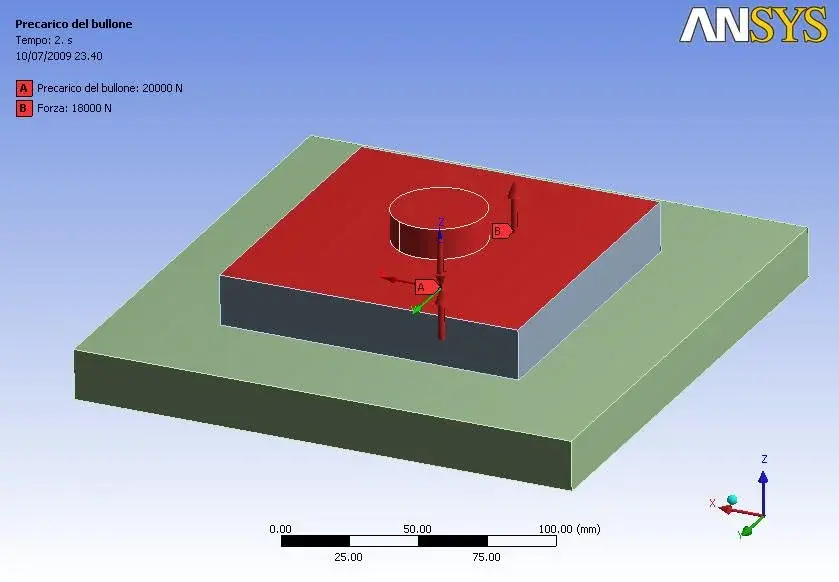
So I'm analyzing the classic problem of the 2-tiers.
(image 01)
in the first step I applied a preload of 20000 n to a screw of diameter 20.
the numerical and qualitative result of the preload alone are congruous (20000/314=64 mpa).
(image 02)
in the second step I applied a force of 10000 n that tends to separate the plates. the used contacts are "fixed" type between the screw underhead and the plate. a "frictionless" contact was used between the plates.
(image 03)
the result is not very encouraging because the tension in the bolt remains practically unchanged. The bolt seems to be stuck in the movements.
(image 04)
then I tried to apply a force higher than that of preload to see if the separation between the plates occurred.
the plates are separated... but of 344 meters!!!! while the tension inside the screw always remains that due to the preload.
(image 05)
Can you help me? Thank you.
 
Last edited:
attached the images of the problem.
 

Attachments

  • 01geom.webp
    01geom.webp
    15.7 KB · Views: 50
  • 02seqv precarico.webp
    02seqv precarico.webp
    26.4 KB · Views: 53
  • 03forze.webp
    03forze.webp
    28.4 KB · Views: 44
  • 04seqvinalterata.webp
    04seqvinalterata.webp
    26.8 KB · Views: 45
  • 05usum ko.webp
    05usum ko.webp
    24.3 KB · Views: 38
Now I do not know the specific application or at least ansys, but the precarious of the vines serves purpose to prevent changes during the application of external efforts. in this way the stress for fatigue of the screws is avoided.

as at 344 meters, clearly there will be a mistake on which side.
 
I'm still using the v11 waiting to switch to 12. Are there any differences in the use of the command between one version and the other?
 
Now I do not know the specific application or at least ansys, but the precarious of the vines serves purpose to prevent changes during the application of external efforts. in this way the stress for fatigue of the screws is avoided.

as at 344 meters, clearly there will be a mistake on which side.
Yeah! In fact the text book juvinall-marshek suggests to tighten the screws with a torque equal to the admissible tension of the bolt that is about 90% of the yielding voltage just to limit the breaks to fatigue. but this may not suffice... depends on the applied external load and the existence of periodic oversollecitation...
However my problem was to understand the operation of the command that apparently or does not work or there is something wrong with setting constraints or contacts or...? ? ?
 
:confused:nothing to do. I just can't get out of it. I also tried simulating a fictitious thermal load (i.e. I imposed a temperature smaller than the bolt compared to the plates) so as to simulate the preload. But when I go to apply the external load the tension in the bolt does not change...
Do you have any ideas?? ? :confused:
Thank you.
 
I did some simulation with wb (version ds, not ansys full) and I have to say that it seems to beat.
I, with my version, have some constraints problem, in the sense that frictionless I can not use it (unfortunately).
How do you put constraints?
and the preload where you put it?
I had problems at his time, I called the assistance and drove me to set the problem correctly.
If you pass me the file I see (I use the 11, the 12 I paused it - too heavy, too slender the interface).
Hi.
 
How do you put constraints?
the images 06 and 07 show the contact type “winned” between bolt underhead and plates.
image 08 shows the contact type “without friction” between the 2 plates. I used this contact because it allows the separation of the plates.
the image 09 shows the bond of type “fix” on the whole side surface of the lower plate. putting the “fix” bond on the lower surface the result, inside the bolt, does not change.
this makes me think that there should not be “interference” between the bond and the contact “bullone-low plate”.
and the preload where you put it?
the image 10 shows the preload of 20000 n applied to only half surface of the cylinder. this way of proceeding is suggested in the article www.ansys.com/magazine/issues/1-4-2007-materials/40-tipsntricks.pdf .
I also tried to change method, applying preload to all solid as it is suggested by the article but the result is always the same.
the preload is kept constant in the 2 phases (time=1 and time=2).
in phase 2 (time=2) I applied an external load on the upper plate. also here I tried to apply the load on the upper surface, then on the side surfaces and even only on the edges. tension in the bolt never changes.
:confused:
I'll get the file I see.
I'm tenacious. Before giving up I want to try a little more:finger:
even if I am moooled near the surrender.
Thank you.
 

Attachments

  • 06.webp
    06.webp
    32.3 KB · Views: 31
  • 07.webp
    07.webp
    28.6 KB · Views: 23
  • 08.webp
    08.webp
    36 KB · Views: 19
  • 09.webp
    09.webp
    22 KB · Views: 20
  • 10.webp
    10.webp
    23.5 KB · Views: 30
Last edited:
if I did not understand correctly you defined 2 loadstep.
Well, on the bottom right of your screen you should see the window "tabular date".
the first line refers to the first loadtsep in which you indicate the preload on the bolt as strength.
the second line refers to the second loadstep: click on "load" or "force" if you use it in Italian. opens a curtain and go to select "lock" (lock)

this means that in the first loadstep apply a preload force f which results in a "virtual approach" of the bolt faces of a x distance (ansys thus manages the preload).
Once you get the x approach in the second loadstep you have to lock it (because of "lock") so if you apply a force to the plates it goes to vary the internal tension of the screw.

I hope I've been clear!
 

Forum statistics

Threads
44,997
Messages
339,767
Members
4
Latest member
ibt

Members online

No members online now.
Back
Top