• This forum is the machine-generated translation of www.cad3d.it/forum1 - the Italian design community. Several terms are not translated correctly.

welded tubular frame.... cutting table not updated

  • Thread starter Thread starter CRAZYMAD
  • Start date Start date

CRAZYMAD

Guest
I am changing a welded frame and I added a tubular but the material cutting table does not update me and in the bubble gives me that the piece is number 0
I tried to remake the table I tried to remake the change but nothing the result is always that in the table there is the insertion of the new tubular and the bubble always 0
What do I help?! ! !
 
I did a test and with "create automatic cutting distinct" not flagged actually gave me your same problem. .
Activated that option and updated the design has balled me correctly.
 
I did a test and with "create automatic cutting distinct" not flagged actually gave me your same problem. .
Activated that option and updated the design has balled me correctly.
Since you seem more prepared than me on the frame issue
You can tell me why the components have cabbage names
 

Attachments

Since you seem more prepared than me on the frame issue
You can tell me why the components have cabbage names
because the bookstores you used have cabbage names. you can tell her if it's a sporadic use, or make a library as you should if use is frequent.
 
because the bookstores you used have cabbage names. you can tell her if it's a sporadic use, or make a library as you should if use is frequent.
If you give me some info, I'd like to fix it, but I don't know where to help
Your help would be valuable
 
what version of sw do you use?
because there are several roads.
until 2021 (?? it seems) did not accept the parametric welding profiles.
so for each measure you had to have a file.
Now you can have a single parameterized one, which is very comfortable in case you have to change profile measurement during the work.
If you have parameterized you do not miss any constraints that you can have put in the assieme father.spero now, for the commercial profiles (type extruded of aluminum) it is not worth thinking, too complitate the parameterization, different is with the square, rectangular or round profiles.

It is very simple to create custom welding profiles, just follow the guide and step by step you build them.
to give you an example and a kindness to start well,
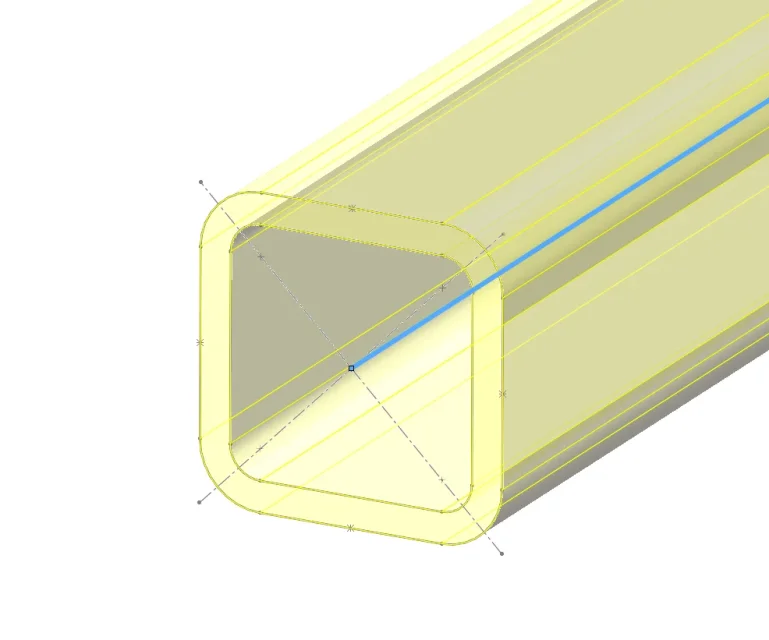
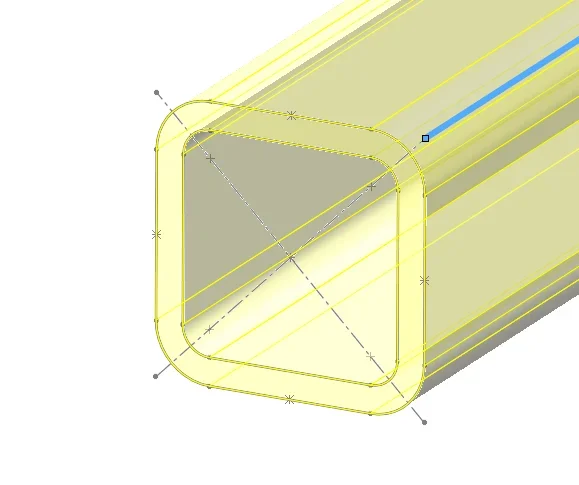
Here's one of those I did.
1718619490787.pngcreates a point for each tube summit/mage (more than the central one), based on how drawings the frame sketch, it could be useful to have more points of origin for the development of the tubular.
so if you have designed "outside" of the frame you can bind it to one of the dots in the middle of the tubular or in a vertex etc (file identifier function)1718619810629.png1718619838508.png1718619855193.pngetc.


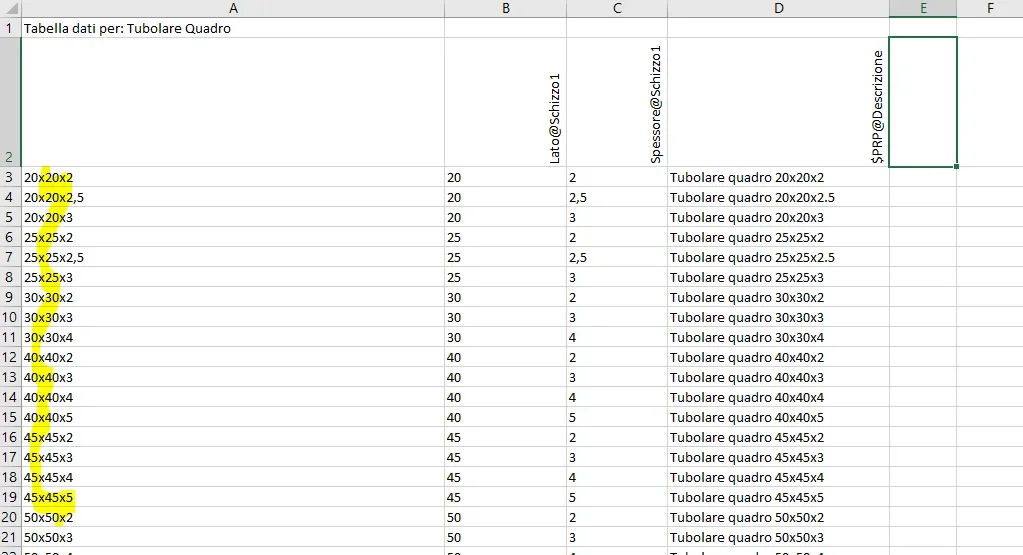
the "property" item of the configuration specification is the one that you will then have to set in the welding table, it must be the same for all profiles.

created an excel table to change all profiles, designed the first, it will then be easier to change quotas in other measures1718619695457.png
1718619726404.pngmade these procedures for all tubulars, wreaths and you will have a separate "ordered" welding. .1718619979710.png
p.s.
check how you create the folder tree, sw for welding profiles is a n@zist@, if you do not respect the number of subfolders folders then you do not find the profiles.
 
net of the convenience of having a single configurable profile throughout the series, the process is the same.
I attached you that of 2018 because the first result that gave me san google.. .
 
fantastic I understood everything easy I've already set up my frame now is a bullshit farli :)
 
now I just miss a last info I didn't understand why the parts made in linear repetition I can't insert in the counts
 
I strongly disagree using automatic update if welded are used in large assemblies, for performance are heavily penalized and keeping the updated folder manually is simple.
thanks tomorrow as soon as I am in the office I place the files
 
I have always counted them, can you post the model? Is cutting distinct updated?
Yes, but the size of the cut didn't put it on me, I had to put it manually on the flat profiles as threaded
Anyway tomorrow I send you the files prt and dwg
 
Yes, but the size of the cut didn't put it on me, I had to put it manually on the flat profiles as threaded
Anyway tomorrow I send you the files prt and dwg
It's weird, it's not supposed to be set up in the profile and it's all about him.
 

Forum statistics

Threads
44,997
Messages
339,767
Members
4
Latest member
ibt

Members online

No members online now.
Back
Top