Mauro66 Guest Nov 23, 2016 #1 Hello, sometimes it happens to me that, exclusively in the prospective views, the new/demolite doors or windows are not displayed. what can be due to? I attach an image for completeness
Hello, sometimes it happens to me that, exclusively in the prospective views, the new/demolite doors or windows are not displayed. what can be due to? I attach an image for completeness
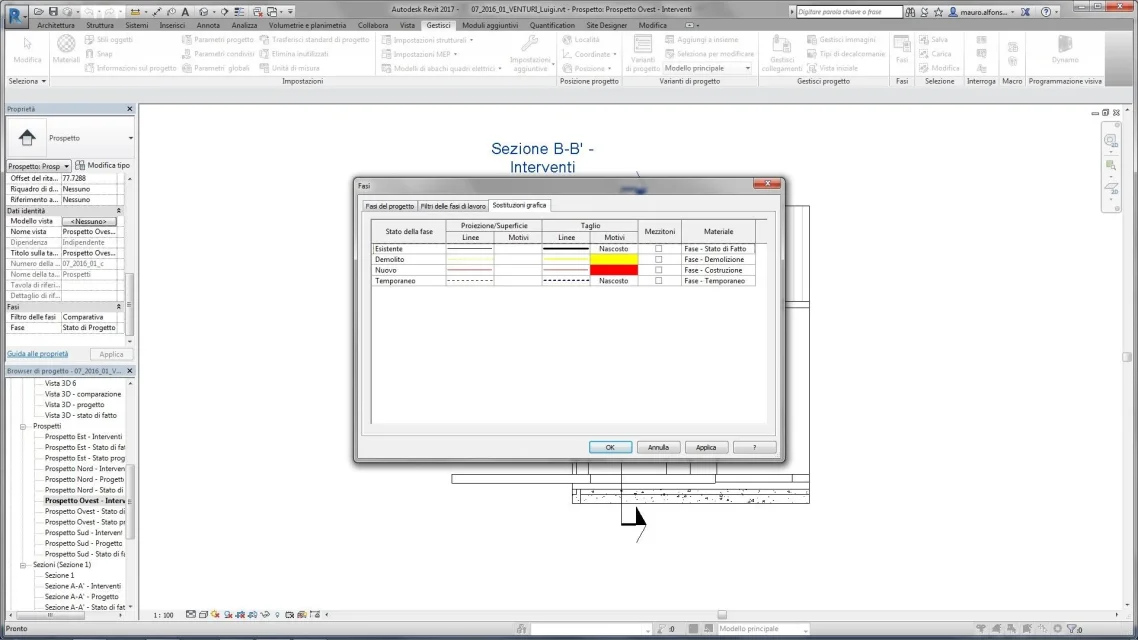
Tristan Guest Nov 24, 2016 #3 make a screenshot of the steps settings window for graphical replacement
Tristan Guest Nov 25, 2016 #6 as it rightly says alfredo, and as I asked in the previous post, it is necessary to see not phase filters but graphical replacements
as it rightly says alfredo, and as I asked in the previous post, it is necessary to see not phase filters but graphical replacements
Mauro66 Guest Nov 28, 2016 #8 what I don't understand is why they see the windows, but not the profiles of the windows, almost as if they remained "enlobed" in the masonry.
what I don't understand is why they see the windows, but not the profiles of the windows, almost as if they remained "enlobed" in the masonry.
Tristan Guest Nov 28, 2016 #9 projection/surface...do you see that the "motive" fields are empty? try to put on yellow and red solid restraints and see what happens
projection/surface...do you see that the "motive" fields are empty? try to put on yellow and red solid restraints and see what happens
Mauro66 Guest Dec 1, 2016 #10 Yes, by putting the retini displays them to me, but I would like to see the profile of new/demolite windows. . .
Yes, by putting the retini displays them to me, but I would like to see the profile of new/demolite windows. . .