
• This forum is the machine-generated translation of www.cad3d.it/forum1 - the Italian design community. Several terms are not translated correctly.

holes made in the assembly then see them in the part .prt

  • Thread starter Thread starter ias87
  • Start date Start date

ias87

Guest
Hello everyone! I have another problem that I didn't find an answer in previous posts. . .

I made a hole in the final assembly... but when I open the single part on which I had made such hole (.prt) the hole is not seen... but if I return to the assembly there is...

is there a way to see this hole in the .prt part? Thank you!
 
Hello everyone! I have another problem that I didn't find an answer in previous posts. . .

I made a hole in the final assembly... but when I open the single part on which I had made such hole (.prt) the hole is not seen... but if I return to the assembly there is...

is there a way to see this hole in the .prt part? Thank you!
Hi.

take into account that for many pro-e things it works as if you were actually making the product and especially works according to the father-son relationship between the features.
looking at this from a logical-informatic point of view: in a set the various details can be considered as features and the hole you performed is a feature daughter of all the details affected by it. changes to fathers also involve children, but not vice versa.
talking from a mechanical processing point of view: If the hole has been made in the axieme, you will not see it in the particular, because it is right that you do not see. in fact that hole was generated following a mechanical processing after assembly.
if you need to see the hole also in the particular you have to insert the hole between the features of the detail.
Alternatively, you could perform a smaller blind hole in the .prt, as if in the workshop you had performed with the drill a tip forearm to have a positional reference for the actual hole to be performed after assembly of the parts.
I hope I managed to explain myself well and above all to help you.
Hello, Adrian!
 
if you need to see the hole also in the particular you have to insert the hole between the features of the detail.
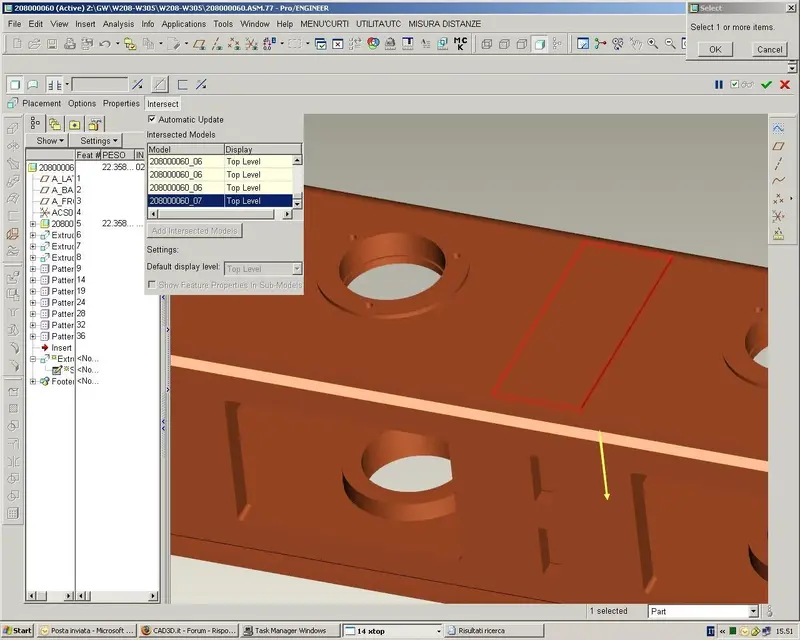
pro-e also allows the use of the "intersect" command in assembly processes, in fact the machining can be propagated at part level by unchecking the automatic intersection. . .
 

Attachments

  • Immagine.webp
    Immagine.webp
    100.9 KB · Views: 19
pro-e also allows the use of the "intersect" command in assembly processes, in fact the machining can be propagated at part level by unchecking the automatic intersection. . .
You did well to make this clarification, if I hadn't specified I would put this question.
 
Achtung!
care that to work in this way, "delete" the component to always exist and in any case with that aid.

is a way of working that imposes on you a series of incredible limitations
a) the detail lives with that assieme
b) all regeneration will become cyclopic, because you will have to regenerate part-assieme-part
c) the detail when it will be knuckled/chechautato will have to carry behind the assieme

to benefit little

So...

to make features of together that must be "lived" at the level of part, I have always used it "temporaneously", to see where it "goed to parare" and then redefined immediately after the various features at the level of part to avoid circular reference and undesired ties.
 
You did well to make this clarification, if I hadn't specified I would put this question.
in addition to propagation at part level you can also choose which components (at assembly level) must be affected by processing, perhaps you had already understood. . .
 
to make features of together that must be "lived" at the level of part, I have always used it "temporaneously", to see where it "goed to parare" and then redefined immediately after the various features at the level of part to avoid circular reference and undesired ties.
I fully agree with you, even I like you used it little but sometimes it's convenient... .
 
Achtung!
care that to work in this way, "delete" the component to always exist and in any case with that aid.

is a way of working that imposes on you a series of incredible limitations
a) the detail lives with that assieme
b) all regeneration will become cyclopic, because you will have to regenerate part-assieme-part
c) the detail when it will be knuckled/chechautato will have to carry behind the assieme

to benefit little

So...

to make features of together that must be "lived" at the level of part, I have always used it "temporaneously", to see where it "goed to parare" and then redefined immediately after the various features at the level of part to avoid circular reference and undesired ties.
Your reasoning doesn't make a wrinkle.
In fact, propagating the functions to the part only serves for tailor-made projects (such as the custom-made furniture industry) in which it is easier to drill components into the axieme ... and you need to have drilling on the piece.
as these projects are born and die there, do not reuse the part for other assemblies.
 
Hello, everyone.

I tried to propagate the features apart... Does it work for the extrude but not for the hole command??? ?
Can someone tell me why?

I work with the wf3.
 
Achtung!
care that to work in this way, "delete" the component to always exist and in any case with that aid.

is a way of working that imposes on you a series of incredible limitations
a) the detail lives with that assieme
b) all regeneration will become cyclopic, because you will have to regenerate part-assieme-part
c) the detail when it will be knuckled/chechautato will have to carry behind the assieme

to benefit little

So...

to make features of together that must be "lived" at the level of part, I have always used it "temporaneously", to see where it "goed to parare" and then redefined immediately after the various features at the level of part to avoid circular reference and undesired ties.
in the midrange cads this is to great lines the only way to make topdown design. I still have to do the course related to the aax package and I know that proe offers interesting alternatives to this mode of operation, linking directly the skeleton to the parts, with the publication of the geometries, etc... I will see it soon (hope).
in addition to propagation at part level you can also choose which components (at assembly level) must be affected by processing, perhaps you had already understood. . .
I understood, even swx works + or - so.
 

Forum statistics

Threads
44,997
Messages
339,767
Members
4
Latest member
ibt

Members online

No members online now.
Back
Top