
• This forum is the machine-generated translation of www.cad3d.it/forum1 - the Italian design community. Several terms are not translated correctly.

wide edge flange of the "father"

  • Thread starter Thread starter reggio
  • Start date Start date

reggio

Guest
Hi, I can't get a wider flange than the sheet section from which... Let me explain:
draws a "u" with base 100 and the two wings from h=50, thickness 5mm, then extrude the profile of the length I need.
I get a "u" whose external base measure is 100 and internal is 90mm.

Now I just want to get a box by adding another 2 lembi to close the "u", these lembies should measure therefore 100 basic and 50 height, unfortunately when they select the outer base edge its size that should be equal to 100 in reality will be (100-bearing-bearing) then we say 100-6-6=88mm so the "link" point will be wide only 88mm....
but I want the "u" to be completely closed (both except for the bass at the base) with the size of 100mm (or even more). .

How would you do that?
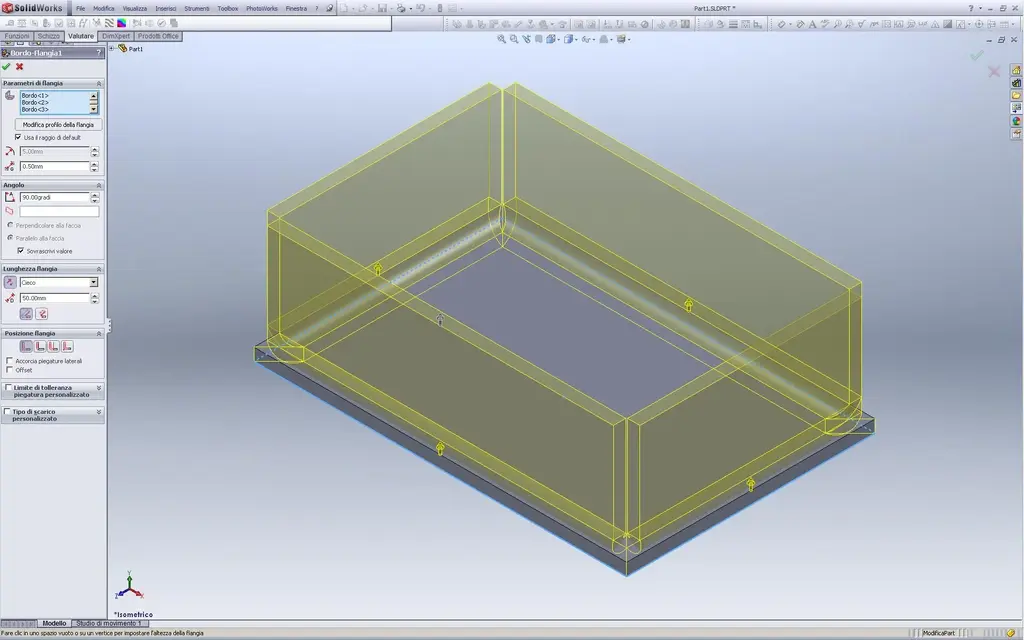
 
tried to make it solid and convert it into sheet metal? you can post an image or model in question
 
Hi, I can't get a wider flange than the sheet section from which... Let me explain:
draws a "u" with base 100 and the two wings from h=50, thickness 5mm, then extrude the profile of the length I need.
I get a "u" whose external base measure is 100 and internal is 90mm.

Now I just want to get a box by adding another 2 lembi to close the "u", these lembies should measure therefore 100 basic and 50 height, unfortunately when they select the outer base edge its size that should be equal to 100 in reality will be (100-bearing-bearing) then we say 100-6-6=88mm so the "link" point will be wide only 88mm....
but I want the "u" to be completely closed (both except for the bass at the base) with the size of 100mm (or even more). .

How would you do that?
Hello, Reggio. .

there would be different methods but perhaps I find it quite simple to start from the rectangular bottom of the box instead of from the "u" profile. to that sheet metal rectangle add all together with only function the 4 "flange on board". you will have set the gaps/lacerations you need and the 4 walls are correct and cut all the same.
so:PIEGHE 4 LATI.webp
View attachment PIEGHE 4 LATI.rarothers might give you better and faster solutions, you try.

greetings
Marco:smile:
 
tried to make it solid and convert it into sheet metal? you can post an image or model in question
or rightly start from the solid and empty it with the appropriate command of the sheet functions.. but not always "likes" as it handles the drains on the edges.

or again,
model the developed sheet (if you already know the development.. or you add it later) in the right shape and then bend it with "Sketch bending"..
I said, it's a lot of methods, see what you like most.

greetings
Mar
 
.... uhmmm:(I liked to proceed in this way (Annex). . .
But I see I can't even add some material to my side... :
I guess I'm wrong.
 

Attachments

.... uhmmm:(I liked to proceed in this way (Annex). . .
But I see I can't even add some material to my side... :
I guess I'm wrong.
Of course you are "strange":smile::tongue:
you asked for a "u" with certain dimensions and then placed an omega with all other measures. .
then why would you add those 2 "striscies of material" that you sketched (other than you are in the lamiere environment and add functions of solids brings you in the cases)? You have to do things that don't touch reality. when you fold a sheet of that type the edges will be "loaded" in that way, useless to invent strange silhouettes with protrusions and recesses that when folded and welded they will still be closed edge. material waste and laser cuts (which if made simple would not serve, just a common and economical tuner).
However also in this case I would recommend you to start from the basic rectangle, then in the same flange function of the edge add the 4 (or 3 as in your example) vertical folds to the sides, and then add the other 2 folds "on the plane" of the omega fins.

if you just want to "add" that material you have to do it by changing the edge flange sketch with the option "change flange profile", but it is not necessary, you would do double work; if you do in the first method you get the same result in one shot only with the correct grooves.

greetings
Mar
 

Forum statistics

Threads
44,997
Messages
339,767
Members
4
Latest member
ibt

Members online

No members online now.
Back
Top