
• This forum is the machine-generated translation of www.cad3d.it/forum1 - the Italian design community. Several terms are not translated correctly.

matching properties with texts

  • Thread starter Thread starter romi
  • Start date Start date

romi

Guest
Having different texts and each with different characters, I have the need to bring all the texts to a single style, so I thought to resort to the autocad brush. the problem though is that it doesn't work... I click with the brush on the first text then on the second but nothing changes. I know very well that the alternative could be to resort to text formatting but I would like to know the causal why the brush does not work me. Do I have to resort to some variable or am I wrong to use the command?
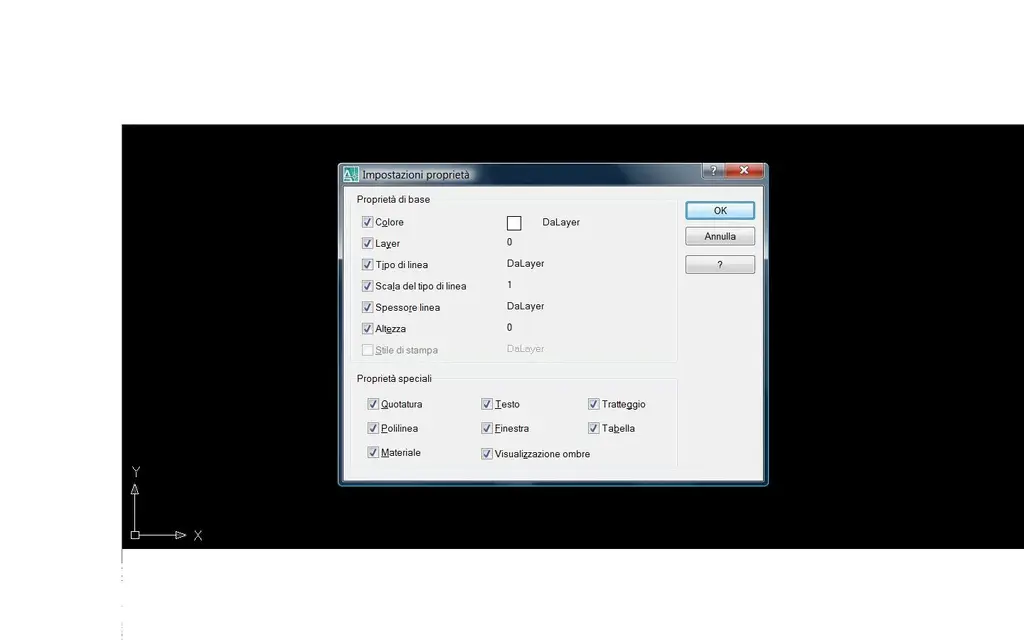
 
maybe some properties have been unchecked to copy in the target object, to check you have to view the property settings dialog box.


command: corrisprop

select source object:
Current active settings: color layer typelinea scalatl line thickness
height print quote text dotted polyline window table material
display multidirector shadows

select target object/s or [impostaZioni]: z
 
thanks gp, I did as you suggested but as you can see from the attached image, the properties were already all selected. I practically only change the height of character but not the style.
 

Attachments

  • impostazioni.webp
    impostazioni.webp
    25.7 KB · Views: 25
you can try to change the text format/style
Well, sure, so I also knew, but in view of the fact that in the question I refer to the autocad pen, I wanted to solve with this tool. the strange thing is that with the penninum I can uniform all the texts to the same color and to the same size, but to the same style (for example if I have 2 texts one with arial and the other with comic sans ms) does not want to know to do so. Too bad. the pen is really a useful tool to shorten working times.
Ezio also makes a try, created 2/3 paragraphs of text having all different style and size, then with the pen see what it does to you.
 
I knew already, dear romi, and I had deduced that the text style does not fall into the list of properties that can be changed with applied properties, hence my alternative. or, other variable may be the fact that the original text has been inserted as a group!?! and here it would be necessary first to explode and then try to change its properties.
Good Sunday!
 
It often happens that, once you write a text paragraph, you want to change the font used to everything or part of the paragraph, not changing the text style but changing only the font, that is by making a local change; in this case matchprop does not work.
 
as an example I attach text paragraphs with different fonts and style from each other. if someone wanted to give some further clarification...
 

Attachments

My compliments to big for the video lesson, but where did you get it?

dear romi, if the good gp asks you to post the incriminated text, it does not mean to post a text proof!
also because to me your proof of text does not give problems of acquisition of the properties through brush! ! ! !
and then it is spontaneous to wonder what the problem you have encountered, or better if the problem is really yours or the files you need to correct! here is therefore the need to verify the properties of the original text that genres this difficulty through the properties of that text, and not of a test text.
This is what we expect further clarifications!:rolleyes::rolleyes:rolleyes::rolleyes:
 
hi ezio, in the attached file I wanted to show as an example that between the different fonts and the different styles, the brush is able to change the color and size of the format but not the font, ie if I have an arial and with the brush I want to change the airl in comic sans it is not possible to do it. Try again and make sure you change everything except the font, maybe you won't notice.
 
Here is my test, I selected the lower text to left and applied the properties on the other texts.
Sorry, but you the properties you managed to change are only color and size of the format but not the font! the font remained such and which even after using the brush. The problem he's talking about is what doesn't change his font, so it doesn't seem like you've solved so much!
 
If you have written single text lines, after reducing all texts to the same style with matchprop, try to explode the texts and get the texts with the same font of the chosen style.
if instead there are texts written with mtext, the paragraph must first explode to reduce it to lines of text between themselves independent and then proceed as above.

all this verified with 2009 (I don't know in the previous)
 
I don't want to be pedant! This must be recognized that the texts have many properties of sectage, font, bold, etc..., so it goes by itself that in order to be able to change them all at once it is necessary to use a more complex methodical than simplistic adopts properties, which is good for more or less simple, mathematical and similar entities.
I'm asking for a vein for my post where I thought I could do it, actually you're right when you tell me it doesn't change. il font, but I don't think there's a simpler way than that indicated by joseph; in the video tutorial I didn't find useful indications to this kind of multiple conversions! I'm sorry, but how many files do you need to uniform? I'm sorry sigh!:redface::redface::redface:
 

Forum statistics

Threads
44,997
Messages
339,767
Members
4
Latest member
ibt

Members online

No members online now.
Back
Top