• This forum is the machine-generated translation of www.cad3d.it/forum1 - the Italian design community. Several terms are not translated correctly.

wall net

  • Thread starter Thread starter Simconti
  • Start date Start date

Simconti

Guest
Sorry the question maybe stupid, but I'm panicking.
I'm drawing a plant of a complex for the thesis.
All right.
wall nets etc, no problem.
I can't even see that I can't find them, but this is the minor problem... they spread the retinas in the walls!
What have I done?
in the class there is the retino.
I go to make new walls (with the desired net), but nothing.. .
help
 
I have to point out that I "harmed" with the "resource bronswer" to look for health care... Maybe I blew something up there? How to recover?

I know I've made more mess than I thought: now you can't even see the doors!
still exist, but by clicking on it you can not see the opening of the door, even in the preview (where you can make the various settings).

seam m...!!!
 
therefore, here comes into play the "source management" and symbols.
I'm talking to you by carcad comparison so maybe you're better. Do you know the autocad blocks? those are similar to groups in vector: select a set of entities, do cmd+g and that you become a group. Now: if you select that group you will see that the whole group is under the category in which it was created, but at the moment the lines follow all the characteristics that their categories of origin have.

a symbol is something more beautiful and usable. If you from a blank file care about the dwg omen for example and check them a thickness select these entities and then pressing cmd+7 turn it into a symbol (every omino must be a symbol), save that file in a position on the hd to your liking. then go back to the project where you were working: if you open the resource management shovel up to dx you will see a curtain where you will indicate the document in which to see what resources there are. your document is probably not there yet, but if you press the small cutter at the top right of the drop-down menu (there are 2 it seems to me, try to see what it is) you can select the command "add document". If you go looking for your document select it and see that it appeared in the drop-down menu, once selected you should have your symbol in the catalog with the name you assigned it.
Now: the symbols when you insert them refer to the mother symbol of the first file, so if for example you put 50 omins sitting on the bench that refer to a symbol found in the resources, and change the thickness to 1 of them, all other omins will change accordingly.
vw architect has a set of ready symblis for the furnishings you believe to begin with are more than enough. you have to go look for documents to add to resource management, find them in the library folder inside the program folder you have installed. you insert in the catalog all documents, then unwrap them and with a simple drag and drop insert them.

Watch out for 3 things:
1) start thinking only about the 2d, become dumb otherwise, believe me
2) be careful because you have to be in sight "plant" and not "over" because sometimes you get confused
3) be careful what categories you check to what. because if in the parent document the ominous bench symbol is under the category "thin lines" but you enter the symbol in the document of your project under the category "men", clicking once on the united symbol will appear in the info that belongs to the category "men", but in reality the thicknesses are assigned to "thin lines" of the parent document. the categories, however, appear to you both in the document! So you're well aware that everything is visible and that you're in a plant view, and you'll find yourself better.

If there's something wrong to write, I'm studying history and after 5 pages I fall asleep, so maybe so I keep active:-)
 
Thank you so much!
I was actually no longer in sight plant.
Now I try to insert new "symbols".

(ii) how do I do the lines outlined to represent the projections? selecting only from the class (category, if I'm not wrong) do not appear to me, not even pdf
 
Thank you so much!
I was actually no longer in sight plant.
Now I try to insert new "symbols".

(ii) how do I do the lines outlined to represent the projections? selecting only from the class (category, if I'm not wrong) do not appear to me, not even pdf
Maybe I know where you're wrong.

if you for example give a feature to the category in this way: fill no color stretch black 0.3 then draw a little and decide

1) that all lines of that category must become dotted: then selects drawn from the edit window of the category and then be careful that the option "attribute to creation" or something like that has appeared in the top left. in that way they should be updated all and be treated.

2) that only one of the lines of the category is covered: then you have to select from the palette the feature you want to assign to the item to edit.

Every now and then he's enchanted... if you need all the category entities present category catathetistics do so: in the categories check out other aggangias or show active, then do cmd+a to select all the entities of the active category, cmd+0 (zero) to frame them all in the screen and with all the entities selected check that from shovel are assigned colors filling thicknesses and how much other from category (where not specified, the round arrow

a last thing: Get out of the world where what you see and what you print in pdf are 2 different things. learn to understand the extent of zoom to be assigned to your screen to understand the true magnitude of the things drawn. draw a square of 10 cm for 10 cm in scale 1:1 and then set the zoom by placing a ruler on the screen. to the 185% zoom entity on my 17 inch mbp corresponds the real size in printed scale. made this empirical test you will realize exactly how you see thicknesses and lines in any scale, simply editanto 185 on the screen, or what you have. varies from resolution and screen size. After that all you will see will correspond to reality, without tricks.
 
question:
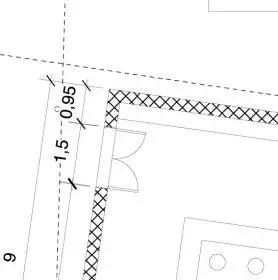
I used the pattern to make this retino of this plant at 100, only has a shirt too big and is too thick the pattern line, needing a retino like this, how can I change it? Are there any settings I didn't find?
 

Attachments

  • retino.webp
    retino.webp
    7.6 KB · Views: 5
patterns are not editable. you need to use hatch ( vectors), which have an editing window to change scale, thickness, color, etc.
I do.
 

Forum statistics

Threads
44,997
Messages
339,767
Members
4
Latest member
ibt

Members online

No members online now.
Back
Top