• This forum is the machine-generated translation of www.cad3d.it/forum1 - the Italian design community. Several terms are not translated correctly.

"surface area" properties in m2

  • Thread starter Thread starter reggio
  • Start date Start date

reggio

Guest
hi, I need to insert in the table the value of the property "area surface" in m2, I tried to change the property but remains in mm2...

How can I do that?

but for a sheet of sheet of 1x1mt thickness 3mm "surface area" will give me 1m2 or 2.036m2?
 
hi, I need to insert in the table the value of the property "area of surface" in m2, I tried to change the property but remains in mm2...How can I do that?

but for a sheet of sheet of 1x1mt thickness 3mm "surface area" will give me 1m2 or 2.036m2?
go to options / property of document / drive and change
The ladder.
volume 2.012 sqm
 
go to options / property of document / drive and change
The ladder.
volume 2.012 sqm
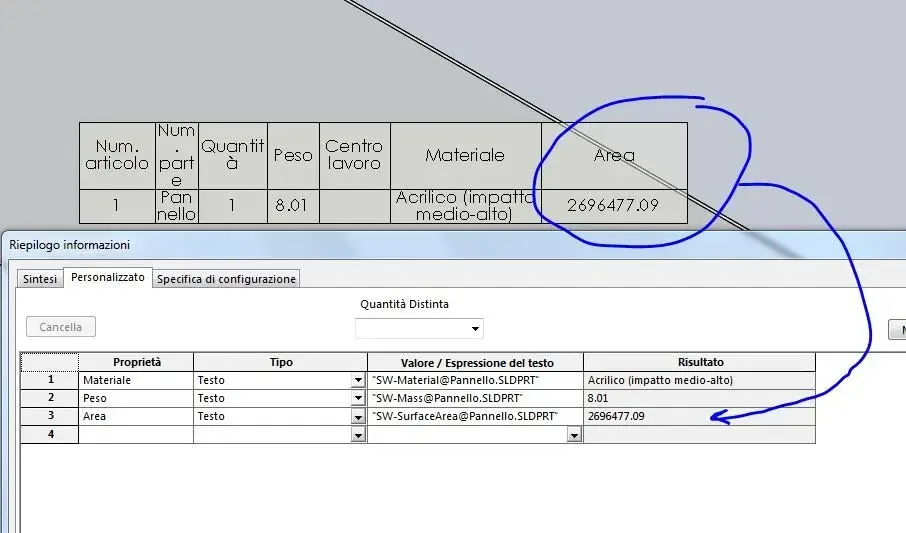
hi, I show you what I have, I did not understand which parameter commands the unit of measure mm2 / cm2 / m2 / ... of the property "area of surface" ...
I only find the parameter for the volume... Where is that for the area ("sw-surfacearea@.....")?
 

Attachments

  • area.webp
    area.webp
    59.3 KB · Views: 11
  • area2.webp
    area2.webp
    35.9 KB · Views: 11
hi, I show you what I have, I did not understand which parameter commands the unit of measure mm2 / cm2 / m2 / ... of the property "area of surface" ...
I only find the parameter for the volume... Where is that for the area ("sw-surfacearea@.....")?
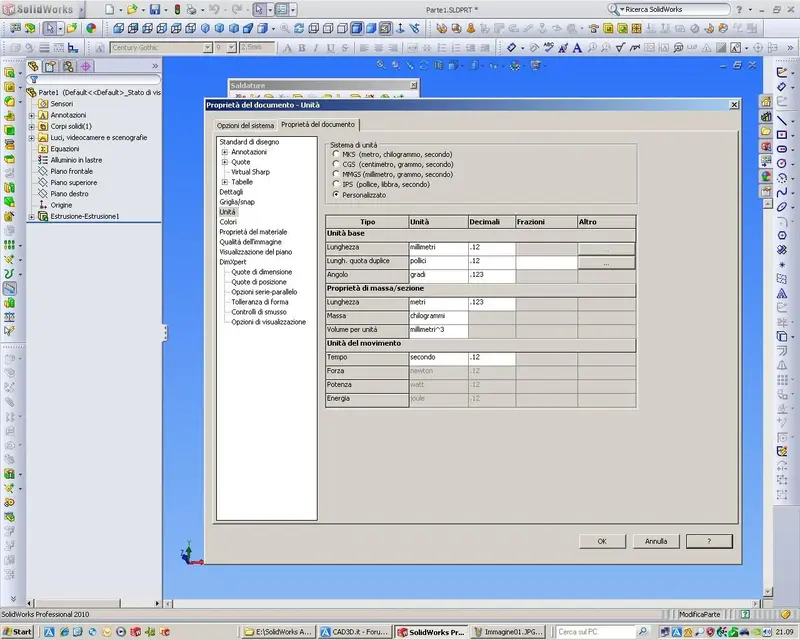
you should change the length unit, from mm to mt. only if you do it from the documents properties you change All units, quotas, various measurements etc.

what you need to change it from mass property in flagged options use custom settings. here you will change the length units:PROPRIETA' di MASSA.webpgreetings
Marco:smile:
 
you should change the length unit, from mm to mt. only if you do it from the document properties you change. all units, quotas, various measurements etc.greetings
marco:smile:
naaaaa...... :biggrin: edit the right ones.... :rolleyes:
hi, i show you what i have, i did not understand which parameter commands the unit of measure mm2 / cm2 / m2 / ... of the property "area of surface" ...
i only find the parameter for the volume... where is that for the area ("sw-surfacearea@.....")?

dall' help :mass: mass units used for density and other mass or section properties that depend on the mass. per volume unit: the units of the volume used by density. for example, per mass in grams and per volume unit in cubic centimeters, the density units are in grams per cubic centimeter.from me, i suggest you close and reopen the file after changing
document options are not always activated immediately.
 

Attachments

  • Parte1.PDF
    Parte1.PDF
    100.7 KB · Views: 9
  • Immagine01.webp
    Immagine01.webp
    30 KB · Views: 8
  • Immagine02.webp
    Immagine02.webp
    128.4 KB · Views: 17
I imagine what the surface area can serve and I suppose it serves to count treatments like painting. in this case keep in mind that the area indicated is given by the sum of the area of all surfaces of solid or solid in case of assembly or multibody, including those not painted because internal, boxed or otherwise. the data could be very unsettling compared to the real and I prefer not to put it rather than inserting strong values.
 
Naaaaa...... :biggrin: change the right ones... .
.
Ooops, you're right. I'm sorry.
modify the mass/section units from there.
I have confused with the previous box basic unit (I had to look at it, I don't remember all the options by memory:wink:).

greetings
Marco:smile:
 
Last edited:
I imagine what the surface area can serve and I suppose it serves to count treatments like painting. in this case keep in mind that the area indicated is given by the sum of the area of all surfaces of solid or solid in case of assembly or multibody, including those not painted because internal, boxed or otherwise. the data could be very unsettling compared to the real and I prefer not to put it rather than inserting strong values.
true, it may seem a little or misleading utility.. but probably in some field can serve (painting as you say.. or bodies immersed in fluids..). maybe limited to single parts, sure that in the assemblies it is a mess.

However to know only the area of a single surface just "touch" the affected face with the tool measure.

Hello
marco
 
...the data could be very disregardful of the real and I prefer not to put it rather than inserting forgery values.
already the idea was to manage the cost of lexan panels going to m2 but obviously the data should be reliable ....:frown:
..however to know only the area of a single surface just "touch" the affected face with the tool measure.
"touching" is useless if I can't move it... is there no way to create a parameter that contains "area_face_xyz"?
 
modify the mass/section units from there.
I have confused with the previous box basic unit (I had to look at it, I don't remember all the options in memory.. .
:confused: I'm sorry but I didn't understand "from there" where, take patience but I have some confusion... You tell me the way?
 
:redface: .. now I understand sorry

It's like this:options/properties of the document/unit/modifies "length" under "mass ownership/section" and not under "basic units".Now that I have modified the options of a document, it is possible to apply such changes also to other documents already made that have different units of measure and that I would like to unify or must open and change everything by hand?
 
si fà così:options/properties of the document/unit/modifies "length" under "mass ownership/section" and not under "basic units".?
Yes, right
Now that I have modified the options of a document, it is possible to apply such changes also to other documents already made that have different units of measure and that I would like to unify or must open and change everything by hand?
you must set it in your templates "model" you use when you open a new part or together.
but it will only work with new documents; I think you'll have to change them one by one.

greetings
Mar
 
:redface: .. now I understand sorry

It's like this:options/properties of the document/unit/modifies "length" under "mass ownership/section" and not under "basic units".Now that I have modified the options of a document, it is possible to apply such changes also to other documents already made that have different units of measure and that I would like to unify or must open and change everything by hand?
I created custom settings that I saved
in a specific folder.
you can adopt the same system, basically when you open a drawing
to which mass properties are not set, you let him load the settings you have previously saved.
So you're getting a simple click of rot.. .
to follow an example.
 

Attachments

  • Immagine.webp
    Immagine.webp
    128.9 KB · Views: 11

Forum statistics

Threads
44,997
Messages
339,767
Members
4
Latest member
ibt

Members online

No members online now.
Back
Top