• This forum is the machine-generated translation of www.cad3d.it/forum1 - the Italian design community. Several terms are not translated correctly.

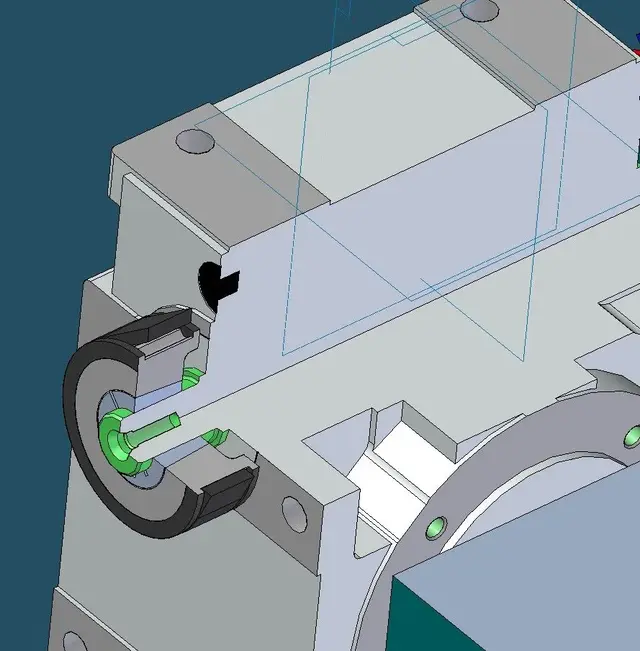
assonometric section

  • Thread starter Thread starter VALEBASO
  • Start date Start date
Thanks the_matrix. kind as always:finger:
You care about nx? Because on solid edge it's trivial, just give a color to the body and another to the faces or fetures. in the section you will see the "material" of the body with the color of the body, and the external faces with the color of the faces.

edit: added jpg
 

Attachments

  • colori.webp
    colori.webp
    35.9 KB · Views: 3
Given the image I think ank'io ke there is a photo editing processing, something like cmq in ug in my opinion you can get considering having all the various details in a modeling (not in assembly) and making a subtract extrusion in the affected area (in this way you get the section). then coloring the various solids and faces, same story for the transparency of the support, you can do everything....by adjusting the lights I would even say that you can make the shades of the dissected faces as shown in the posted image.
I honestly don't have the material time to try, but if it happens, I'll let you know. :wink:
Bye-bye
 
Last edited by a moderator:
Given the image I think ank'io ke there is a photo editing processing, something like cmq in ug in my opinion you can get considering having all the various details in a modeling (not in assembly) and making a subtract extrusion in the affected area (in this way you get the section). then coloring the various solids and faces, same story for the transparency of the support, you can do everything....by adjusting the lights I would even say that you can make the shades of the dissected faces as shown in the posted image.
I honestly don't have the material time to try, but if it happens, I'll let you know. :wink:
Bye-bye
correct.
as dynamic sections are made "on the fly" the face cut physically does not exist.
 
You care about nx? Because on solid edge it's trivial, just give a color to the body and another to the faces or fetures. in the section you will see the "material" of the body with the color of the body, and the external faces with the color of the faces.

edit: added jpg
but is it a true section or a section of those made on the fly, with a plan?
 
but is it a true section or a section of those made on the fly, with a plan?
I did not understand the question well, I drew a sketch in a plan of the assembly and then I dissected the parts, but to be honest I did not understand the difference between the two sections, in my old if I believe that the "dynamic" sections with the plans are not there.

On the other hand there are and I can also use them to iron the solid by pulling it from the edges resulting from the cut dissected.
 
I did not understand the question well, I drew a sketch in a plan of the assembly and then I dissected the parts, but to be honest I did not understand the difference between the two sections, in my old if I believe that the "dynamic" sections with the plans are not there.

On the other hand there are and I can also use them to iron the solid by pulling it from the edges resulting from the cut dissected.
are the sections that are typically defined by planes and move dynamically by cutting the assembly.
 
are the sections that are typically defined by planes and move dynamically by cutting the assembly.
then, the cutting plan command with the dynamic section also exists in if v18 (I had never used it), but in this case the color of the body is neglected and shown the default one. Maybe in the latest releases things work better.
However with the section realized with a sketch (it's a view dissected in 3d, not a real cut on the parts) things work well also on the v18.
 

Attachments

  • taglio_dinamico.webp
    taglio_dinamico.webp
    32.3 KB · Views: 1
  • taglio_con_schizzo.webp
    taglio_con_schizzo.webp
    67.7 KB · Views: 2
Given the image I think ank'io ke there is a photo editing processing, something like cmq in ug in my opinion you can get considering having all the various details in a modeling (not in assembly) and making a subtract extrusion in the affected area (in this way you get the section). then coloring the various solids and faces, same story for the transparency of the support, you can do everything....by adjusting the lights I would even say that you can make the shades of the dissected faces as shown in the posted image.
I honestly don't have the material time to try, but if it happens, I'll let you know. :wink:
Bye-bye
powerists start cmq from an assembly and with the command promote body carry the part in the assembly and then there sections, colors, ...etc
But there's some work.

Hi.

g.
 

Attachments

  • promote_body.webp
    promote_body.webp
    7.8 KB · Views: 5
What are they? :confused:

Thank you.

g.
start pmi, gives you the possibility to insert quotas/notes/works symbols and sections directly in 3d.
is present in mach2/mach3 are called "3d annotation (gd & t, pmi)" if you have a mach1 you cannot use them.
Bye.
 

Forum statistics

Threads
44,997
Messages
339,767
Members
4
Latest member
ibt

Members online

No members online now.
Back
Top