• This forum is the machine-generated translation of www.cad3d.it/forum1 - the Italian design community. Several terms are not translated correctly.

printing management

  • Thread starter Thread starter zetadierre
  • Start date Start date

zetadierre

Guest
Good morning and good Sunday,

I have to audit the unit: I wanted to print 2 a4 to make an a3 that will be part of a photographic documentation. I need to make some marks on the pencil.
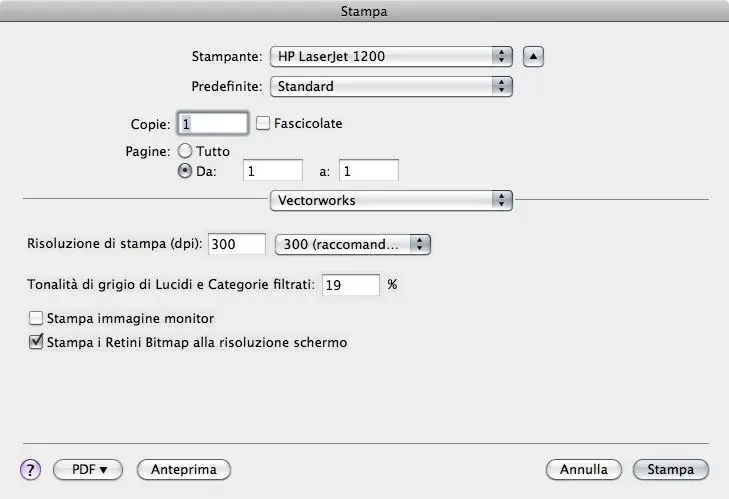
I set the printer as from attached imamgines, I wanted to use the command moves print area and do 2 prints, but only a blank sheet comes out. What am I wrong? thanks and good work

ps: I added at bottom 1 of 2 pages that I would like to get directly from vector
 

Attachments

  • Vista intera schermo.webp
    Vista intera schermo.webp
    255.7 KB · Views: 14
  • impostazioni1.webp
    impostazioni1.webp
    5.6 KB · Views: 10
  • finestra stampa.webp
    finestra stampa.webp
    21.2 KB · Views: 8
  • Doc Fot1.pdf
    Doc Fot1.pdf
    166.9 KB · Views: 6
I don't understand your problem. Anyway, I usually move the page manually or check two a4 flanked in print settings.
I do.
 
there must be something wrong..
if I carry out pdf we are almost there, the problem is in trying to give a print directly from vectorworks.. What are the fields where you have to be careful? But it seems so simple to me.. Boh...
 
in the Italian version, "page setup" is called "size drawing": there you can define your two pages horizontally.
 
dal manuals utite di vectorworks basic 2009, pag i-60, ii paragrafo"... fixing the a0 cine size of the print area and choosing the a4 as sheet size in the set page (win) or print format (mac), vectorworks determines the number of a4 sheets needed to compose the necessary drawing size. the number of pages required to print horizontally and vertically is automatically updated in the dialog."


It's true that taking a serious vacation is good for the brain! :smile:

Greetings
 

Forum statistics

Threads
44,997
Messages
339,767
Members
4
Latest member
ibt

Members online

No members online now.
Back
Top