• This forum is the machine-generated translation of www.cad3d.it/forum1 - the Italian design community. Several terms are not translated correctly.

fold on sheet

  • Thread starter Thread starter vale79
  • Start date Start date

vale79

Guest
Hello dear
I'd need some advice, please. I designed this piece with the sheet module, but I think I didn't use the right procedure. Can someone explain to me how it should be done properly?
Thank you very much
Hi.
That's right.
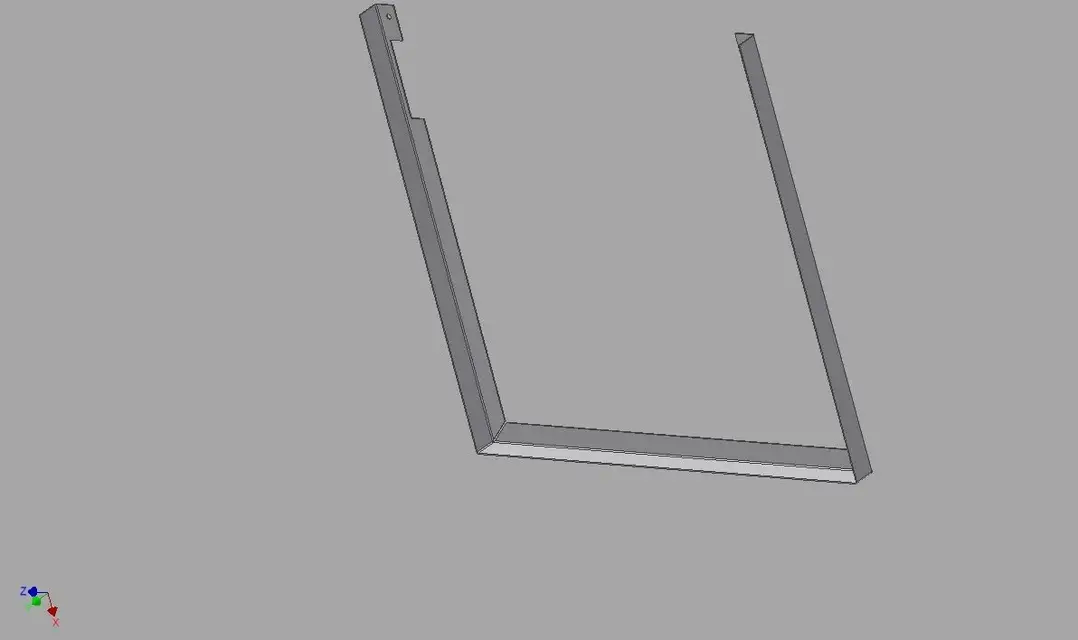
 

Attachments

  • Profilo superiore 1.webp
    Profilo superiore 1.webp
    13.6 KB · Views: 49
  • Profilo superiore 1_2.webp
    Profilo superiore 1_2.webp
    14.2 KB · Views: 54
I do not know inventor, but the piece looks well built, the only thing is that in the options there should be the treatment of the angle so as to close the angle that you veins of the second image posted.
 
I never used the sheet module, I did as I would do with a real piece: I designed a rectangle, then I cut off 2 triangles in places where I have to fold the wings, I made the 2 main folds and then folded the wings inside. Apart from that it is not very beautiful finish, xò doesn't even make me the flat model,instead should it,no?
 
I do not know inventor, but the piece looks well built, the only thing is that in the options there should be the treatment of the angle so as to close the angle that you veins of the second image posted.
What are you saying? the existing gap is due to needs of realization and more generates exhaust of tensions! How would you bend such a detail?
 
I do not know inventor, but the piece looks well built, the only thing is that in the options there should be the treatment of the angle so as to close the angle that you veins of the second image posted.
Maybe the option is there, but I'm afraid I'm wrong with basic processing, it's really bad! a bit of play between the 2 sarebe lembi the least then is bet and is not a part to sight. I made 2 folds at 90° and the 2 sides do not turn to 180°, so then it does not take the constraints when I go to fix the piece in the axieme.
Thank you.
v.
 
Maybe the option is there, but I'm afraid to have the wrong basic processing, it's priprio ugly! a bit of play between the 2 ilminimous sarebe lembi, so much then it is bet and is not a part to sight. I made 2 folds at 90° and the 2 sides do not turn to 180°, so then it does not take the constraints when I go to fix the piece in the axieme.
Thank you.
v.
Could you explain yourself better? help you!:finger:
 
I'll get the file if you can take a look at it. A real piece wouldn't you do it with this procedure? the problem is that when I fold the wings inside then does not make the flat model anymore, so I wrong the crease sketch because the piece definitely has a flat development.
 

Attachments

What are you saying? the existing gap is due to needs of realization and more generates exhaust of tensions! How would you bend such a detail?
I did not say that it does not need, but that it is too big, if the piece was stainless steel and you have to weld it to tig, the welder (at least where I work) makes you a tie with a gap (as you call it) so big.
 
In fact it is a little too big, I think too, 2.3 mm gap on a sheet of 15/10... even if I do it by hand is such a disaster!
 
I'll get the file if you can take a look at it. A real piece wouldn't you do it with this procedure? the problem is that when I fold the wings inside then does not make the flat model anymore, so I wrong the crease sketch because the piece definitely has a flat development.
you have used a typical methodology by performer (practical workman). you have used features based on sketch cut, not calculating that inventor is a virtual laboratory that digitizes the particular interested with its philosophy! you should use feature (flange), which allows the creation of a flange from an indicated edge. the edge can belong to any sheet metal element made with face, flange, etc.:finger commands:
 
in the sheet metal context, create a face with the thickness that interests you, after using the flange command and from the dialog box choose the corner tab (corner), from the drop-down menu choose the one most appropriate to your needs! Let me know!
 
:eek: ok... thank you very much, I understood the concept and you confirmed what I suspected... at the end the piece vaguely resembles the result I should have, but it is not the right procedure for inventor, for this then it does not develop and the sides do not remain parallel.
clarified the doubt...how can I do? I tried f1 but I didn't find this kind of explanation. I also tried to make use of flange to make wings: the first ok, it comes well, I cut her a edge, but when I make the 2 aletta it becomes self-intersecting. Do I try to be an aletta with an orthogonal face or join it to the frame with pins? Maybe it works :smile: but it seems so strange.. .
 
Remember that if you have applied a feature like the cut on one of the flanges you want to fold at a later time, the system will give you error. In fact the feature cut is in the browser in a position that does not allow you, you may try to reorder the father/son addiction, but if you use an integrated modeling philosophy you will always have these problems! You should think about hybrid modeling that does not generate dependence on features and sketches, you will not experience any more problems like this! Remember hybrid modeling!:finger:
 
:tongue: I would do it more than willingly if I knew how:tongue:. As you can see, I'm more than in the beginning, but with some help, maybe I can:) in the meantime I tried with flange and then to do the corner, and I also found the page in the guide where there is exactly the image of what I'm doing, now I want to be able to do it too! without your advice I would never have found it.
do you mean that in the sheet form you do not proceed as in reality, contrary to that in environment parts? Is there any guidelines to follow in particular? Thank you thank you
 
Hello dear
I'd need some advice, please. I designed this piece with the sheet module, but I think I didn't use the right procedure. Can someone explain to me how it should be done properly?
Thank you very much
Hi.
That's right.
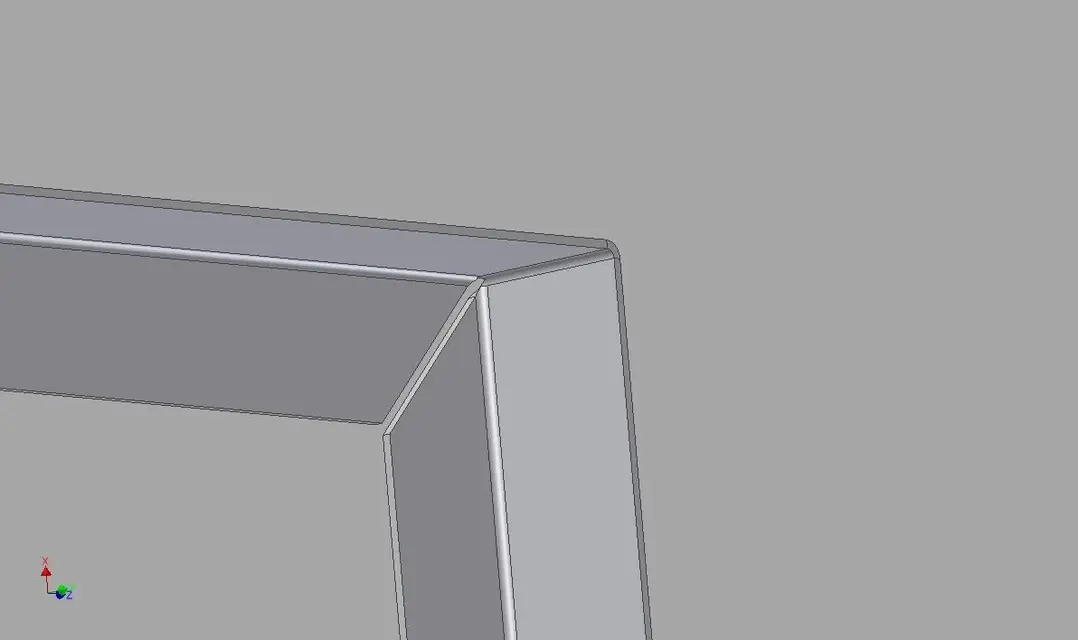
I don't even know inventor (but a bit of sheet yes :biggrin:), but I think that more or less softwares "region" all in the same way and that is, following rules. and the sheet wants that at the crossroads there is a proper "scaric".
your piece is not flattened (and therefore no longer recognized as sheet) partly because you have worked in "mixed environment", then normal "solid cut" processing in the sheet metal module, but above all because you have not assigned a proper laceration of exhaust.
this discharge must go beyond the area of influence of the piego (beyond the lines of tangence between fitting and flat face) otherwise the fold will go to interest also the part that you want to remain flat "roining" (and this happens in reality).. and the program does not accept it and gives you the error.
in your case the cut in the edge should rise more on the vertical.
I attach the image of your modified edge in paint with a development sketch as it should be:SPIGOLO 1_2.webpthat then in practice the width of the discharges can be even less (or nothing in some cases) and decided by the expert operator is another speech. but a software is programmed according to precise parameters that must be respected.. then in work we arrange:smile:

if I had done everything in the sheet module with the bending flanges and all related functions, the program would automatically allocate the right lacerations (for him) and the piece would be solved immediately.
in fact not always the solution provided is " aesthetically beautiful", with huge "holes" between the folds of edge.. often I happen to have to fix "hand" the dwg that will go to laser cutting, so I know that the folds in the car will come out well the same.

you can also use the "mista" procedure (at least, in swx it is possible.. I don't know inventor) but remembering that the cuts are made in a very precise way.

greetings
Marco:smile:
 
Well, I don't have any words. Thank you very much. You don't know how much I'd like to see them in practice, how and how much you can fold the sheets and everything!
Meanwhile I try to understand a bit like 'think' inventor.. .
Thanks again
 
Well... I don't have words... very clear and precise! thank you very much.... .
Thanks again
Please. Figures

greetings
Marco:smile:

p.s. The same name and coeva of another more famous:smile:
Good luck for the next season "red" :biggrin:
 

Forum statistics

Threads
44,997
Messages
339,767
Members
4
Latest member
ibt

Members online

No members online now.
Back
Top