• This forum is the machine-generated translation of www.cad3d.it/forum1 - the Italian design community. Several terms are not translated correctly.

options in the blend edge

  • Thread starter Thread starter Utente NX
  • Start date Start date

Utente NX

Guest
I imported a file from the internet and I was dabbling to rebuild it, just for a personal matter.
When I put the rays, the result doesn't suit me.
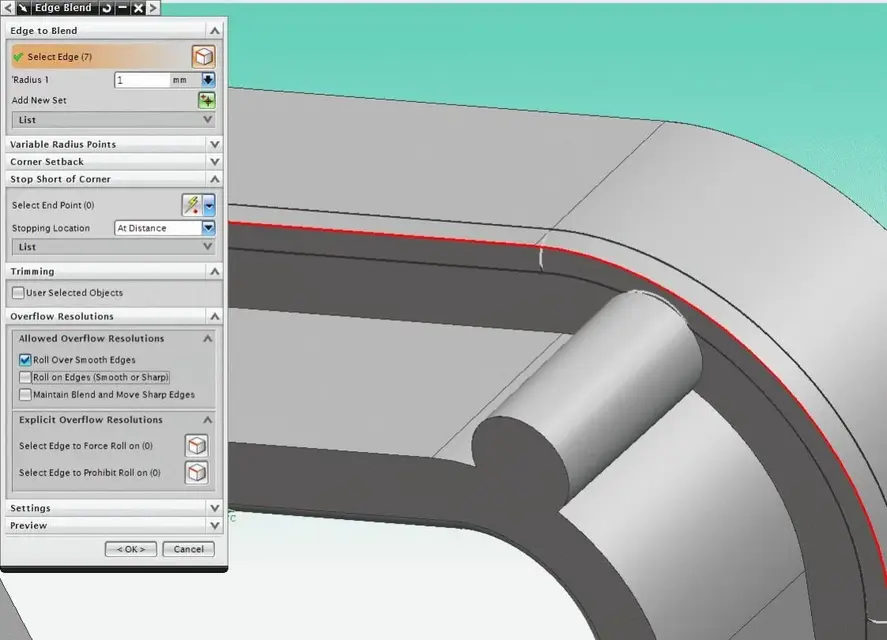
in the images I attach, I would like to get a r=1 connection as from edge blend image yes, and instead I get edge blend no.
I would also like to bring radius 0.5 and radius 1 as from edge blend image so that they die together, not that one overrides the other.
I know there are options, but I can't figure out what it is to get the desired result.

Thank you. .
 

Attachments

  • Clip.zip
    Clip.zip
    22 KB · Views: 5
  • Edge blend SI.webp
    Edge blend SI.webp
    41.5 KB · Views: 17
  • Edge blend NO.webp
    Edge blend NO.webp
    10 KB · Views: 10
I imported a file from the internet and I was dabbling to rebuild it, just for a personal matter.
When I put the rays, the result doesn't suit me.
in the images I attach, I would like to get a r=1 connection as from edge blend image yes, and instead I get edge blend no.
under the allowed overflow resolutions, you must uncheck roll on edges (smooth or sharp)
 

Attachments

  • 1.webp
    1.webp
    57.6 KB · Views: 10
  • 2.webp
    2.webp
    59 KB · Views: 12
I would also like to bring radius 0.5 and radius 1 as from edge blend image so that they die together, not that one overrides the other.
I know there are options, but I can't figure out what it is to get the desired result.

Thank you. .
I don't understand this....
test with setting a variable radius in the final part.
 
I don't understand this....
test with setting a variable radius in the final part.
If you do the 1 or 0.5 radius first, change the shape, right?
I wish neither of them had priority over the other.
a few months ago matrix had posted an example about it.
If I find it... I collect the file, but maybe at that point I find the solution alone.
The last... I can't get this edge. .and even in the real piece is 1.
Maybe I should use a face blend?
 

Attachments

  • Error.webp
    Error.webp
    51.4 KB · Views: 9
I uploaded the parasolid of the first post (which seems a little different to me) and the blend does.
Maybe it's just this little difference that doesn't make you do it. can you post the last file?
 

Attachments

  • raggio.webp
    raggio.webp
    43.2 KB · Views: 7
I uploaded the parasolid of the first post (which seems a little different to me) and the blend does.
Maybe it's just this little difference that doesn't make you do it. can you post the last file?
Nothing changed.
the connection goes on everything.
Try to also see the edges that are there after the extractor poppette.
 
You're right, I had blended on another edge.:rolleyes:

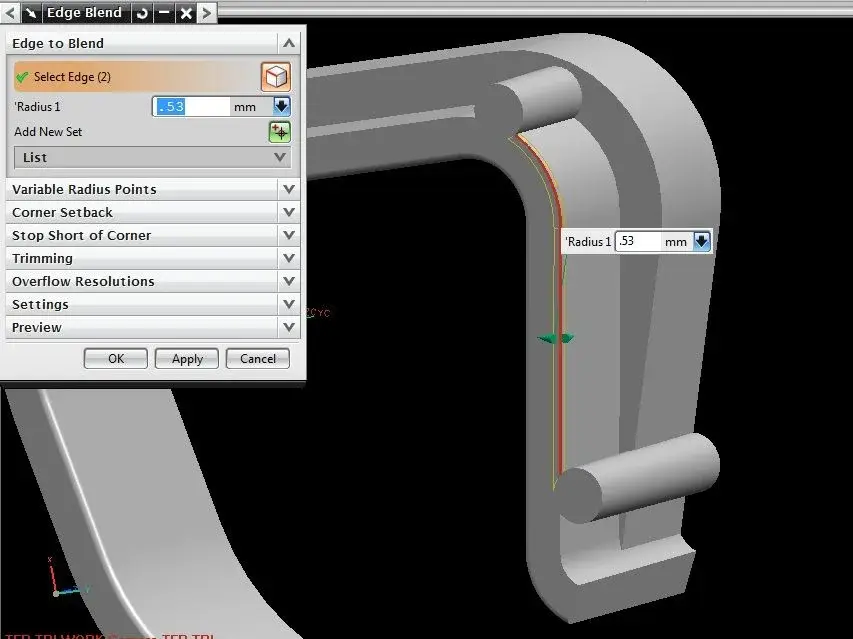
the problem of that edge is that if you pass a blend greater than 0.53 mm, this should pass below. see attached pictures.
to do so you could also join the extractor after making the blend.
 

Attachments

  • raggio1.webp
    raggio1.webp
    31.2 KB · Views: 8
  • raggio2.webp
    raggio2.webp
    34.7 KB · Views: 8
  • raggio3.webp
    raggio3.webp
    16.1 KB · Views: 5
You're right, I had blended on another edge.:rolleyes:

the problem of that edge is that if you pass a blend greater than 0.53 mm, this should pass below. see attached pictures.
to do so you could also join the extractor after making the blend.
I omitted this speech as I thought some blend option would survive the problem.
I solved by moving the extrusion function after the blend.
I was hoping for some options.
thanks for the support.
 

Forum statistics

Threads
44,997
Messages
339,767
Members
4
Latest member
ibt

Members online

No members online now.
Back
Top