marcuccio HF
Guest
Good morning
Unfortunately I find it difficult to understand the exact functioning of the public command. I searched in the forum but there is no explicit "guide".
I hope to define once and for all this precious command, that who like me must print more than 400 dwg files.
I list my operations, with autocad 2011 64 bit:
I create a new file called "prova400"
button dx options and imposed as printer my....printing
I verify that there is the "public" check
click on lay out
management page
new, I call it "prova400"
on the printer I choose my printer (the same that is selected in "options")
dim sheet a4
area to print extensions, center print, scale 1:1, monochrome print styles
Shut up!
save (prova400.dwg) and close the file
open the first of the famous 400 (premit are all "model" so no lay out)
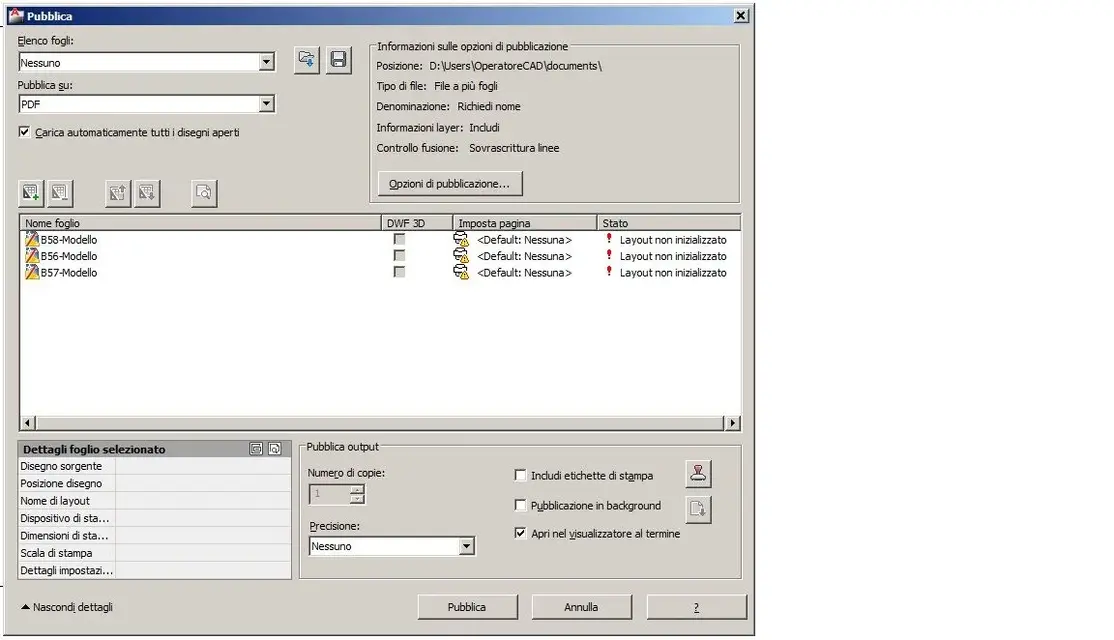
public command
add two files (to try)
on public on: Lascio plotter defined in print settings
...... now the trouble begins.... .
on the page set icon there is the exclamation point, select import that famous test file400.dwg
result......do not print anything
Sorry if I was "long" but I think if we do a step-by-step guide, or better yet an example, this command (as I think so many others) will be very easy.
Thank you very much for your trust.
Unfortunately I find it difficult to understand the exact functioning of the public command. I searched in the forum but there is no explicit "guide".
I hope to define once and for all this precious command, that who like me must print more than 400 dwg files.
I list my operations, with autocad 2011 64 bit:
I create a new file called "prova400"
button dx options and imposed as printer my....printing
I verify that there is the "public" check
click on lay out
management page
new, I call it "prova400"
on the printer I choose my printer (the same that is selected in "options")
dim sheet a4
area to print extensions, center print, scale 1:1, monochrome print styles
Shut up!
save (prova400.dwg) and close the file
open the first of the famous 400 (premit are all "model" so no lay out)
public command
add two files (to try)
on public on: Lascio plotter defined in print settings
...... now the trouble begins.... .
on the page set icon there is the exclamation point, select import that famous test file400.dwg
result......do not print anything
Sorry if I was "long" but I think if we do a step-by-step guide, or better yet an example, this command (as I think so many others) will be very easy.
Thank you very much for your trust.