• This forum is the machine-generated translation of www.cad3d.it/forum1 - the Italian design community. Several terms are not translated correctly.

lamiera: discontinue

  • Thread starter Thread starter Angelo66
  • Start date Start date

Angelo66

Guest
Hello, everyone.
stò using recently sw premium 2010. It seems to me that the subject has not been dealt with.
I have to draw a piece of sheet metal and send it to laser cutting (usually accept the dwg) and then to the bending machine.
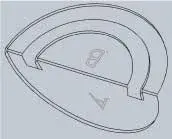
the drawing below attachment shows the fold I can do with sw.
I would like the semicircle b to remain on the same plane as a and the fold concerned only the outer arc.
I tried to mark the folds only on the outer arc but the fold function gives me error. I tried to draw the piece without the semicircle b and then add it after the fold function, but if I do "join the result" it gives me error because there "in conflict" with the previous fold line.

I probably lost myself in a glass of water, but... I don't get there:).
How would you solve the problem?
 

Attachments

  • CerchioPiegatoW.webp
    CerchioPiegatoW.webp
    3.8 KB · Views: 62
Hello, everyone.
stò using recently sw premium 2010. It seems to me that the subject has not been dealt with.
I have to draw a piece of sheet metal and send it to laser cutting (usually accept the dwg) and then to the bending machine.
the drawing below attachment shows the fold I can do with sw.
I would like the semicircle b to remain on the same plane as a and the fold concerned only the outer arc.
I tried to mark the folds only on the outer arc but the fold function gives me error. I tried to draw the piece without the semicircle b and then add it after the fold function, but if I do "join the result" it gives me error because there "in conflict" with the previous fold line.

I probably lost myself in a glass of water, but... I don't get there:).
How would you solve the problem?
you can use the extension cable and straighten the fold, or you could shape the sheet differently. can you post the file?

I have seen that it is your first message, I ask you to present yourself in the appropriate section and read the rules to avoid committing infringements.

Hello and welcome
 
Hello, thank you for the welcome and prompt response.
I presented myself in this debate: http://www.cad3d.it/forum1/showthread.php?t=187&goto=newpostI thought I realized I had to do it there... I wrote the night... maybe I wasn't very shiny and I was wrong. later, when the baby goes to sleep I will try to check carefully.
I tried with the fold and stretch functions, but it seems to me that they do not allow to use a broken fold line in the center.
the file is the following attachment:
 

Attachments

Forgive me, but you're losing in a glass of water:biggrin: (no offense, eh.).
do not stare at you on a "method", try to change the way; swx offers several in this case.
then try to think: How could you make that piece under one knife/matrix of the bending machine?

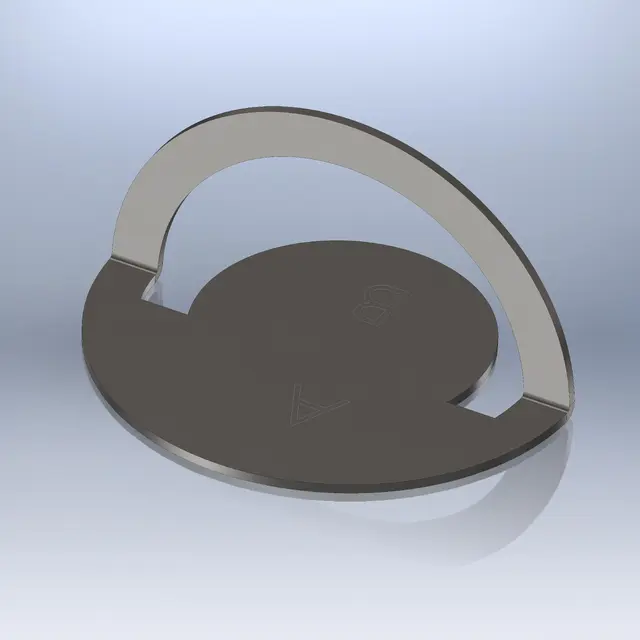
here you have an example of how you could shape your part.. but I repeat, it is only one:Copia di CerchioPiegato.webp ___ View attachment Copia di CerchioPiegato.rardo the program tutorials, follow the helps and guide online. These basic procedures are all illustrated.

greetings
Marco:smile:

p.s. and take the good habit of always defining sketches completely. .
 
Hello, thank you for the welcome and prompt response.
I presented myself in this debate: http://www.cad3d.it/forum1/showthread.php?t=187&goto=newpostI thought I realized I had to do it there... I wrote the night... maybe I wasn't very shiny and I was wrong. later, when the baby goes to sleep I will try to check carefully.
I tried with the fold and stretch functions, but it seems to me that they do not allow to use a broken fold line in the center.
the file is the following attachment:
with 2010 I think you could do this, for example.

with 2011 is even easier!
 

Attachments

:biggrin:
equal to mine, step by step. Looks like we called.

greetings
Marco:smile:
In fact we had the same idea...I also tried with 2011 and also consider them the double bending lines so even easier!

(What a beautiful thing the forum, you learn and you compare! )
 
Thank you very much to both of you.
I actually lost myself in a glass of care (water:), and I made you "lose time", but it was the fastest way to figure out where I was wrong.
In fact, the piece I drew is slightly more complex, but to understand where the error was I drew what you saw and that you solved me.
I underestimated the sw, because in my piece (that "complete") the function of the tab gave me error and I assumed (grave error!!!) that would have made me mistake even with the simple piece I put in the message.
Fortunately you opened my eyes and showed that it was possible (as well as very simple) so I took over my complex piece and found the error. the sketch for the tab had, besides the base attached to the existing sheet, also two small sides that probably ended too close to the fold of the sheet. I'm probably saying why I think the error is there, since resize the tab so that the two sides didn't touch the existing sheet the function.... it works! also the development of sheet metal.
What I thought a sw limit was just a limit in my head... friends also serve this!!! Thank you!
 

Forum statistics

Threads
44,997
Messages
339,767
Members
4
Latest member
ibt

Members online

No members online now.
Back
Top