• This forum is the machine-generated translation of www.cad3d.it/forum1 - the Italian design community. Several terms are not translated correctly.

material mapping. .

  • Thread starter Thread starter michina
  • Start date Start date

michina

Guest
Bye to all,
I was wondering if in revit it is possible to make an object mapping.. .I mean to adjust an image to a surface...for example having to create a family of plant (a tree) after importing the 3d of the stylized tree from autocad and wanting to assign a leaf material (with its beautiful aesthetic map and opacity) to the surfaces that indicate the leaves?
 
hi michina....you throw it there because it seems to me that you are making a project with a little particular "green"....you thought to use the crop option for the trees? It is true that you have to prioritize the frames but the fact of using images could facilitate you in the search, to combine the times of rendering and not to weigh too much the model.to me taught Emilian and since then I always do so also because frankly the yield of the rpc does not make me mad.

Say hello to your partner... .
simone
 
Dear Lance, I'm glad to read you, I know you're better. .
by option cut out what do you mean? maybe apply the image of trees in photo editing?
For the rpcs, I agree. .
what leaves me a bit interrupted is the impossibility (or maybe I don't know..) to map adapting an object image...that is. .immagino should not necessarily do a thousand tests from the management of materials for the modification of the scale, also using the option of not repeating the map... ?
thank you for the answer I'm "picking" a lot.. .
 
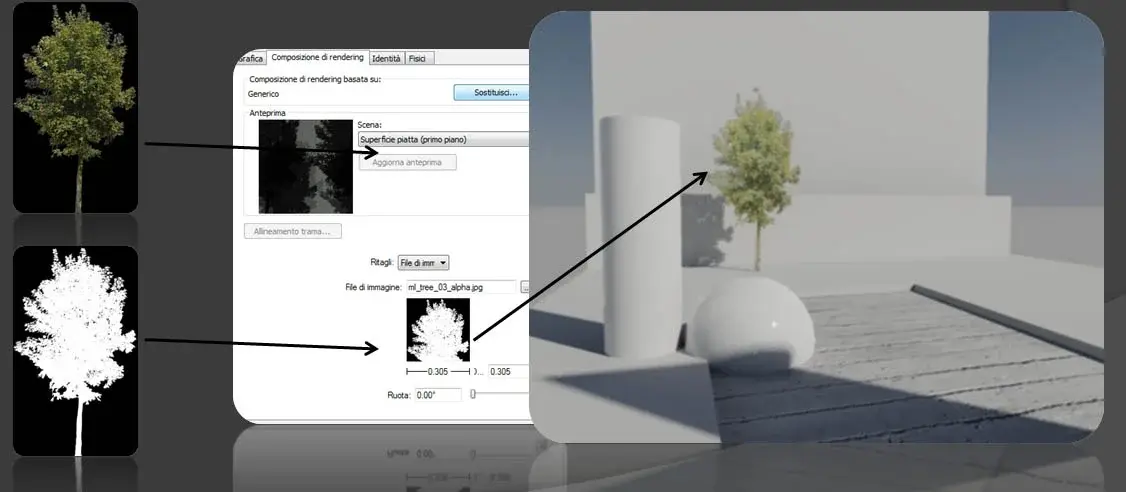
the cutout effect allows you to cut out a full three-dimensional element (only during rendering) with the aim of increasing the detail. black and white images are used: white= matt material, black=transparent material.
in practice you have to create a special material dovi insert a color image of the tree you want to display, then activate the crop option and insert a black and white image of the same tree (black background tree, prepare it with ps). after which you draw an element (e.g. a wall) and apply the material "tree".
advantages:
finding an image is easier to find or create a rpc
rendering is faster.
still projects shadows.
disadvantages.
is not an object 3d so a priori should be set a frame.
Hi.
 

Attachments

  • Opzione ritaglio.webp
    Opzione ritaglio.webp
    34.2 KB · Views: 54
ah! you mean opacity map! I actually thought about it but never applied to green...thanks for the precious advice!
Instead, I doubt how to make the map adapt to the object... is it going for attempts giving measures?
 
Hi, everyone, I reconsider this debate because the subject is the same.
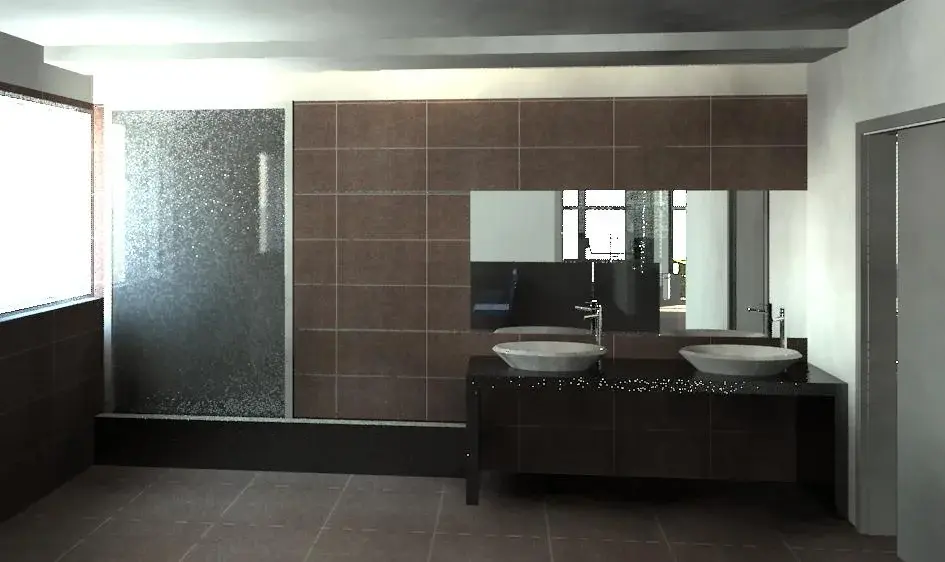
is it possible to adjust the position of a texture based on an object or its coordinates, without "packing" other objects that own the same material?. In summary, I would like to know if the escapes between the floor and the prospect can be coincided. image is a miserable proof
 

Attachments

  • Vista 3D 15_bagni_bozza.webp
    Vista 3D 15_bagni_bozza.webp
    49 KB · Views: 28
Hi, everyone, I reconsider this debate because the subject is the same.
is it possible to adjust the position of a texture based on an object or its coordinates, without "packing" other objects that own the same material?. In summary, I would like to know if the escapes between the floor and the prospect can be coincided. image is a miserable proof
Maybe it's a rough workaround but you could create two equal but different materials (like "floor tiles" and "wall tiles") so you can change one without altering that other
 
Thank you. Yeah, I finally did that.
I'm experimenting with other ways to align the escapes, like breaking the floor in 2 parts or sim, but I must say that it's attempts without a real method. at the end turns his head.. software crashes and the latest version is compromised. :(but this is another problem!! soon
 

Forum statistics

Threads
44,997
Messages
339,767
Members
4
Latest member
ibt

Members online

No members online now.
Back
Top