
You are using an out of date browser. It may not display this or other websites correctly.
You should upgrade or use an alternative browser.
You should upgrade or use an alternative browser.
Mone89
Guest
gfrank
Guest
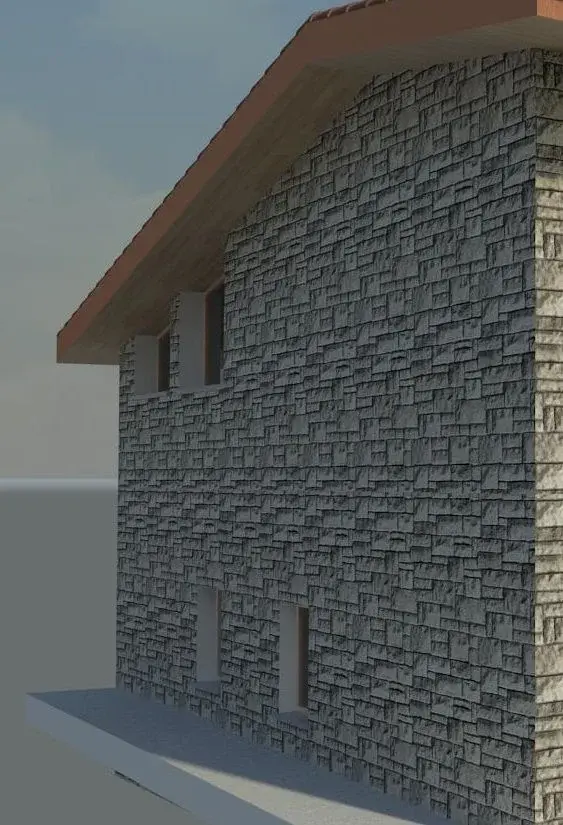
premise is not a great "cultor" of renderings, it is evident that such objects consist of "irregular parts" (at least in one direction), in the repetition of the material on the facade, during rendering, create the effect indicated by you.
In general, through offsets, you should try to make the "cuts" of the texture coincide with the escape line (if possible and if it exists - in your case only horizontal) or select the area of cuts (repection) that creates a "low" impact in the "duplication" of the plot.
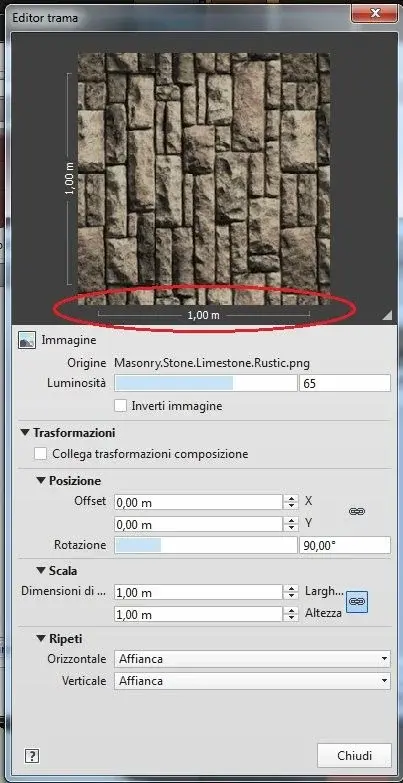
to reduce this "impact" you could soothe texture by means of an external sw (photoshop) that contains a greater surface. to understand the texture you use has the real size of 1 m x 1 m, instead you should create a texture that is a 4 /8 /12 set or more times than that base. created this texture, you must import it in revit assign to the same the new real dimensions (e.g. m 4 x 4 or 12 x 12 m) to respect the real measurement proportion of the individual components (stone blocks).
In this case, if you have worked well with photoshop, in rendering it would be reduced the effect caused by the multiplication of the texture (more small textures, greater need for repetition of the same).
to understand us: if you use the texture of a 50x50 cm "plate", during the render in a wall of 20 square meters. is repeated 80 times; if you use a texture (pre)composed by 4 piasterelle (= 1mq) is repeated 20 times, if you use a texture (pre)composed by 80 tiles (=20mq) it is never repeated.
the ideal, with such types of material (ardhesia, stones, etc.) would be to have only one image of the material, as large as the wall on which it is applied.
In general, through offsets, you should try to make the "cuts" of the texture coincide with the escape line (if possible and if it exists - in your case only horizontal) or select the area of cuts (repection) that creates a "low" impact in the "duplication" of the plot.
to reduce this "impact" you could soothe texture by means of an external sw (photoshop) that contains a greater surface. to understand the texture you use has the real size of 1 m x 1 m, instead you should create a texture that is a 4 /8 /12 set or more times than that base. created this texture, you must import it in revit assign to the same the new real dimensions (e.g. m 4 x 4 or 12 x 12 m) to respect the real measurement proportion of the individual components (stone blocks).
In this case, if you have worked well with photoshop, in rendering it would be reduced the effect caused by the multiplication of the texture (more small textures, greater need for repetition of the same).
to understand us: if you use the texture of a 50x50 cm "plate", during the render in a wall of 20 square meters. is repeated 80 times; if you use a texture (pre)composed by 4 piasterelle (= 1mq) is repeated 20 times, if you use a texture (pre)composed by 80 tiles (=20mq) it is never repeated.
the ideal, with such types of material (ardhesia, stones, etc.) would be to have only one image of the material, as large as the wall on which it is applied.
Last edited:
Tristan
Guest
I agree. It's the only applicable solution. the materials of the autodesk library are excellent "for those who please" but can present these problems.the ideal, with such types of material (ardhesia, stones, etc.) would be to have only one image of the material, as large as the wall on which it is applied.
Mone89
Guest
I have always used this way of doing in case of unusual walls or standard floors.. I thought that as a program, at least as regards its own textures, it did not create these texture effects, or that there was a way always through revit to avoid it. instead I realize that it has a big gap, unlike results such as programs like 3dmax and 4d cinema..
However opinions aside I thank you for your answers, especially gfrank for the explanation, as always, detailed and well argued.
However opinions aside I thank you for your answers, especially gfrank for the explanation, as always, detailed and well argued.
Tristan
Guest
you are equivocating and not little! revit is not a modeling and rendering software. you can't compare the nutella with the pier jam!...I realize that it has a big gap, unlike results such as programs like 3dmax and 4d cinema..
Mone89
Guest
And yet he was born to build 3d models of buildings, and supports a good rendering function. is not specific for generic 3d models, but for buildings (architecture word) should be one of the top. compared to allplan I find it + complete, to my parer. it is useless to flank a motor render of poor quality to this product, if then to do certain things you have to use 3dmax or 4d cinema.. so much worth doing with these programs.. so I wonder why revit has not for its specific skills a high quality rendering.. If I wanted to do 3ds, I used autocads.
Tristan
Guest
was born as an aid to architectural design and not for the construction of 3d models; It is not the same thing! from your statements I understand that the term bim is not from your sideand yet he was born to construct 3d models of buildings
Maybe you mean "high quality." .it is useless to flank a motor render of poor quality to this product, if then to do certain things you have to use 3dmax or 4d cinema.
revit has a high quality rendering (use mr just like 3ds max even if with minor settings), but this does not mean that if I use mediocre textures he must correct my shortcomings! !so I wonder why revit has not for its specific skills a high quality rendering.. If I wanted to do 3ds, I used autocads.
asalalp
Guest
as tristan says you have some confusion between using software. . .
autocad = general design
revit = bim design
max and cinema = modeling, animation,rendering of the highest level
autocad = general design
revit = bim design
max and cinema = modeling, animation,rendering of the highest level
Mone89
Guest
I do not think that the autodesk provides along with its mediocre textures.. is a countersensus.. an account is a custom from me, an account is to use its and get disappointing results. .revit has a high quality rendering (use mr just like 3ds max even if with minor settings), but this does not mean that if I use mediocre textures he must correct my shortcomings! !
p.s. excuse the wait in the answers but I have now finished my relaxation period:biggrin:
Mone89
Guest
I admit my ignorance I made different confusion with programs.. I do not think I know what the bim ahah cmq design is about allplan which is a software similar to revit, for rendering to equal some textures seems to me qualitatively better. . Is it a program like max and cinema?as tristan says you have some confusion between using software. . .
autocad = general design
revit = bim design
max and cinema = modeling, animation,rendering of the highest level