
• This forum is the machine-generated translation of www.cad3d.it/forum1 - the Italian design community. Several terms are not translated correctly.

create variations in the same set

  • Thread starter Thread starter arzigogolo
  • Start date Start date

arzigogolo

Guest
Hello, everyone!

I've been meaning to ask this question for a long time. I waited to see if I could understand it myself, but not being sure, I prefer to ask here in the forum.

i.e., I can't understand if in solidworks there is an analogous function similar to that superlative of solidedge called "alternal assemblies" to manage in a single set different variants of the same with other internal subaxes to it.

to understand, in the same together at the main level, maybe there is the difference of a component replaced with another more updated and therefore with this function there would be no need to create many copies (doing "Save with Name") of the same together how many are the replaced components, but you could manage the whole in a single together with the possibility to realize different variants (or combinations) of the same with some replaced components, or with other subassies, always contained in the same


For what I have understood, I do not think that there is this possibility, but I would like to have the certainty because by consulting the online guide of solidworks, I did not understand it.
In fact there is the possibility to create different configurations of the same set, but it refers to the opportunity to choose which component to display or not depending on how you want to create the table. always if I didn't understand badly obviously.

Do you know if there is this function?

thank you all!:smile:
 
Hello, everyone!

I've been meaning to ask this question for a long time. I waited to see if I could understand it myself, but not being sure, I prefer to ask here in the forum.

i.e., I can't understand if in solidworks there is an analogous function similar to that superlative of solidedge called "alternal assemblies" to manage in a single set different variants of the same with other internal subaxes to it.

to understand, in the same together at the main level, maybe there is the difference of a component replaced with another more updated and therefore with this function there would be no need to create many copies (doing "Save with Name") of the same together how many are the replaced components, but you could manage the whole in a single together with the possibility to realize different variants (or combinations) of the same with some replaced components, or with other subassies, always contained in the same


For what I have understood, I do not think that there is this possibility, but I would like to have the certainty because by consulting the online guide of solidworks, I did not understand it.
In fact there is the possibility to create different configurations of the same set, but it refers to the opportunity to choose which component to display or not depending on how you want to create the table. always if I didn't understand badly obviously.

Do you know if there is this function?

thank you all!:smile:
Bye-bye

in solidw there are configurations at part level and axiemi.
I don't know if you're already using them, but I assure you it's worth a while to learn how to use them because they help you so much.
I'm clearly talking about my case with frames and panels you can have different sizes of the various parts. And together you can make different combinations, replacing the various configurations of parts or sub-assiems.
 
exact, they do not need to create display states for the table, but real different subaxis. if you combine parts and assemblies configurations is really convenient.
 
Bye-bye

in solidw there are configurations at part level and axiemi.
I don't know if you're already using them, but I assure you it's worth a while to learn how to use them because they help you so much.
I'm clearly talking about my case with frames and panels you can have different sizes of the various parts. And together you can make different combinations, replacing the various configurations of parts or sub-assiems.
exact, they do not need to create display states for the table, but real different subaxis. if you combine parts and assemblies configurations is really convenient.
hi guys and thanks for the answers!:smile:

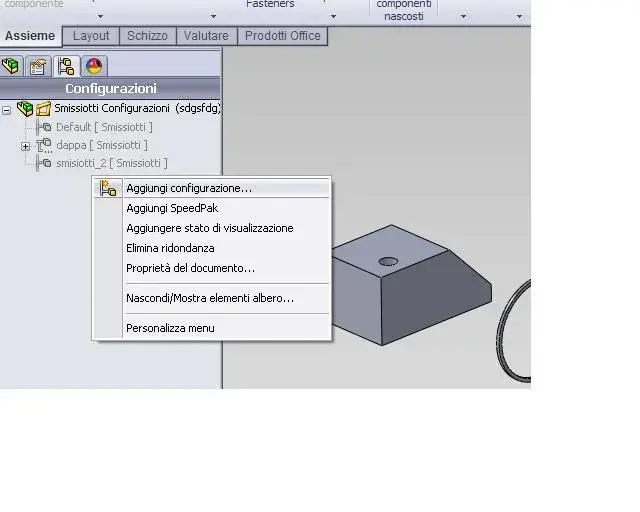
but the command you say is this?swx_conf_ass.webpbecause I was talking about this when I said that it only allows to create different states of visualization of the components and not different states of substitution of the components.
That is, from how I understood it (and I also used it), I can create different visualization states by hiding and/or showing the various components, but for what I would like to do and that is, create in the same together different variants of the same with substititled components, I felt that it was not to be done. Can you?

because I tried in every way without rusting.
even if they select "configuration manager" then "add configuration", they appear to me the configuration properties and, right at the bottom, there is the voice "father son options", but also there I handed out in different ways without however being able to create a configuration of the same set that differed for one or more replaced components.swx_conf_ass_2.webpI also looked at the command help, but I couldn't figure out how to do this.

you could please indicate the procedure, because I keep turning around without getting to the solution.:frown:

Thanks again!:finger:
 
with configurations you can do much more. on the part level you can, for example, have different odds for the same feature (also guided by data table), you can suppress or resolve features, you can have specific colors for each configuration, you can have different properties (metadati) for each configuration, etc.
for example to make a series of screws models the first and then create a configuration for each variant through data table and in a few minutes you made dozens of screws (in one file).
in axiemi, you can suppress or solve components, you can select specific configurations of components to be associated with the configurations of the axieme (e.g. at the same time recalls conf. to 5 parts, conf. b asm recalls conf. b of other 10 parts, etc...) you can change sketches within the axieme, you can change the work together (which are actually of asm features).
If you combine these few infos the combinations that come out are many and should open you to a function that I think does not exist, in a comparable way, in the other midranges.
 
with configurations you can do much more. on the part level you can, for example, have different odds for the same feature (also guided by data table), you can suppress or resolve features, you can have specific colors for each configuration, you can have different properties (metadati) for each configuration, etc.
for example to make a series of screws models the first and then create a configuration for each variant through data table and in a few minutes you made dozens of screws (in one file).
in axiemi, you can suppress or solve components, you can select specific configurations of components to be associated with the configurations of the axieme (e.g. at the same time recalls conf. to 5 parts, conf. b asm recalls conf. b of other 10 parts, etc...) you can change sketches within the axieme, you can change the work together (which are actually of asm features).
If you combine these few infos the combinations that come out are many and should open you to a function that I think does not exist, in a comparable way, in the other midranges.
Hello re_solidworks.

Thank you so much for the examples. I didn't know you could do so much!:finger:
I think that's what you say: "you can select specific configurations of the components to be associated with the configurations of the axieme (e.g., at the same time recalls conf. to 5 parts, conf. b asm recalls conf. b of other 10 parts, etc...)".But I couldn't really figure out how to do it.
I mean, I give you an example: I have a set that I call "assieme a" with components inside.
We put that you have to change a component with any change (addition of a hole, change of a chord, or anything else).
then, I open the component, save it with a new name and make the change.

Then I open my "assieme a", I do "save by name" and call it "assieme b".
At this point, in the axieme b, I replace the modified component with the new one and save everything.
I will now have two axioms: that "a" with the component before the change and that "b" with the modified replaced component.

practically if I have to make repeated modifications to one or more components of the last saved version of the axieme, in this case the "b", I should make repeated saves "with name" of the same together calling it from time to time, "b", "c", "d", etc. for so many times as are the changes to one or more components within it.

Here, instead I would like to do all this within the same group without having to make copies with "Save with name" but being able to manage the different combinations with the various replaced parts choosing from time to time, what combination to activate depending on the need, and being able, of course, to create others to please.

Similar to how you do with display configurations, only that instead of choosing which component to hide or not, you can choose the "version" with the replaced component of interest.
but always inside the same together.:smile:

I'm sorry if I repeated myself, but I try to make myself understand better than I can.:smile:
from what you tell me, it seems to me that you can, but I swear I tried in every way, but I couldn't.
Would you please tell me the procedure for this particular need?

Thank you again and sorry.

p.s.
I think it's the same problem as this previous discussion I found. http://www.cad3d.it/forum1/showthread.php?t=14219
 
Then I open my "assieme a", I do "save by name" and call it "assieme b".
no! you create a new configuration of that same together. and the same you will have done first with the component that changes, so as to assign to each configuration its variant of the component. everything remains within the same file.

greetings
Mar
 
no! you create a new configuration of that same together. and the same you will have done first with the component that changes, so as to assign to each configuration its variant of the component. everything remains within the same file.

greetings
Mar
Hello, Marco!

perfect!!! I managed it!:finger::finger:

It was easier than I imagined, only I couldn't understand the operation. But I finally got it. it was months that I used to wander around, and I did tests on evidence without ever getting the desired result, but now it is clear.

I did as you said: I opened the component that changes and created a configuration. there I made some adjustments for proof and saved the file.
Then I opened the axieme and did the same thing. I created a configuration with his name and entered the component in question.
at insertion, I chose the saved configuration and got the result!
It's even better than I imagined it, because there's no need to make a "Save with Name" in the modified component, as it's enough to create the configuration and make the changes inside it. so you also avoid uncontrolled proliferation of files and its waste of disk space.
perhaps even better than solidedge, or at the same worst.

Unfortunately in the last company where I worked I didn't have solidworks, but inventor 11 (not 2011, but just the 11!:biggrin:)) and I slaughtered it 1000 times for all files, both together and part, for which I had to make a "save with name" because of the frequent changes that were made.

I had had a chance like this, I would have spared myself scolded and incaxature to iosa, but it's good the same: At least I'll be useful in another firm and it's one more thing I've learned!

I don't even think inventor 2011 has a function like this. I honestly don't understand what they're waiting for autodesk to insert it, because it's very useful!

anyway again thank you so much to you and all of you because I solved!:finger:

Bye.

Light
 
solidworks is the only mid that has configurations in this way that I know. Please note that in a set you can change a component configuration by simply clicking it with the dx key, property and configuration change ownership screen.
you can also change configuration to repetition or mirroring instances. to do this unroll the repetition function, select the parts or subsets that must have a different configuration from the serial head and then with the properties you can change the configuration.
I recommend you look at how the data tables work, with those automates remarkably the configuration process while maintaining a great control over different instances.

Hello and good work!
 
solidworks is the only mid that has configurations in this way that I know. Please note that in a set you can change a component configuration by simply clicking it with the dx key, property and configuration change ownership screen.
you can also change configuration to repetition or mirroring instances. to do this unroll the repetition function, select the parts or subsets that must have a different configuration from the serial head and then with the properties you can change the configuration.
I recommend you look at how the data tables work, with those automates remarkably the configuration process while maintaining a great control over different instances.

Hello and good work!
Great! I did not know that with configurations you could do all these things.:finger:
I thank you for having told me, it is great to know because sooner or later I could find myself faced with a problem of this type and the fact of knowing it already, it puts me with an extra march to face them in the best way.
I will certainly follow your advice and deepen the use of data tables. I had already used them once to create different versions of a component and they had returned very useful, then this thing that can be used also for the series is great! As soon as I get it, I try to see how it works.

Hello and next!

Light
 

Forum statistics

Threads
44,997
Messages
339,767
Members
4
Latest member
ibt

Members online

No members online now.
Back
Top