
• This forum is the machine-generated translation of www.cad3d.it/forum1 - the Italian design community. Several terms are not translated correctly.

automatism for sketches?

  • Thread starter Thread starter MarcoAtk
  • Start date Start date

MarcoAtk

Guest
Bye to all,

after you have solved the problem of repetitions in 1000 different ways, I would like to know if it exists, or you know, a way to place a point in the center of the circles without having to put it in hand... I'll explain.
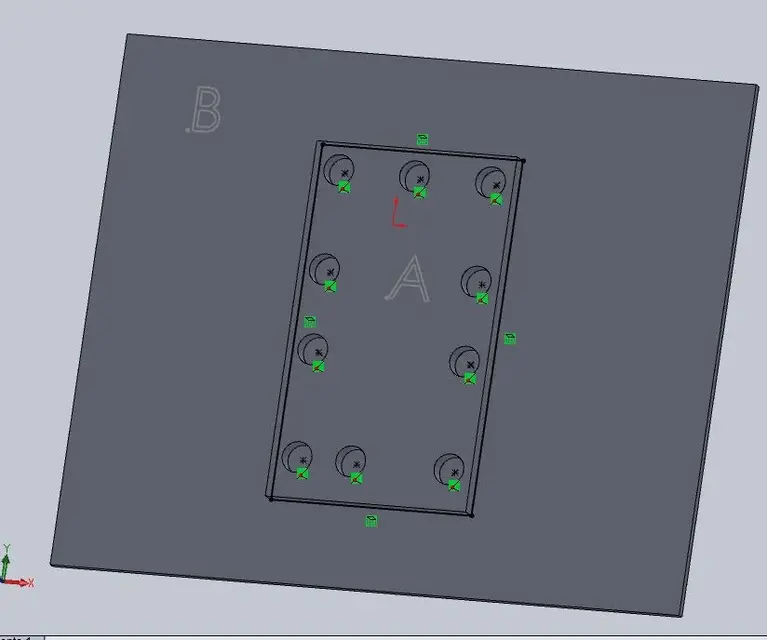
I did a part (a) and then drilled with creation wizard holes. I put that part in a set and placed it on another part (b) and placed the couplings. now I would like to draw a point on the common face to and b (on a sketch of b) in correspondence of all holes of a... when they are few ok it is simple, but when they are many...

Do you know an automatic method or should always be done by hand?
I attach the image.. .

Thank you!
Hi.
Mar
 

Attachments

  • fori punti.webp
    fori punti.webp
    21.9 KB · Views: 14
copy the part a hole sketch on the part b... with the convert entities For example.

greetings
Mar
 
mike1967 : you can use the "hole series" function
http://help.solidworks.com/2011/ital...ole_series.htmor use the part as "smart component".
http://help.solidworks.com/2011/ital...fc0f74e467#pg0
smart components, more or less I know how to use them, but I don't understand how to use them to "project" a sketch with variable geometry from one side to another!! !

sampom: copy the part a hole sketch to the part b... with convert entities for example.

greetings
Mar
Marco,

Yes, ok... but to convert the entities you must however select the edges of the holes and then add a point (I need as a carrier sketch for a repetition) to the center of each circle. .
Do I miss any selection functions?

Thank you.
Hi.
 
...mirror,
Yes, ok... but to convert the entities you must however select the edges of the holes and then add a point (I need as a carrier sketch for a repetition) to the center of each circle. .
No. if for the drilling of the "father part" you used the creation wizard holes, in the sketch you only have the points of the center holes. you just have to select that sketch from the feature manager and "in one shot" you will have all the centers to convert entities. do not select anything in the graphics area.

greetings
Mar
 
Damn it! ! !

would be the perfect solution! !
Mythic...:finger::finger::finger:

I try!

Thank you so much!
Mar
 
Mike,

for the process I use now, I don't need any operation that modifies the geometry of the part. only a b-point projection at the center of the a hole.

but if you have indications, please write them, that surely come good for one of the other methods.. .

Thank you.
Hi.
 
Damn it! ! !

would be the perfect solution! !
Mythic...:finger::finger::finger:

I try!

Thank you so much!
Mar
besides that suggested by sampom there is also the solution of the derived sketch. from a certain point of view is less flexible as it does not allow you to change if not passing through the father sketch, but it is not bad and I use it often.
with convert entities if you add holes in the original part do not add to the part where you convert into entities, while with the derived sketch you always have a copy of the father sketch that is constantly updated.
Try both solutions and then see what you want.

anyway. in the original perforated part, you must always have holes that depend on points, so if the hole you do it by hand with cutting features you must repeat the instances with the repetition guided by the sketch.
 
besides that suggested by sampom there is also the solution of the derived sketch. from a certain point of view is less flexible as it does not allow you to change if not passing through the father sketch, but it is not bad and I use it often.
with convert entities if you add holes in the original part do not add to the part where you convert into entities, while with the derived sketch you always have a copy of the father sketch that is constantly updated.
Try both solutions and then see what you want.

anyway. in the original perforated part, you must always have holes that depend on points, so if the hole you do it by hand with cutting features you must repeat the instances with the repetition guided by the sketch.
I didn't know you! thank you 1000 now I have a new alternative for the couplings. :biggrin:
 
Fear!

It looks like that's exactly what I was looking for the derived sketch... I've been looking for the guide. .
It seems simple... I try today!
I can therefore choose which road to follow according to the needs! ! !

Thank you.
Hi.
Mar
 

Forum statistics

Threads
44,997
Messages
339,767
Members
4
Latest member
ibt

Members online

No members online now.
Back
Top