• This forum is the machine-generated translation of www.cad3d.it/forum1 - the Italian design community. Several terms are not translated correctly.

i can't change the character with the brush

  • Thread starter Thread starter Giovannino60
  • Start date Start date

Giovannino60

Guest
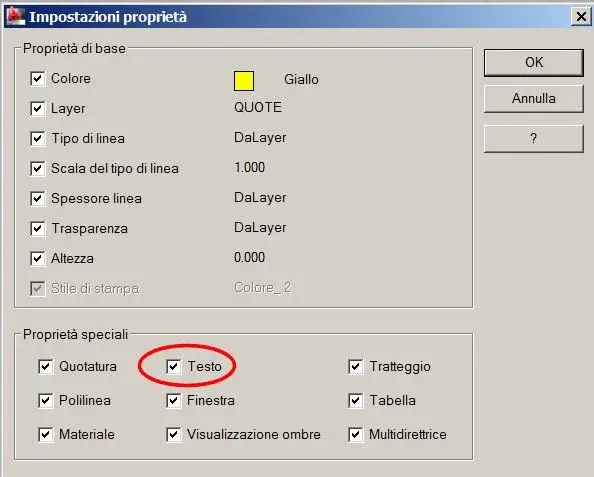
in autocad 2007 when I had to change a character with two writings given for example a made with arial and one with times, I clicked with brush, changes propitiousness, instead with autocad 2010 with the brush you see image I can not change the character.
 

Attachments

  • Cambia caratteristiche scrittura.webp
    Cambia caratteristiche scrittura.webp
    820 bytes · Views: 35
cases are two:


1) the option is not enabled, check by typing z (sets) to the request of the target object.
335.webp2) It is a mtext that has changed the font locally.
 
cases are two:


1) the option is not enabled, check by typing z (sets) to the request of the target object.
View attachment 24362I checked the text square is encrypted

2) It is a mtext that has changed the font locally.
you write mtext on the command line turns out the name of the text I had inserted for the odds, so I don't know what happened.
 
Have you seen my post #4?
Yes, young man, but unfortunately I did not understand.
Do you need to brush texts, multiline texts or quotas?

with double click on a multiline text (or textm command to create it) opens the text editor from which it is possible to change fonts even to some text characters, in this way the font "locally" is changed.

if this is your case you can edit (double click) the textm, select all characters and assign the font you think, or use the lisp I posted in This is what discussion It restores the font of mtext to the style, after which it is also "pennellable".or see also stripmtext.
 

Forum statistics

Threads
44,997
Messages
339,767
Members
4
Latest member
ibt

Members online

No members online now.
Back
Top