
• This forum is the machine-generated translation of www.cad3d.it/forum1 - the Italian design community. Several terms are not translated correctly.

date csys

  • Thread starter Thread starter avalon3d
  • Start date Start date
I repeat: I work in master model (drawing on a file and model-i on others).

but the problem with adding views (with all components in one layer) is: I don't find it convenient to insert the views into the drawing.
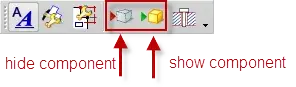
I use commands as from attached image, as recommended in tutorials and in the help.
 

Attachments

  • comandi.webp
    comandi.webp
    6.8 KB · Views: 4
I use commands as from attached image, as recommended in tutorials and in the help.
Thank you.
I was referring to these too.
Anyway, I'm doing some show/hide tests and good company.
If I solve my export problem and other small amenities. ...

by the way: how do I see in the relative only the show parts and not those hide, without reference sets?

Go ahead!
 
hello to all and good year!
I meant my speech layer. I agree with the user nx. we also work for several companies that impose a precise definition of the layers, the result is that it always model everything on layer 1 and then at the end of the model massly shift the objects on the layers indicated by the customer with a macro! practically I do it only because required in the specifications, I do not transgress big advantages from this type of management.
Moreover now that the groups have been introduced I find very convenient to use those!
 
... then at the end of the model massively shift objects on the layers indicated by the customer with a macro!
Good year to you too!

I care about this speech.
Can you know how you set this macro?

Thank you.
 
Good year to you too!

I care about this speech.
Can you know how you set this macro?

Thank you.
in my discreet ignorance of nx I simply recorded a sequence of commands:
-visible all layers
-I take everything in sight all that is hidden
- placed on layers filtering by object type
 
in my discreet ignorance of nx I simply recorded a sequence of commands:
-visible all layers
-I take everything in sight all that is hidden
- placed on layers filtering by object type
OK clear.:finger:
In my case, I have to study something different.
 
I believe that the discussion has degenerated on methods/work habits rather than on the actual problem:
having a single "pool" where all things are inserted is logically less ordered than having a "schedario" with the things ordered in their "cartelline".

I hope that at least this will agree.
the macros quoted by omen share the features, but if we divide too many things into a single layer I don't think you create an effective advantage.
Ultimately: from my point of view it is an effective additional filter to display logical patterns/processes followed.
personally if I got a file without fatigue levels I would be able to put hands on it, and I would believe in a superficial working method by the designer.
often happens that even inside the same technical office it is difficult to put hands on the same file, because nx is very elastic, and allows to do the same in several ways: based on the experience of the designer you choose "the right way".

what I wanted to say is that the layers, if used correctly and according to precise rules, help to give a "skeleton" to the structure of the component.
I hope that this functionality is not removed.
 
I believe that the discussion has degenerated on methods/work habits rather than on the actual problem:
having a single "pool" where all things are inserted is logically less ordered than having a "schedario" with the things ordered in their "cartelline".

I hope that at least this will agree.
the macros quoted by omen share the features, but if we divide too many things into a single layer I don't think you create an effective advantage.
Ultimately: from my point of view it is an effective additional filter to display logical patterns/processes followed.
personally if I got a file without fatigue levels I would be able to put hands on it, and I would believe in a superficial working method by the designer.
often happens that even inside the same technical office it is difficult to put hands on the same file, because nx is very elastic, and allows to do the same in several ways: based on the experience of the designer you choose "the right way".

what I wanted to say is that the layers, if used correctly and according to precise rules, help to give a "skeleton" to the structure of the component.
I hope that this functionality is not removed.
No one will take the levels off and no one has ever sought a fight.
I just said that the structure at levels is just a waste of time.
if so were not, as demonstrated in this point, describe an example with a small file and the steps you perform to view and hide the entities you need to use / manipulate, taking into account also the upstream work to bring them to those levels and in case you work in the environment together what would you see if the same structure at levels was also on other components?
What would you get more than a hide & show with a relative?
then if you come and talk to me about skeleton, then your skeleton is invisible to your eyes and to your colleagues, using levels.
a skeleton structure I see it with the 'feature groups', not with the levels.
 
an example of a job done a few years ago:
for particular needs I had to create a molding body that provided 3 "hairs": Matrix side, punch side and wagon. all in surface, with the sew only at the end of the tree.

Suppose the use of datum alone, without the complete organization for curves, points, sketches and various defining.

level 50 datum main
l 51->53 floors reference side matrix where, e.g. 51 floor construction, 52 floors reporting/direction, 53 floors cutting.

l 54->56 sting side reference planes, with the same logic above

l 57->59 car reference planes, with the same logic above.

complete all ctrl+j to move into categories, ctrl+l to activate/disable levels.
without scrolling up and down for a 2500 feature tree, I know that by activating layer 53 I can change a cutting area of the matrix side, giving a different value or reference to the desired floor of the surface that interests me.
This is about plans, let's imagine if we were talking about changing the trend of defining curves! (e.g. grids) with show/hide on "impegnative" surfaces how many features do they jump out?

Ultimately: my procedure would be ctrl+l, select the plan, edit, ctrl+l again.
without should I select the feature, show/hide parents, select the plan, edit, select the object or objects and hide.. .
Not to mention that with nx8 I think the showe/hide also works with layers...
 
an example of a job done a few years ago:
for particular needs I had to create a molding body that provided 3 "hairs": Matrix side, punch side and wagon. all in surface, with the sew only at the end of the tree.

Suppose the use of datum alone, without the complete organization for curves, points, sketches and various defining.

level 50 datum main
l 51->53 floors reference side matrix where, e.g. 51 floor construction, 52 floors reporting/direction, 53 floors cutting.

l 54->56 sting side reference planes, with the same logic above

l 57->59 car reference planes, with the same logic above.

complete all ctrl+j to move into categories, ctrl+l to activate/disable levels.
without scrolling up and down for a 2500 feature tree, I know that by activating layer 53 I can change a cutting area of the matrix side, giving a different value or reference to the desired floor of the surface that interests me.
This is about plans, let's imagine if we were talking about changing the trend of defining curves! (e.g. grids) with show/hide on "impegnative" surfaces how many features do they jump out?

Ultimately: my procedure would be ctrl+l, select the plan, edit, ctrl+l again.
without should I select the feature, show/hide parents, select the plan, edit, select the object or objects and hide.. .
Not to mention that with nx8 I think the showe/hide also works with layers...
I should have an example file and the type of modification you should perform to understand whether your methodology is necessary or not.
for my part, I group and if I have to edit a hidden curve because not englobed, the monster and at the end of all my changes I use a ctrl+w.
I avoid losing time for these things....
As for your last sentence, I don't find anything new in nx 8 on the exhibition and hide the levels.
Do you have any details about this?
 
an example of a job done a few years ago:
for particular needs I had to create a molding body that provided 3 "hairs": Matrix side, punch side and wagon. all in surface, with the sew only at the end of the tree.

Suppose the use of datum alone, without the complete organization for curves, points, sketches and various defining.

level 50 datum main
l 51->53 floors reference side matrix where, e.g. 51 floor construction, 52 floors reporting/direction, 53 floors cutting.

l 54->56 sting side reference planes, with the same logic above

l 57->59 car reference planes, with the same logic above.

complete all ctrl+j to move into categories, ctrl+l to activate/disable levels.
without scrolling up and down for a 2500 feature tree, I know that by activating layer 53 I can change a cutting area of the matrix side, giving a different value or reference to the desired floor of the surface that interests me.
This is about plans, let's imagine if we were talking about changing the trend of defining curves! (e.g. grids) with show/hide on "impegnative" surfaces how many features do they jump out?

Ultimately: my procedure would be ctrl+l, select the plan, edit, ctrl+l again.
without should I select the feature, show/hide parents, select the plan, edit, select the object or objects and hide.. .
Not to mention that with nx8 I think the showe/hide also works with layers...
I am absolutely with usernx.
in your case:
1) go to the tree and select the groups that interest, with ctrl x la of the multiple
2) show
... the problem of those who love lasers instead of groups is only because they have never tried or seen use the grp.
 
If you ask me this question means that like you, drink and avalon do not use the master model approach.
so I would say that first of all you have to work with this method and then the answers to your questions will come to you alone.
This question has already been debated here with as many misunderstandings.
http://www.cad3d.it/forum1/showthread.php?t=18880in this thread are also explained some of the reasons why unigraphics, at those times, advised the use of the master model, which matfio and avalon3d (I know by direct experience) use for at least ten years.
the fact that I, matfio and avalon3d have had to deal with multinationals operating in the most various fields, does not mean that we are masters of the truth, but that we have been able to evaluate many ways of working and making experience that we gladly share.
How many of you still use primitives or boss-pokets and pads?
Is that what you think?
secondo te sono da usae o no? e perché?
 
secondo te sono da usae o no? e perché?
I'm obsolete.
boss, pocket and pad have not been implemented for years.
the construction by sketch I prefer for two main reasons:
1) flexibility in shape.
2) Variability of mediated positioning sketch is significantly higher, especially if you need to vary the positioning method.
 
I'm obsolete.
boss, pocket and pad have not been implemented for years.
the construction by sketch I prefer for two main reasons:
1) flexibility in shape.
2) Variability of mediated positioning sketch is significantly higher, especially if you need to vary the positioning method.
nx and first noug has always been a parametric cadVariation. the second term means exactly what you specify at the first point: an extrusion can become a cylinder or a parallelepiped, for example, depending on what is below.
Also the holes I prefer to do them with sketch (even if sometimes I run away someone, true matfio?:rolleyes:).
In some cases, however, I use the bosses to make threaded pins as it is the diameter of the thread that commands and not that of the boss.
This is a simple example of how nx never throws anything away.. .

but back to the question made by beppino and matfio: why are the layers not supported in mm?
 
...
but back to the question made by beppino and matfio: why are the layers not supported in mm?
Hello boys and good 2012 .
I say my hope not to make any sense.
in mm the layers are supported, only if they are used together with refs. sets some users may have understanding problems .
If I change the position of a component on a different layer in my set, I will always find it on the original layer when I open the file individually,
and this thing I have noticed goes crazy several at the level of understanding; I don't know why but to many it turns out "strange" that nx manages the levels of entities in a distinct way between together and part file , but on the other hand it does so with colors if we want to tell it all .
as I have always said the layers I use them and I have always found myself very comfortable, then it is obvious that there are other ways to work but you should have time to experiment, time that these times is hard to find .:biggrin:
 
nx and first noug has always been a parametric cadVariation. the second term means exactly what you specify at the first point: an extrusion can become a cylinder or a parallelepiped, for example, depending on what is below.
Also the holes I prefer to do them with sketch (even if sometimes I run away someone, true matfio?:rolleyes:).
In some cases, however, I use the bosses to make threaded pins as it is the diameter of the thread that commands and not that of the boss.
This is a simple example of how nx never throws anything away.. .

but back to the question made by beppino and matfio: why are the layers not supported in mm?
I make the holes absolutely absolutely through the 'hole' function.
Why?
1) follow a standard
2) I don't care what value to do, since I follow a standard
3) insertion of the screws through the reuse library
4) I can pass with nx 8 from one type of hole to another.

Let's go back to the question you asked me about the master model and the layers.
What does it mean to me supported?
for me supported means that if a procedure is described in the help, then any anomaly on that procedure is worthy of revision / resolution, otherwise it becomes an er (request for improvement / implementation).

levels in the master model are not supported because the procedure to be able to see them is not described in the help and because the procedure that I will describe will make you understand why they are not supported in my opinion.

1) the visibility of geometric entities in master model mode is managed by the 'reference set'.
2) the visibility of axiemi components in master model mode is managed by the 'reference set' at the level of assembly or part and the 'show & hide' commands described in the previous topics.

not supported because:
1) the levels of the components are incorporated into the first creation of the table, after which every change to the levels at the level of the assembly is not transported and must be performed at the level of the table.

2) deactivation of levels by using the 'layer setting' command does not produce any effect, so.....

3) the display or not can occur by the 'visible in view' command.

4) same thing on a single part level.

5) other cases that I do not have the confirmation of repeatability, but which lead me to think about the above.
 
"It drives a lot crazy at an understanding level"
quoted in full this phrase, thinks that there is a strong difficulty also for "fix at current timestamp". save us who can, I think I know who but I hold it for me...hihhihi:4406:
 
non uso layer e reference set.
This is not clear to me.
go for layers, it is question of methodologies, habits etc... the beauty of nx is precisely the fact of "adapting" to the different needs.

but I don't understand how you can work (in master model) without reference sets.
 
This is not clear to me.
go for layers, it is question of methodologies, habits etc... the beauty of nx is precisely the fact of "adapting" to the different needs.

but I don't understand how you can work (in master model) without reference sets.
I wrote wrong.
I do not use layers but reference sets.
 

Forum statistics

Threads
44,997
Messages
339,767
Members
4
Latest member
ibt

Members online

No members online now.
ciao
Back
Top