peloritano
Guest
Hello everyone
I have a problem that often arises and since I failed to solve it I want to ask your opinion
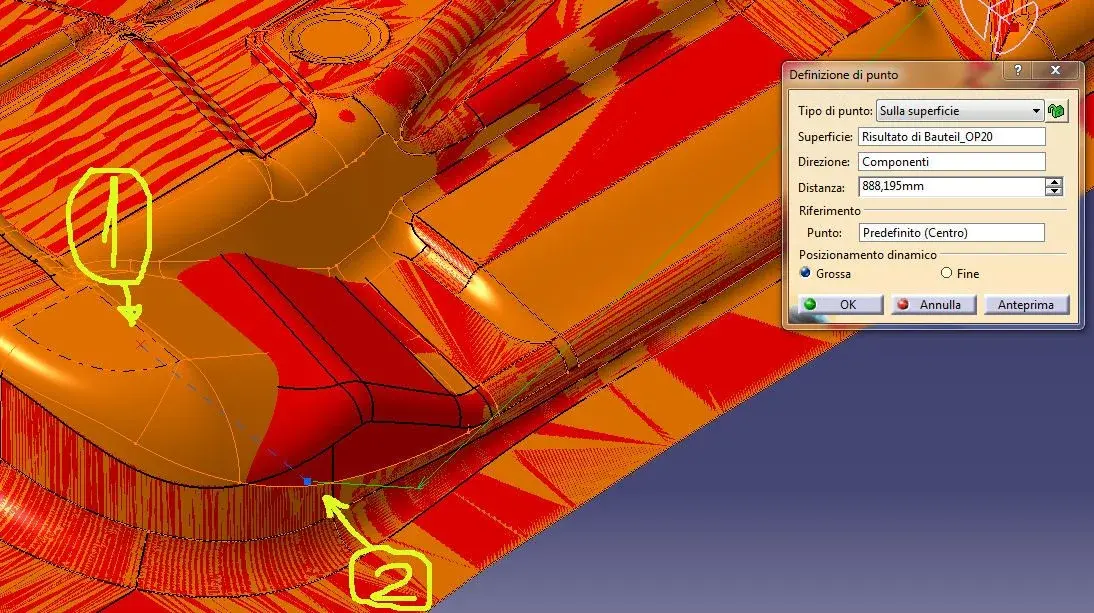
It is simply to create a point on a surface. in this regard I attach the image.
The command I use is "point"
when opening the dialog box I choose as "point type=on the surface"
I select the surface and move on the same by identifying the exact area where I want to place my point
as seen from the image are identified two points 1 and 2
I want to place my point exactly in 1 but he puts it in 2
I also tried to change the direction (drawing different axes) and to change the dynamic position from big to finish but nothing.. .
How the hell do I place the point exactly where I want??? ? ?
I have a problem that often arises and since I failed to solve it I want to ask your opinion
It is simply to create a point on a surface. in this regard I attach the image.
The command I use is "point"
when opening the dialog box I choose as "point type=on the surface"
I select the surface and move on the same by identifying the exact area where I want to place my point
as seen from the image are identified two points 1 and 2
I want to place my point exactly in 1 but he puts it in 2
I also tried to change the direction (drawing different axes) and to change the dynamic position from big to finish but nothing.. .
How the hell do I place the point exactly where I want??? ? ?