• This forum is the machine-generated translation of www.cad3d.it/forum1 - the Italian design community. Several terms are not translated correctly.

extrusion prevented by the fact that the sketch is not closed

  • Thread starter Thread starter briele2
  • Start date Start date

briele2

Guest
When you can't extrude a drawing, small enough of a lever, does it mean that the design is not closed as in autocad?

What am I supposed to do, go over the drawing? I'm not extruding from head 5 times!!!! help
 
Last edited by a moderator:
When you can't extrude a drawing, small enough of a lever, does it mean that the design is not closed as in autocad?

What am I supposed to do, go over the drawing? I'm not extruding from head 5 times!!!! help
If it wasn't closed, inventor automatically doesn't see it as solid to create an area, but as a perimeter so knows to chreate an empty surface, I hope to have given the idea, an example of failure to extrusion can be the auto intersection, but would tell you, as he said before me maurom, surely to every action not possible corresponds an error message, to you what does it appear?
Bye.

you can also attach the file to take a look, ke version you use.

Bye.
 
already... lately the respect of the rules, even the unwritten ones, are an option.... poor Italian... no longer the acca is used...
 
:cool:a discussion entitled "help", especially for the search function...:mad:
You're right. I'm novice. I was just desperate after 3 hours.


at the end I went to see the perimeter and in fact it was not closed... Probably there will be a function to see where the points are not connected and you can't understand why the solid is not formed, unknown to me. . .
 
You're right. I'm novice. I was just desperate after 3 hours.


at the end I went to see the perimeter and in fact it was not closed... Probably there will be a function to see where the points are not connected and you can't understand why the solid is not formed, unknown to me. . .
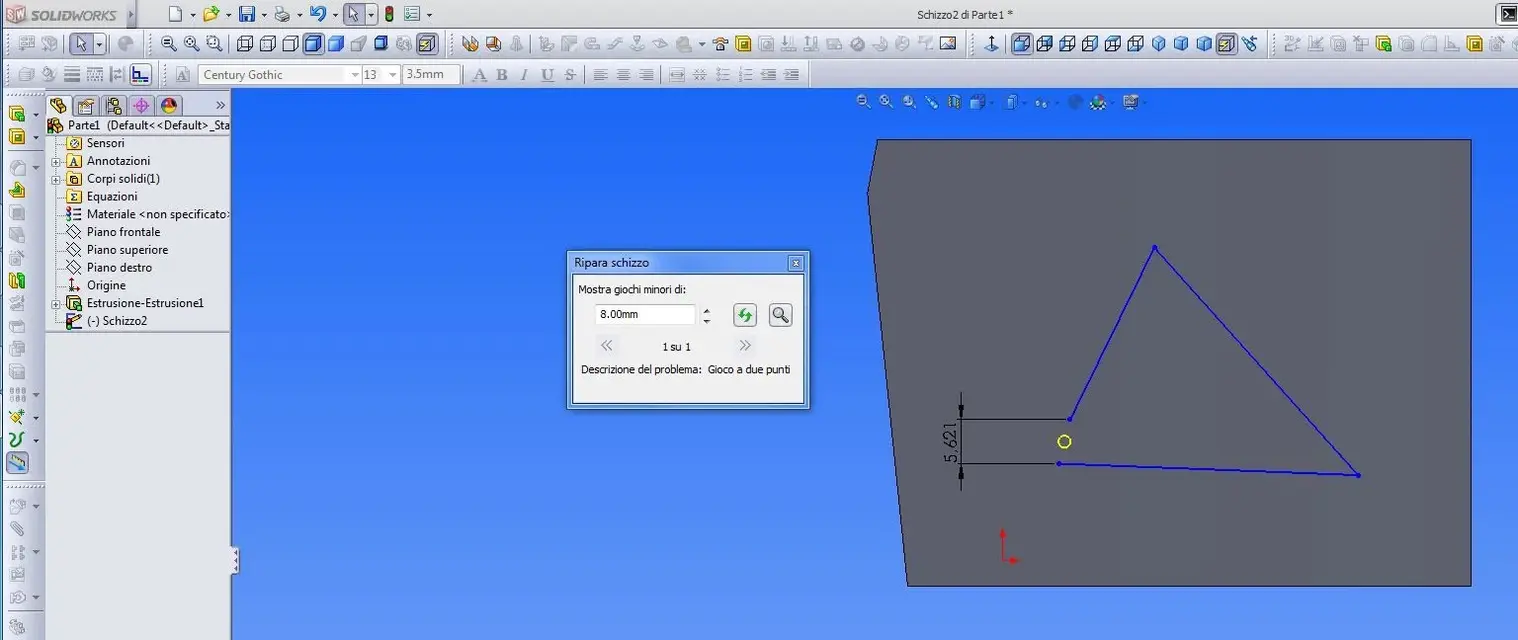
Is there no control/repair of the sketch?
in solidworks, for example, when a function fails you can check the sketch with a special check function.
 

Attachments

  • Ripara schizzo.webp
    Ripara schizzo.webp
    56.8 KB · Views: 12
But don't say that's the problem, you have to check:finger.
I just happened five minutes ago!
I was in sheet metal, face command, warns me that there is no closed perimeter and highlights the problem in the sketch. this because the command does only work with a closed perimeter.
for proof, having read in the morning the request for help (and having found it immediately thanks to the admirable reformulation of the title by stefanobruno :smile:) I tried the extrusion; In fact inventor nothing says about open or closed perimeters, but if I pass the arrow on the incriminated profile select me. Thinking about it, who knows inventor that I want to extrude a solid instead of a surface like I sometimes do? I suppose the operation is logical, in the end...
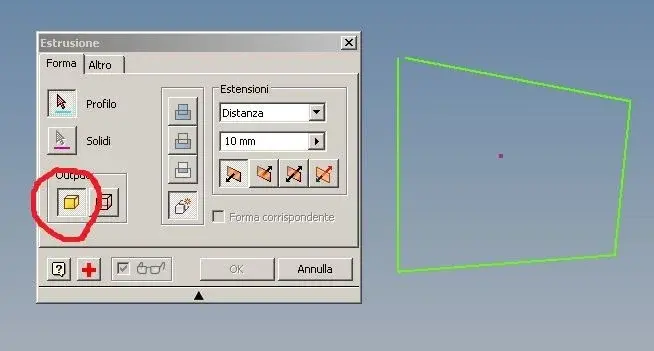
 
I tried to extrude an unclosed profile, by default inv proposed me to extrude a surface, instead I selected solid and appears the red crucible that then tells me that the profile is not closed etc...
I think I have something to say. .
 

Attachments

  • Cattura.webp
    Cattura.webp
    16.3 KB · Views: 3
I tried to extrude an unclosed profile, by default inv proposed me to extrude a surface, instead I selected solid and appears the red crucible that then tells me that the profile is not closed etc...
I think I have something to say. .
He says, say, maybe he doesn't say it in the same way as solidworks, but he says it.:finger:
 

Forum statistics

Threads
44,997
Messages
339,767
Members
4
Latest member
ibt

Members online

No members online now.
Back
Top