
• This forum is the machine-generated translation of www.cad3d.it/forum1 - the Italian design community. Several terms are not translated correctly.

import coordinate points in catia v5

  • Thread starter Thread starter Lello_84
  • Start date Start date

Lello_84

Guest
Hello everyone, my intent is to write a macro that allows me to import the coordinates of a set of points from a .txt and/or .xls file so as not to have to make paste copy for each single coordinate of each point.
the problem is that when I open the help of the v5 macro window it gives me error so I can't have any idea what catia commands I can write in the macro, so I ask you even if you have some tutorials or some guide on the catia commands for macros.
I hope you can help me. Greetings:
 
I think that you can do it using the project table, unless you have so many points or a number of varable points from time to time. That's the problem I have. I must import a defined wing profile with a number of points and described in a .txt file. you can do with the project table and a number of parameters previously defined in cat, to which those read in the project table are associated, but I would like to know if any of you know if there is a way to define an array of measures, a vector that then somehow one uses to define a group of points.
Thank you all.
 
the macro already exists and is part of the online documentation of catia (original dassoult)
see if it can help you.

Hi.
 

Attachments

But does it appear to you? open office use.
if you tell me what to use?
 

Attachments

  • Cattura60.webp
    Cattura60.webp
    35.3 KB · Views: 60
the display is correct me with openoffice does not work.

you have to use excel

Hi.
But it tells me that there is a macro that can be performed.... cabbage.. .
How would it be used anyway?
what data should be entered? If it's complicated, I also need a link to a documentation.
 
But it tells me that there is a macro that can be performed.... cabbage.. .
only that microsoft has an eclusva contract with dassoult while oracle no.

open cat and open a file part
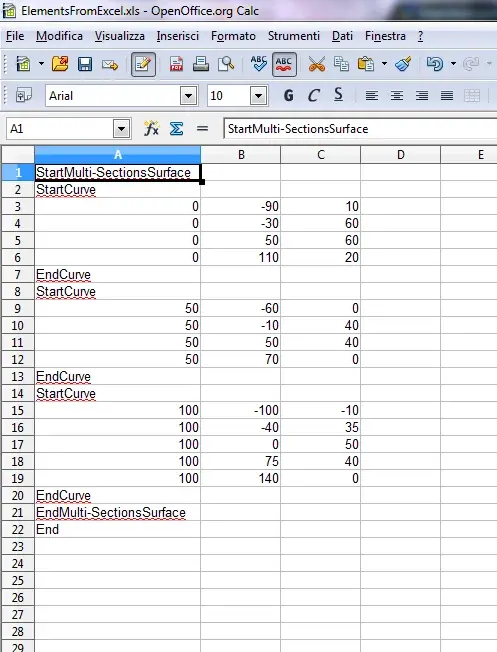
open excel file with points
run the macro, following requests
you will see the result on catia

each three lines of the electronic sheet correspond to an arch of the superfice that will build.

Hi.
 
I tried to make the same operation but when I launch the macro tells me that "properties or method not supported by the object"
 

Forum statistics

Threads
44,997
Messages
339,767
Members
4
Latest member
ibt

Members online

No members online now.
Back
Top