• This forum is the machine-generated translation of www.cad3d.it/forum1 - the Italian design community. Several terms are not translated correctly.

rounding rope

  • Thread starter Thread starter Borntired
  • Start date Start date
Status
Not open for further replies.

Borntired

Guest
Good morning. use proe for some years. mainly for mechanical modeling while delegoing alias style.
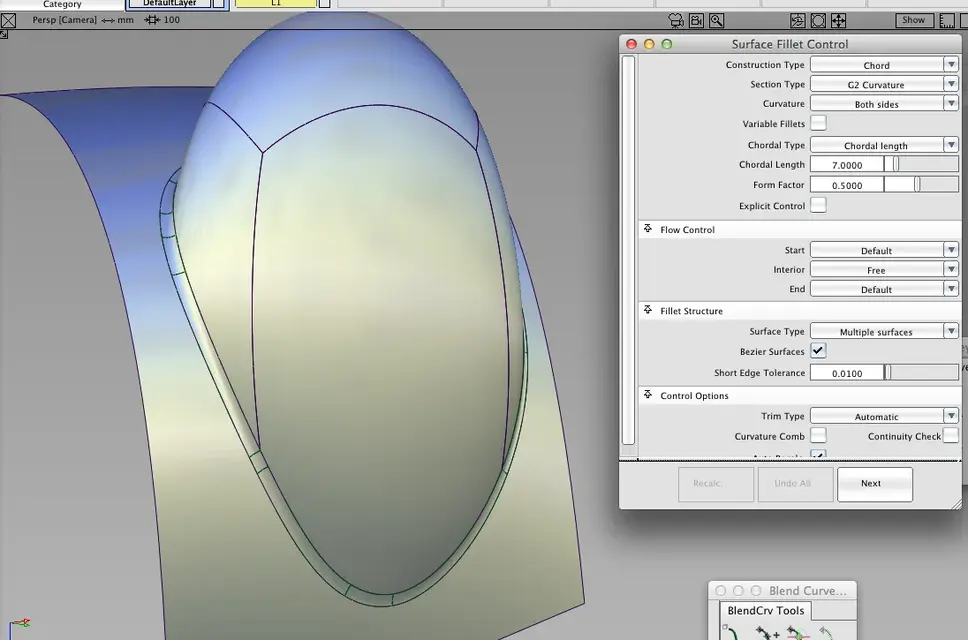
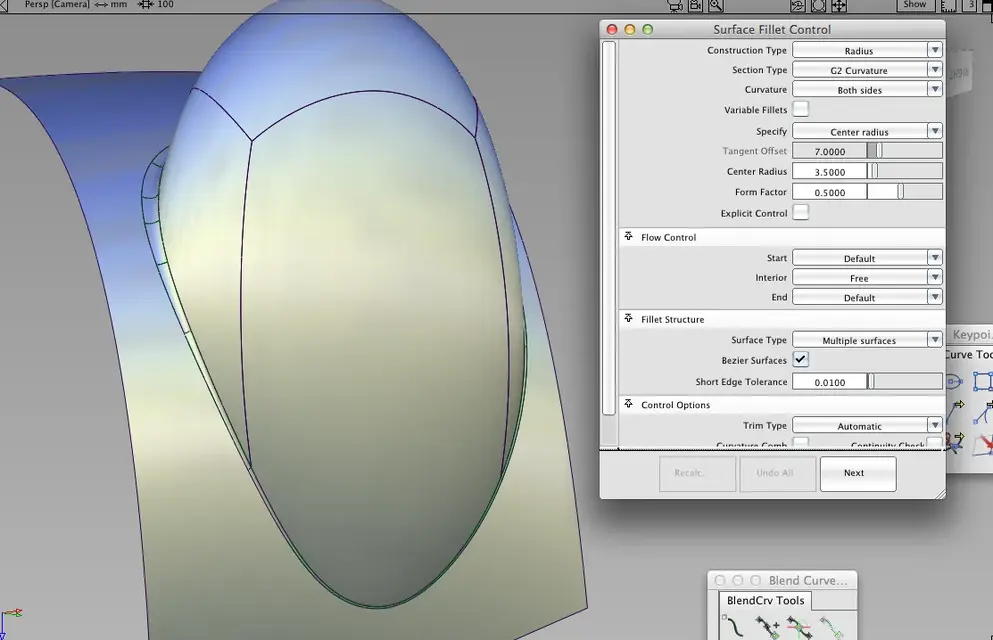
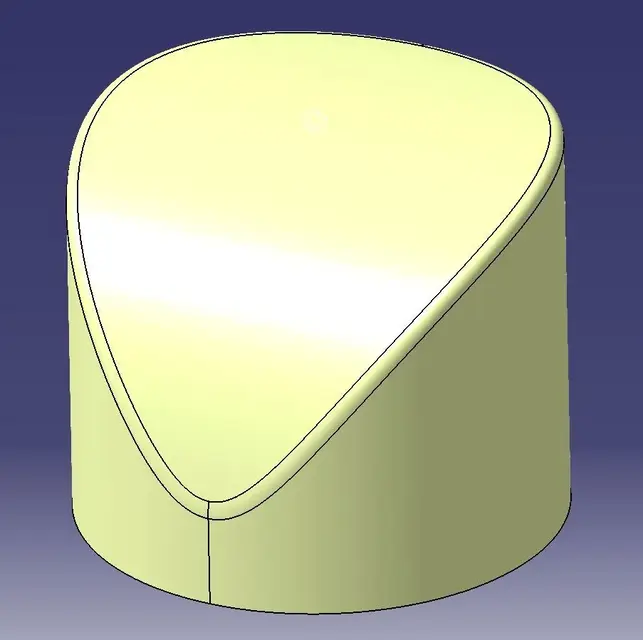
I've been looking for a feature that I can't find and it seems impossible for me not to be present in proe. I'm talking about the ray rope, to understand it is a type of ray in which it is defined not the value of the ray (type rolling ball set in proe) but the value of the arc of the fillet. This type of radiation is present as well as in aliases also in catia (in the ray feature requires to select round or chordal; similar to the alias fillet tool). if I have not been clear enough I can provide screenshots.

thanks for the delucidations and good work to all.
 
First of all, I kindly ask you, as a new user, to present and read the regulation.

for the question: You too, strange, they asked me the same question this morning.
the rounding command does not have the option for the constant rope (which I know).
you can get the same result with the function driven by the offset curve.

of grace, who explains to me the usefulness of this thing? In 25 years of work I have never been asked.
 
I introduced myself. and thank you for the quick answer.

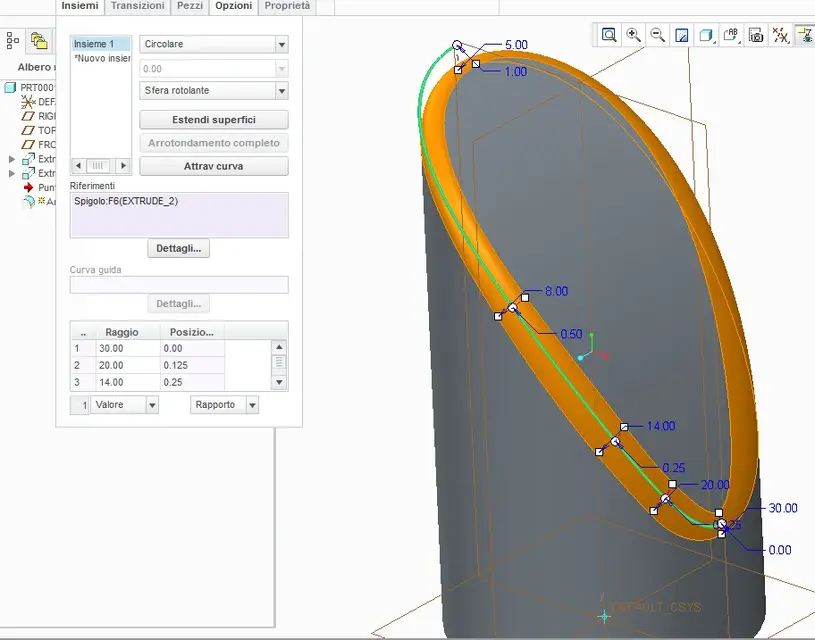
returning to topic, I imagine that with offset curve you mean these steps: create an offset of the edge, project this curve to the surface and then use the rounding function "through the guide curve".

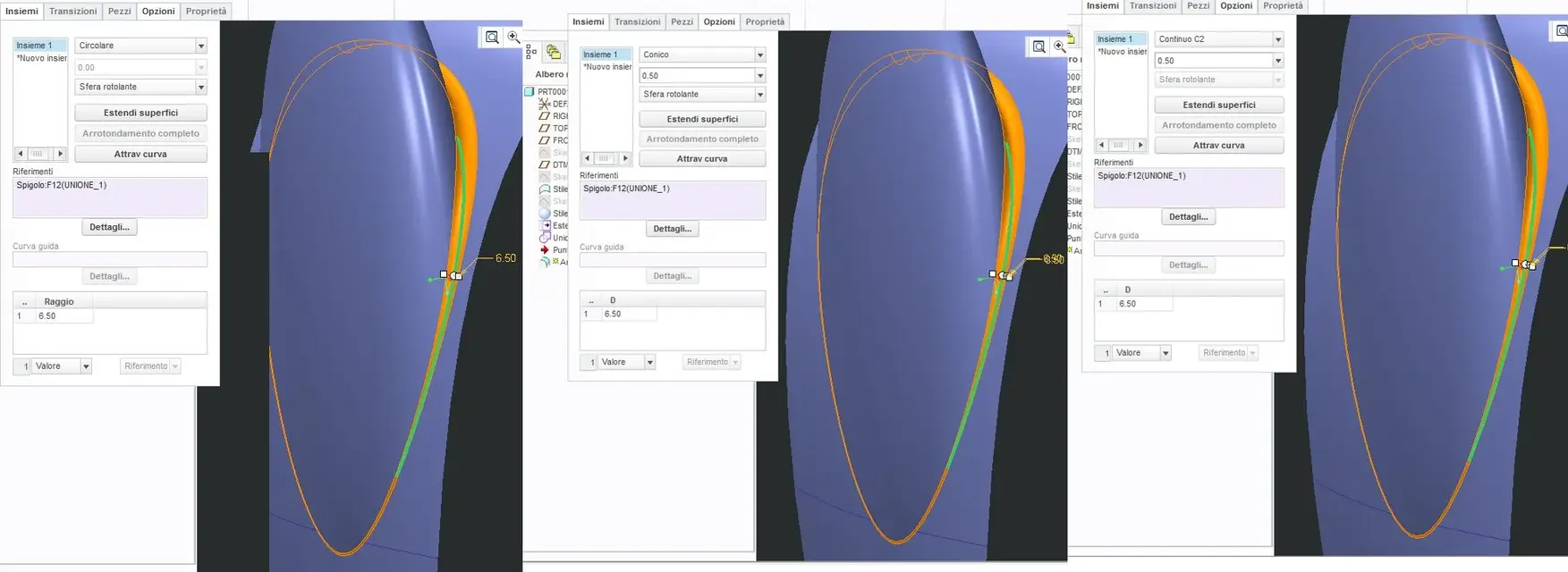
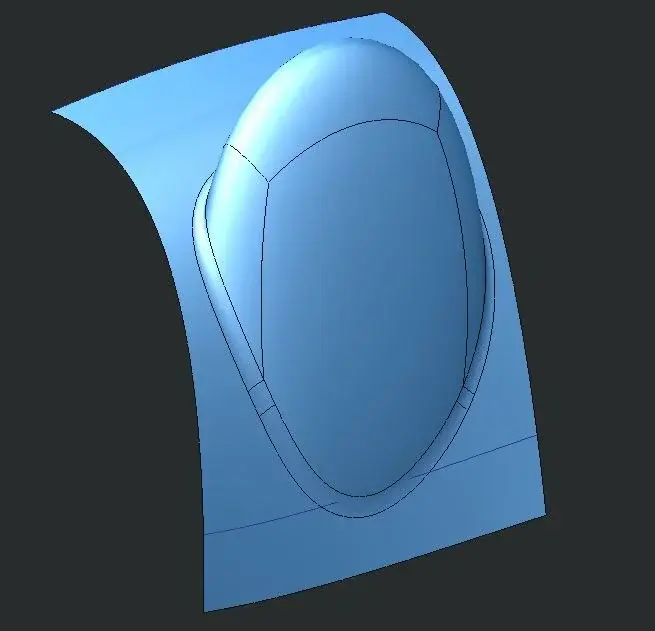
If that's what you mean, I tell you that the result will be the same only in some basic cases (such as the screens I have attached), but it is not usable with more complex geometries.

the only way to get the same result would be to use the edge to create a tube, intersect the tube with the surfaces and trimmarle, then create a blend surface. but it is a rather long and desperate technique.

in order to answer your question the cord radiation may not be useful for those who work in the field of mechanics or in any case where aesthetics is of limited importance but if we talk about style is fundamental and the radiances to the head are practically never used.
 

Attachments

  • catia.webp
    catia.webp
    26.5 KB · Views: 16
  • proe.webp
    proe.webp
    14.1 KB · Views: 18
I introduced myself. and thank you for the quick answer.

returning to topic, I imagine that with offset curve you mean these steps: create an offset of the edge, project this curve to the surface and then use the rounding function "through the guide curve".

If that's what you mean, I tell you that the result will be the same only in some basic cases (such as the screens I have attached), but it is not usable with more complex geometries.

the only way to get the same result would be to use the edge to create a tube, intersect the tube with the surfaces and trimmarle, then create a blend surface. but it is a rather long and desperate technique.

in order to answer your question the cord radiation may not be useful for those who work in the field of mechanics or in any case where aesthetics is of limited importance but if we talk about style is fundamental and the radiances to the head are practically never used.
we do not only mechanics (for example we deal with famine and aerodynamic components for the motorcycle industry) and a rounding with these characteristics has never been asked.
continuous c2 roundings guided by curve or conical section are more than enough to meet the specific requirements.
However the direct command is not there in creo ... I stop in the coming days and see what is the fastest way to get the same result.
 
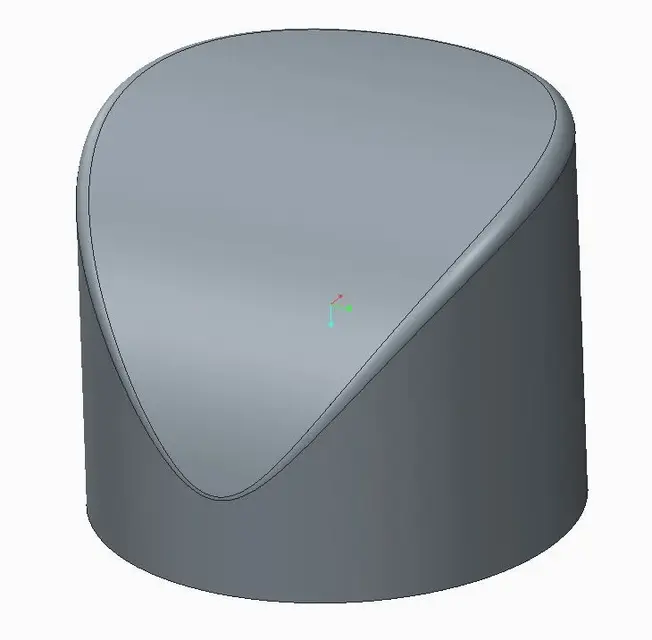
I think you just use a variable radius, you get a quick result and more than aesthetically acceptable.
 

Attachments

  • Cattura.webp
    Cattura.webp
    7.6 KB · Views: 33
but this is driven by curve and I accentuated the cutting of the cylinder.
 

Attachments

  • Cattura2.webp
    Cattura2.webp
    11.8 KB · Views: 12
First of all, thank you for the time you're dedicating to me, but we're not really there. :frown:

in the first example that you placed the surface is all smeared near the light stroke (try to light the zebras) and is a very convenient cut (I made a test using this methodology, with a cut a more complex moment, and it is deleterious to get decent surfaces; image allego).

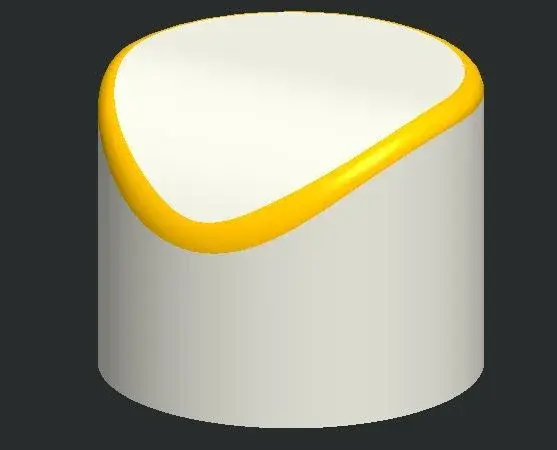
While for the second example, the result is definitely better but it is only applicable in some particular cases and with simple geometries (e.g. if you had to create a string rounding to the intersection of two surfaces in double curvature your method would not produce qualitatively acceptable results) also the cos (curve on surface) is little controllable.

a definitely better workaround is just what I had suggested before (and that I tried) and consists in using the edge as a guide curve
to run a circular section sweep and use this sweep to cut the surfaces and then build the blend surface, but also by this method the rope length is not constant.

It seems strange to me that a sw of the caliber of proes is not able to create a string fillet, which in other sw is done with a click; Moreover it would be a nonsense to implement.

I attach pictures of my evidence, made in proe and in alias. that reveal the difference between chordal and radius. I also attach the file I used to do my tests if you want to try and try.

thanks again for the availability.:smile:
 

Attachments

  • Prove_proE.zip
    Prove_proE.zip
    963.2 KB · Views: 13
  • Raggio variab.webp
    Raggio variab.webp
    45.2 KB · Views: 24
  • Alias_chord.webp
    Alias_chord.webp
    43.8 KB · Views: 24
  • Alias_rad.webp
    Alias_rad.webp
    44.5 KB · Views: 20
  • ProE_R_circ+Con+C2.webp
    ProE_R_circ+Con+C2.webp
    84.1 KB · Views: 27
First of all, thank you for the time you're dedicating to me, but we're not really there. :frown:

in the first example that you placed the surface is all smeared near the light stroke (try to light the zebras) and is a very convenient cut (I made a test using this methodology, with a cut a more complex moment, and it is deleterious to get decent surfaces; image allego).

While for the second example, the result is definitely better but it is only applicable in some particular cases and with simple geometries (e.g. if you had to create a string rounding to the intersection of two surfaces in double curvature your method would not produce qualitatively acceptable results) also the cos (curve on surface) is little controllable.

a definitely better workaround is just what I had suggested before (and that I tried) and consists in using the edge as a guide curve
to run a circular section sweep and use this sweep to cut the surfaces and then build the blend surface, but also by this method the rope length is not constant.

It seems strange to me that a sw of the caliber of proes is not able to create a string fillet, which in other sw is done with a click; Moreover it would be a nonsense to implement.

I attach pictures of my evidence, made in proe and in alias. that reveal the difference between chordal and radius. I also attach the file I used to do my tests if you want to try and try.

thanks again for the availability.:smile:
it will seem strange but this function in creo-pro/e is not there.
you can get an excellent result from the qualitative point of view but on other roads.
It forgives irony, to me for example it seems strange that alias exposes so as crap (and this is much more serious than the rope radius), each cad has its defects or shortcomings.
If you want, I'll place you a beam made with other criteria, but the constant rope radius is not there.
 
This ray is made in continuity of curvature and it doesn't seem like a pigeon at all.
 

Attachments

hi max, I agree that each program has its advantages and disadvantages but among all the problems I have had over the years with alias export is not one of questions.
Can I know what trouble you had?
Do you know that there is a panel in "preferences" which is called "construction option" and serves precisely to select the tolerances used in the program where you will import the surfaces?
anyway I'm not here to defend alias and I wasn't even making comparisons between proes and a cas program like alias.. .

However if I go to look at the 3 top end programs: catia, nx and pro/e only the latter does not allow to build rope fittings.

ps: About export problems the step you posted has a superimposed surface.
 
1) export alias: a couple of times they passed me files made by "designer" and the surfaces were completely disconnected not for problems of accuracy ... I had to remodel them completely, I did before trying to repair them.

2) a nx user told me he doesn't do it, did you reconsider that?

3) the overlapping surface is my forgetfulness, that is precisely the offset surface I used to define the radius and I forgot to hide it.

4) at the end of the fair you tell me how the quality of the radius in the step I posted?

Take care.
Bye to all,

similar discussions on blend and corner blend are also in section nx (perhaps it will be the season....:smile:).

I answer point 2: You must have a special license (shape study) that also does other beautiful things.

Hi.
 
and instead I looking for an order surface 15 with continuity c4 and g4 ...:-)
make me laugh a little... without offending anyone and respecting everyone's needs...
I fortunately have other problems!
 
and instead I looking for an order surface 15 with continuity c4 and g4 ...:-)
make me laugh a little... without offending anyone and respecting everyone's needs...
I fortunately have other problems!
ops ... zimmy:biggrin:
 
Excuse me zimmy and radio but... all is soup just couldn't look.
Now I'm gonna have to convince my clients to stay with me even if I use a program that doesn't make constant rope.
I don't know if they'll sleep at night... I might have them on my conscience. :-)
 
Just buy all the programs.
with one make the solids, with another the rays, with another the holes, with another the drawings, then return to the first, complete with the cam
then put everything together, smooth well... and

Maxopus, I'm sorry.
Maybe I unintentionally unleashed the mess!
next time!
 
Just buy all the programs.
with one make the solids, with another the rays, with another the holes, with another the drawings, then return to the first, complete with the cam
then put everything together, smooth well... and

Maxopus, I'm sorry.
Maybe I unintentionally unleashed the mess!
next time!
No zimmy, I'd really like if you could participate more assiduously.
You have always been very polite and your expertise is out of discussion.
Your line was absolutely inside the lines... the son of the jaguar must have swallowed something strange. :smile:
 
Status
Not open for further replies.

Forum statistics

Threads
44,997
Messages
339,767
Members
4
Latest member
ibt

Members online

No members online now.
Back
Top