• This forum is the machine-generated translation of www.cad3d.it/forum1 - the Italian design community. Several terms are not translated correctly.

tip : inserting geometric group inside a body

  • Thread starter Thread starter stef_design
  • Start date Start date

stef_design

Guest
Hey, guys.
Give me a few tips on how to insert a geometric group inside a body in a position I want.
I would like to insert the group between the pocket.69 and the fitting.130.

Thank you.Immagine.webp
 
insert a geometrical set, cut it and paste it by clicking with the right button above the pocket.69.
he will insert it between the pocket and the fitting.

Hi.
 
why do you want to insert the geometric group?
for 2 reasons:
1 - clarity for other designers who take the piece one tomorrow. in this way (on very long trees) if I have to do operations with the surfaces and then use them to trim something you do not need that I go up and down to understand the story.

2 - I want to insert a geometric group before the pocket containing planes and surfaces.
if I do it later (at the end of the tree), when I edit my pocket comes out the message that it is impossible to update because there is an operation later.

Hi.
 
But how do you make sure that othermuters take your good habits, too? we with over 500 cv5 users did not succeed.

unless you make available a tool that does everything automatically but then we don't talk more about constructors but well of configurators users --> crush here for fae this, crush them to do that

I saw him at the daimler!! !
 
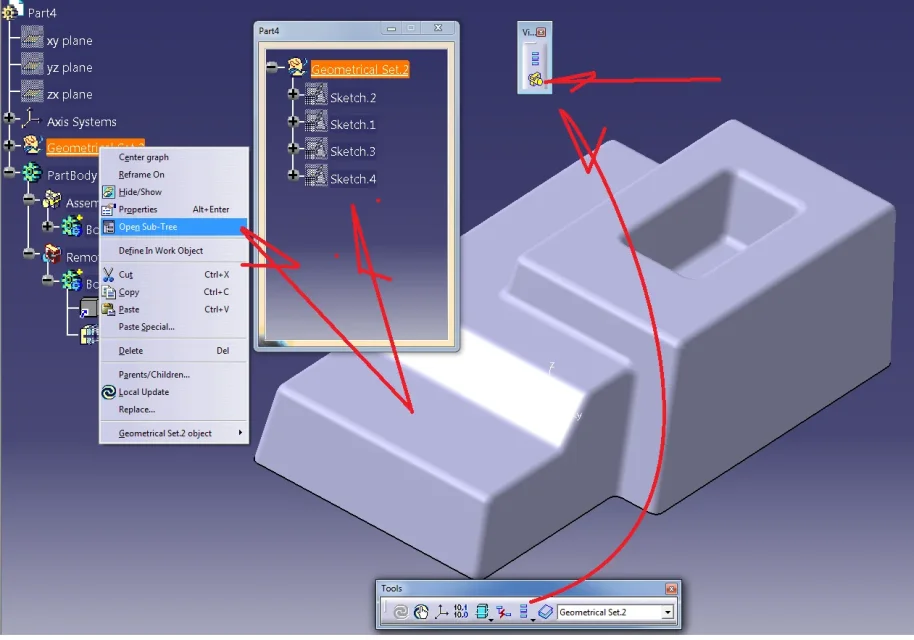
it is preferable to keep all sketches outside and use the sub-tree function, which you can combine with the current body view.

Hi.
 

Attachments

  • sub tree.webp
    sub tree.webp
    70.2 KB · Views: 21
I think it's two different types of modeling. You're forcing a hybrid modeling. also wireframe operations can create them simultaneously with solid ones, thus obtaining a cleaner shaft
Not to mention that an unordered geometrical set does not follow sequence rules like the body.
 
it is preferable to keep all sketches outside and use the sub-tree function, which you can combine with the current body view.

Hi.
hi, I usually use the icon 'only the current body'.
By reading the guide the icon used by you 'only the solid current' allows me to view the current body but also the one contained in any geometric groups.
is it correct?

Hi.
11-05-2013 17-06-52.webp
 

Forum statistics

Threads
44,997
Messages
339,767
Members
4
Latest member
ibt

Members online

No members online now.
ciao
Back
Top