
• This forum is the machine-generated translation of www.cad3d.it/forum1 - the Italian design community. Several terms are not translated correctly.

helical excavation

  • Thread starter Thread starter olibass2011
  • Start date Start date

olibass2011

Guest
Hello, guys.
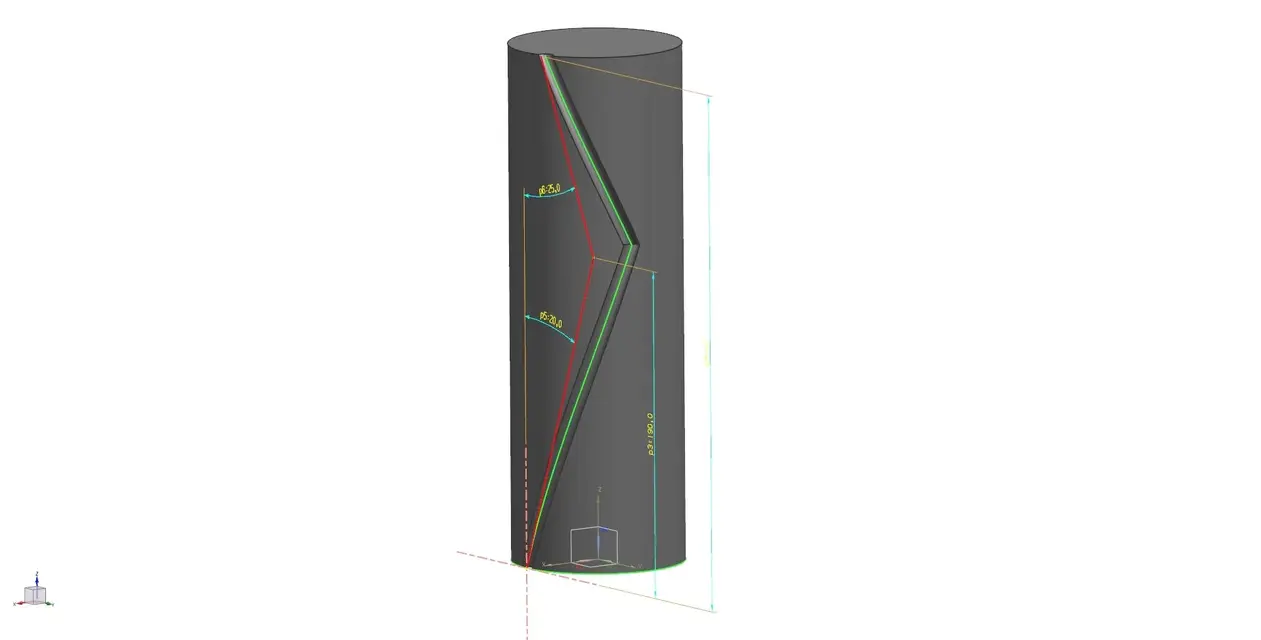
I'm trying to make a helical dig with directional change. . something that comes to me as a saint with solid edge... unfortunately with nx... nothing. Please help me if it's feasible... I attached a photo to illustrate my research with nx....as you can see this last one was done with if.
thank you in advance for your answers.
olivier
 

Attachments

  • elica.webp
    elica.webp
    30.3 KB · Views: 35
I have no time today to post something.
Maybe you've already solved it.

Say hi.
 
only by curiosity, is it a tool for wood?
what is seen on the image is only the illustration of a helical excavation done with it on a tip. therefore not only is a tool for wood, it can also serve for other things. drilling of walls, processing of other materials beyond wood...
I hope I have satisfied your question... If you want to know anything else, I'm available.
soon dear
olivier
 
try to describe the procedure you use with yourself the sequence of commands. You'll see how we find him
 
try to describe the procedure you use with yourself the sequence of commands. You'll see how we find him
helical excavation with: I assume you already made your cylinder
1- do the sketch (s1) of the shape to dig + a lines (l1) at the center of the cylinder to determine the height of the first excavation.
2 - click on the helical excavation commando to choose the option (perpendicular ) - click on l then on s1 validate the choice - choose (high axis and step)- enter the value of the step - finally if you click on (other) opens the window of the parameters, important to choose the direction of the helix (right or left) - ok - (successive) - preview -

to make the second helix, I do the sketch (s2) of the form to dig on the plane coincidentally the end of the first dig then the line guide l2 starting from the end of l1 .
the procedure remains the same until the insertion of the value of the step then on (other) you have to choose a different direction of the first

I hope I've been clear.
see if this can help you do the same with nx 7.5
Thank you.
 
Hi, I did a test trying to translate the commands you use on if.
I hope to help you I can't send you the file because I use nx9 but I'm sure the same commands you also have them in your version because I used them in 2.0.
from the little experience I have with if I can tell you that your command digs in nx is a little different. You almost always have to think about creating a solid that you will go to subtract (digrease).
Also in this case I create a solid first with the sweep and then with the swept that I will eventually subtract. this may seem like a complication but you will realize over time that it is very comfortable because you can go to work on those solids before the final excavation (please stretch them etc)utensile.webp
 
Hi, I did a test trying to translate the commands you use on if.
I hope to help you I can't send you the file because I use nx9 but I'm sure the same commands you also have them in your version because I used them in 2.0.
from the little experience I have with if I can tell you that your command digs in nx is a little different. You almost always have to think about creating a solid that you will go to subtract (digrease).
Also in this case I create a solid first with the sweep and then with the swept that I will eventually subtract. this may seem like a complication but you will realize over time that it is very comfortable because you can go to work on those solids before the final excavation (please stretch them etc)View attachment 36353
Thank you supertramp, tonight I'll try and let you know.
soon
 
if the two propellers are speculative to simplify you could do as the example below:1a.webp. .

Saluted.
 
and if you use the wrap command rather than the propeller as you use cylindrical faces?
 
hi supertramp, I tried your method ... I can very well do the first propeller unfortunately the second :mad: ... I just can't... But I think you chose the right path... Perhaps with some explanations I will succeed.
thanks the same
 
hi primizio,
This comes to me as a saint... unfortunately I would like to make two asymmetrical propellers...
thanks the same
hello guys, luck belongs to those who don't lose hope... I found what I was looking for even if you can improve. . .
for example to control the height of the propeller with a central line instead of the least precise number of turns
Thank you
 

Attachments

  • scavo.webp
    scavo.webp
    57.3 KB · Views: 9

Forum statistics

Threads
44,997
Messages
339,767
Members
4
Latest member
ibt

Members online

No members online now.
ciao
Back
Top