• This forum is the machine-generated translation of www.cad3d.it/forum1 - the Italian design community. Several terms are not translated correctly.

parameters and categories of families - shared

  • Thread starter Thread starter mario cant
  • Start date Start date

mario cant

Guest
a greeting to all
I begin by saying that I am aware and I am aware of what is a “shared paradigm” and the benefits that you have in using them.

My question is:
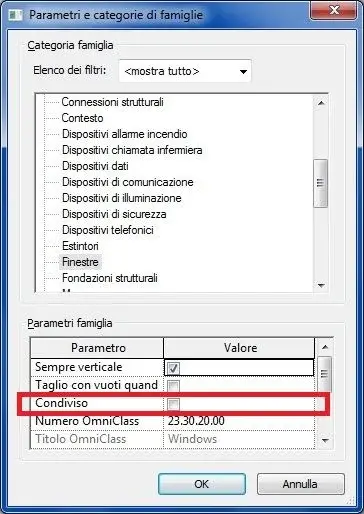
in attributing the category to a family because you should activate “Shared” in the window “parameters and categories of families” ? (see figure)
in other words the activation of the “shared” option what kind of benefits does it give to the families? What does it actually produce for the family?

ps: possible that in the online guide of the program did not find answer to such question!
 

Attachments

  • Immagine.webp
    Immagine.webp
    27.1 KB · Views: 55
In other words, the “shared” option allows you to abacate the whole family if it is nested in a host family..
wanting to make an example: I create a family handles that I make shared, after its nesting in a host family, the handle will be abacabile!
 
there’s something that doesn’t come back!
I opened a x-door family, in this family I selected the handle and modified the handle, making it shareable (I activated the “shared” option), I reload the handle modified in the host port.
I then also carry the x host port it can be shared and load a project.

I create an abaco/quantity of the doors but in the section “available fields” I do not find the handle I had made available.

Is there something wrong? . . . . . . . . . . . . . . . . . . . .
 
I opened a x-door family, in this family I selected the handle and modified the handle, making it shareable (I activated the “shared” option), I reload the handle modified in the host port.
What category is the handle? I remind you that generic models are not listed in the doorbaco!
 
it is therefore advisable that nested components and host family belong to the same “family category”

another “problem” I found and that the handle does not appear in the fields of the abacus (window “abac property” section “fields available”) in any form in the name of the family in any other way .... I thought that this was “automatic” but it's only coming introducing the fields in the abacus: type, familyI would like to make another example, I have one:
- “port 1” in which the “handle 1” is nested
- “port 2” in which the “handle 2” is nested
how do I associate / correspond to each of the doors its respective handle?

introducing, in the abaco, the fields: type, family ....the handles will be present but in order scattered i.e. not associated with the respective hosts.
Have some patience:confused:
 
Besides making the family of the shared handle you must create a "family type" parameter that refers to the category of belonging of the nested family (so it is not necessary that it is the same of the host family, but it is appropriate, to manage the graphics through the subcategories.) with the family type parameter makes possible the interchangeability of the handle according to the type (or instance of the door). the family-type parameter must of course be created as shared so that it can appear in an abacus within the project. you will then find the type of door and the type of handle you assigned to him.
 
therefore to associate and match a nested component to the respective host instance the best way is to create a directly <parametro condiviso=""> “family type”.
I was thinking that if nested instances are different as they could be: handle, panel, as well as the quality of the glass if present.......create a <parametro condiviso=""> for each one of them is as challenging.</parametro></parametro>
 
I need to ask for some advice!
when creating a “shared parameter” this is stored/saved in a .txt file
that file where should it be placed?
when you upload the family to a project the txt, which contains the shared parameters, will be copied in the directory of the prog, automatically or you will have to make paste copy ?...like "ragiona" revit in that sense!

is it better to create an ad hoc txt for each family or a single file in which to save all shared parameters, which will be created for all families?
 
unique file or however the least possible number of files, the shared parameter type handle that I use today for a door tomorrow I can use it for a window and so on....stessa philosophy of the project parameters.
as to where to put it does not matter (holding the study needs) if you use the e-trasmit app for revit architecture when you transmit a file.
 
besides making the family of the shared handle you must create a "family type" parameter that refers to the category of belonging of the nested family (so it is not necessary that it is the same of the host family, but it is appropriate, to manage the graphics through the subcategories. )
still up
<parametri condivisi=""> “family type”
in creating a family you always decide the category for families, for that host and for nests.
in the case of <parametri condivisi=""> “family type” we can say that there are two stages of choice of categories.</parametri></parametri>the first stage sees:- category of host family > (window “parameters and categories of families” box “family category”)
- categories of under nested families, in the host > (window “parameters and categories of families” pane “family category”)The second stage sees:
- categories to be attributed when creating the "family type" parameter, for nesting or for the component.

a “conflict” between the categories of families at the family level (hosts and nests: 1st stage) and categories to be assigned in the same parameter “family type” (second stage).

I would like to make the following reflection: which logic guides such choices of categories, together with the parameter in question...... and in the parameter itself.
It is obvious that in this it plays an important role the choice regarding - management of graphics through subcategories - that is if:
1. you want the management of subcategories graphics in one category: implies that host and nested family will have to share the same category.... unique category.
in this hypothesis which category to use in the family-type parameter and assign to nests?
and what role it plays, possibly, the group in this choice.
2. you want to manage the graphics of subcategories in different categories: implies that host and nested family do not share the same category.... different categories.
in this hypothesis which category to attribute in the family-type parameter for nested ?
and what role does the group play, possibly

Basically, which logic guides such choices also for the purpose of creating correctly (functioning) the <parametro condiviso=""> “family type”?

you can make some light in this sense!
I hope I've been clear enough.</parametro>
 
you are working too much of gray matter without having the picture of the situation. ...

then, should the subcategory of the elements assigned to the family type parameter be different from those of the nested and the host family?
Why? bhe, let's say it's not nice that when choosing the type of handle I also appear in the list the threshold or the persian of the window, not to mention that I would create some trouble.

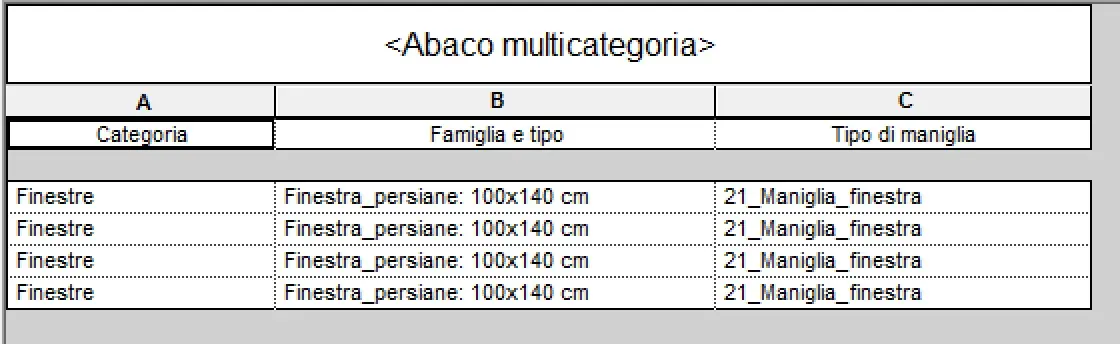
what subcategory to assign? boh depends on the cases...for a window and the handles could go well the category furniture, but it wouldn't make any difference even if you used special equipment or other. Why? because there are multicategory abachi to correctly compute the elements. with regard to the graphics nothing prohibits creating a subcategory window handles in the category furniture (following with the example above) or nidify a detail and check the question from the category detail elements.

There is no right way and a wrong one there are goals to achieve and a family planning to do according to these.
 

Attachments

  • Schermata 2014-05-27 alle 18.30.39.webp
    Schermata 2014-05-27 alle 18.30.39.webp
    33.1 KB · Views: 11

Forum statistics

Threads
44,997
Messages
339,767
Members
4
Latest member
ibt

Members online

No members online now.
Back
Top