• This forum is the machine-generated translation of www.cad3d.it/forum1 - the Italian design community. Several terms are not translated correctly.

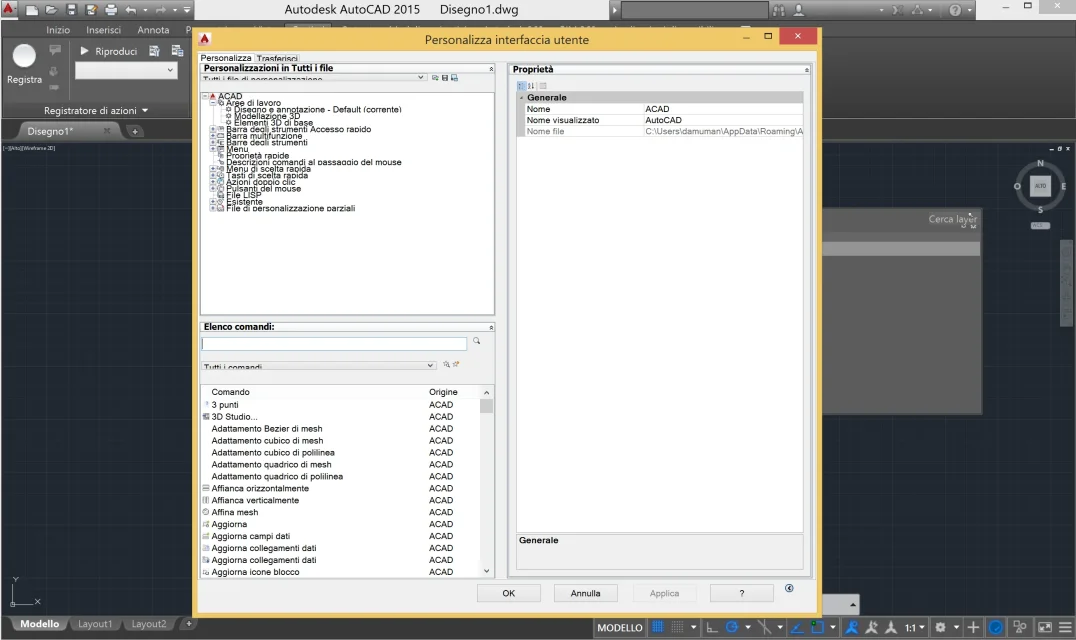
autocad interface 2015 with cut words

  • Thread starter Thread starter damuman
  • Start date Start date

damuman

Guest
hi to all guys, I have a problem that plagues me since I installed autocad 2015. when I open the palettes for example estate layers, you cut the words as if there was a resolution problem. :Mother: It's hard to explain why I've never happened, so I'm putting an image to make you understand better.Schermata 2014-09-01 alle 12.04.04.webpCan anyone recommend a solution?? I'm losing my mind.
Thank you all.
Damian
 
it seems obvious that you have changed the interface fonts (see also the prompt); restore original fonts and you will see that the problem disappears
 
it seems obvious that you have changed the interface fonts (see also the prompt); restore original fonts and you will see that the problem disappears
I tried to restore through design utility- options- profiles - restores.... but nothing changed... maybe I'm wrong or I misunderstood....delucidations? ? ?
 
try this way:
start menu of win > autodesk > autocad 2015 - italian (italian) > reset default settings
 
Nothing to do. restored, recharged everything but the result is the same...but view is what. Bo.
 
eh si.... Apparently if I lower the resolution and decrease the size of the writings on windows settings...the problem is resolved. But I have to sacrifice the resolution. . .
 

Forum statistics

Threads
44,997
Messages
339,767
Members
4
Latest member
ibt

Members online

No members online now.
Back
Top