• This forum is the machine-generated translation of www.cad3d.it/forum1 - the Italian design community. Several terms are not translated correctly.

tutorial differences and my design

  • Thread starter Thread starter Mark87g
  • Start date Start date

Mark87g

Guest
I wanted to ask why some differences between these two designs. In practice big way are the same only that the design I made has black lines along the edges that, instead, the tutorial I’m following does not have. How is it possible? How do you solve the problem? I've read about something tangency, can I?

then, other thing: how do you define the material? where do I find the command to define the material?
Thank you for your help.
 

Attachments

  • Esempio_1.webp
    Esempio_1.webp
    64.8 KB · Views: 15
  • Esempio_2.webp
    Esempio_2.webp
    36.7 KB · Views: 14
Bye. .
black lines are definitely due to the type of
display you set.. .
there is a visualization without edges, which eliminates them
as long as the built surfaces are tangent. .
in the display stand you will find the various icons, test
to set them differently, you will see the difference
for the material, in the classic interface there is an icon
to apply materials... .Visualizzazione.webp
Materiale.webpI hope everything is clear
to the
 
below in your menu, close to the no-show keys there is an icon depicting a cylinder ................. open by clicking on the black dart and try the various commands................. You'll see what you're looking for.
 
You guys have been helpful. You're right. No doubt. in the menu below there was everything I needed (although the screenshot of alpole) did not look great (the second image I mean). Thank you very much. I would like to ask you:

1) Do you recommend me some tutorials on youtube? However, they must be well done in English. books are not so accepted because you learn little compared to audio and video that remains more impressed. I'm doing some tutorials at the moment, but if you have any advice that comes.

2) Can you tell me why software doesn't allow me to do this? i.e. in practice I defined the rectangle and the axis of symmetry (which is the vertical one) so as to define the tab. the preview seems correct only that then comes out the error message. Does anyone have any idea why this message comes out?
http://www.sitohd.com/siti/18765/foto/316277.jpg
http://www.sitohd.com/siti/18765/foto/316280.jpgI attached the pictures. If you have not understood the problem I can explain it better. I hope you guys got an idea.

Thank you all!
 
I'd like to ask you two more things.

1) as never the color is red. Can it be that "shorting" has changed some setting or is it a momentary thing? How do you get to the classic gray color?Colore_rosso.webp2) honestly I found a lot of difficulty seeing all the buttons available. what is the best view for you to have everything under your hand? for example some commands must go to find them from time to time. do you recommend something special to have everything under hand?
 
some answers ..

I tried to make the tab and how you see from the pictures
It works perfectly. .
Perhaps the material to be subtracted, sketch, which is not seen very well,
out of volume...? ?Growe-1.webpGrowe 2.webpred color perhaps means that the design is not updated and that we
are some operations that determine conflicts.. ? ?
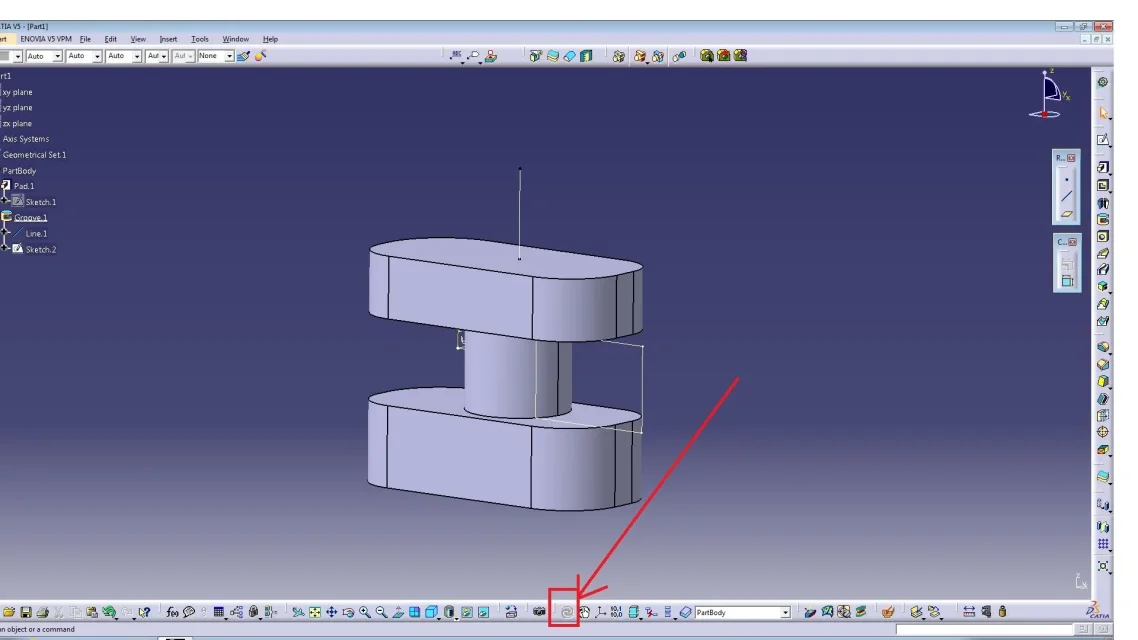
in this case you have to press the icon with the "vortice" to update
Update.webpfor commands there are no particular indications. .
You just have to get used to it. .
to the
 
Thank you very much. As for the vortex icon you mean the one that is also called updates everything? I think so because after two positions there is the Cartesian reference system. Unfortunately, the images are bad, but it's not your fault. But I think that's the picture.

with regard to the tab honestly but it is different exercises. But I'm not worried about anything. rather, doing another tutorial, I found this other error. Can you tell me why it makes me mistake?

I would like to ask you some things:

green lines, purple lines and orange lines and white lines. green lines are like the procedure went well and it's okay. purple lines are there when in practice they are bound to have that measure, because other measures have been defined. What about the orange and white lines do you have something to suggest? For example in the attached design I think the problem is that some lines were still white. Maybe white is associated with sketch? you had to click somewhere to finish the construction operation?

I hope that seeing the image you can understand why it makes me this problem that the guy on youtube does not come out.
Thank you very much.
Errore_1.webp
 
the problem is that you have an open sketch profile, or cmq with problems .
I think I see a black spot in your sketch......... that means it is open.
practically as soon as you get out of the sketch you don't have to see black spots but the sketch completely white.
the colors of the sketches are (the + important) green all properly bound, and it is what you have to see, white means that it is not viculate and purple means that it is superviviculated, practically you put quotas or costrains in + that they did not serve.
 
Schizzo.webpHere's the sketch. I can't figure out what the problem is. It seems closed to me, but I might be wrong. You see something wrong? Does white mean I didn't put the odds then? Are black points both right and left at the top? If so, how do they eliminate?

Thank you very much.
 
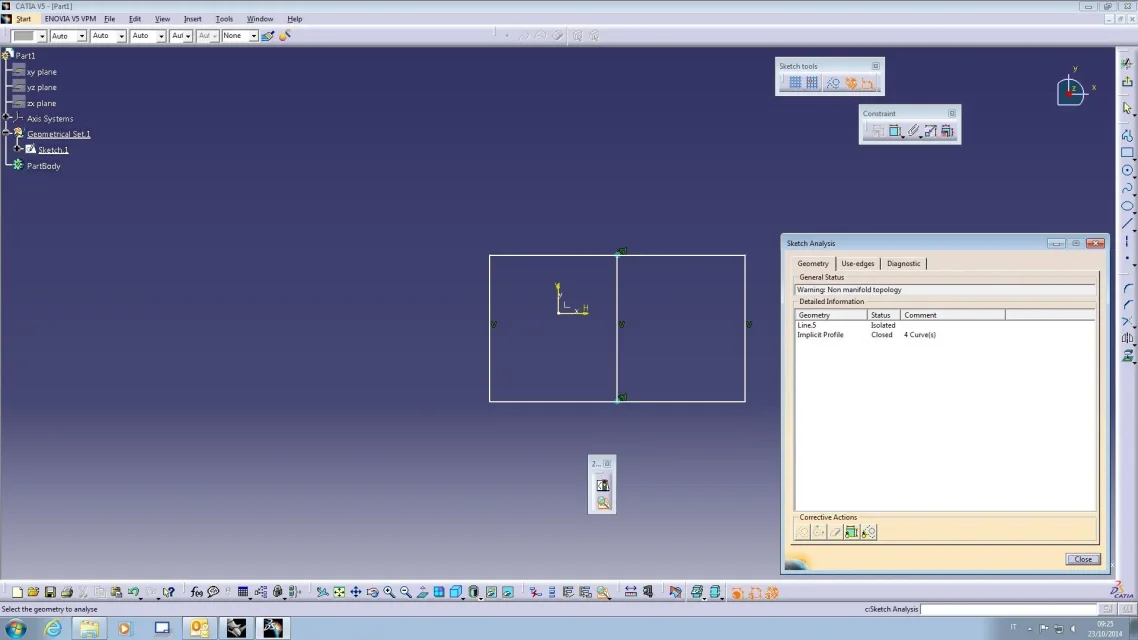
as you can see from the images I attach
there are tools to analyze and resolve
any inconsistencies in the sketch environment;
sketch and sketch solving -

using the above mentioned you will have displayed
all the history of the sketch, profiles not closed,
intersecting profiles, points not in mode
construction etc. etc.

these are very useful tools that will allow you
understand where the mistake is.. .Sketch-1.webp
Sketch-2.webpand revive it

to the
 
alpole thanks for your message. Actually, as you understand, I'm at the very first weapons and so I don't know where to find the section you say: sketch analysis and sketch solving. Would you be so kind to tell me that? that already finding things is a bit complicated! :
 
Okay, I think it's in the sketch tool-analysis section, right? I saw that your version is in English while mine is in Italian. Is there anything else I can see to analyze everything?

in this regard, since I wanted to download the English version (because it's always better) and since my operating system is 64-bit, do you have any advice to give me on where to download it or is it something that cannot be said here?

Sorry to bother you all the time.
 
to you, for example. the problem could be the line.5 because next door is written isolated, correct? If it is written isolated already is an alarm bell because you do not understand this line well, right?

Would you tell me, big way, the terms I could find and that must be an alarm bell should check the operation and be careful because there is likely to be some mistake?
 
then I saw a tutorial where at the minute 2.10 (I also leave youtube link) he writes below, or it seems to me that he writes:

c: revolves and opens the revolve command.

Now I ask myself why my version is English or why am I wrong the syntax? the command in Italian is

c: revolution or is it another?

I asked you two hundred questions. If you have time/talk/e patience when you want, I'd like to answer, of course. Thank you very much.
 
It seems to me to see the top left and maybe right a black spot.................. There's the problem.
 
It seems to me to see the top left and maybe right a black spot.................. There's the problem.
Yes there is a black point on the right and one on the left. but if I click on the point and/or do something I can understand directly what the problem is or I always have to do the sketch analysis procedure and see where the problem is. But then once indivud as it solves, that is also the problem.


then I can't find swept definition surface. Is there anyone who helps me find where this command is? The fact is that there are 2 hundred thousand commands, damn it!
 
practically if you open the sketch and go to the point where from outside you see the black ball, you will see that the profile is not closed, you must close it.
 
However error or this option lies in the wireframe and surface deisgn. I must first go here and then look for sweep is correct?
 

Forum statistics

Threads
44,997
Messages
339,767
Members
4
Latest member
ibt

Members online

No members online now.
ciao
Back
Top